
设计基于小部件的用户界面
Qt Creator 会自动在集成的Qt Widgets Designer中以Design 模式打开所有.ui 文件。
Qt Widgets Designer 处于设计模式" src="images/qtcreator-formedit.png" title="Qt Widgets Designer 处于设计模式"/>
使用Qt Widgets Designer创建的小部件和表单会通过Qt信号与槽机制与编程代码无缝集成,该机制允许您轻松地为图形元素分配行为。在Qt Widgets Designer中设置的所有属性均可在代码中动态更改。此外,小部件提升和自定义插件等功能允许您在Qt Widgets Designer中使用自定义的小部件。
有关Qt Widgets 设计器的更多信息,请参阅《Qt Widgets 设计器手册》。
通常,集成的Qt Widgets Designer与独立版的Qt Widgets Designer具有相同的功能。以下各节将介绍两者的区别。
若要了解如何使用集成的Qt Widgets Designer创建一个基于Qt Widgets 的小型应用程序,请参加Qt Academy的“Qt Creator 入门”课程。
代码编辑器集成
要在表单(Design 模式)和代码(Edit 模式)之间切换,请按Shift+F4。
您可以使用“Qt Creator ”功能来创建槽函数的占位实现。在Design 模式下,右键单击小部件以打开上下文菜单,然后选择“Go to Slot ”。从列表中选择一个信号,即可跳转到现有的槽函数或创建新的槽函数。
管理图像资源
在独立版的Qt Widgets Designer中,图像资源通过内置的Resource Editor 创建。在Qt Creator 中,.ui 文件通常属于某个项目,该项目可能包含多个资源文件(.qrc )。这些文件通过Qt Creator 资源编辑器进行创建和维护。Qt Widgets DesignerResource Editor 被禁用,图像资源显示在Qt Widgets DesignerResource Browser 中。
要在代码编辑器中打开资源文件,请在上下文菜单中选择“Follow Symbol Under Cursor ”,或者将光标悬停在字符串字面量上时按F2 键。
设置“Qt Widgets ”设计器的首选项
您可以将Qt Widgets 设计器中的视图拖放至屏幕上的新位置。
要设置“Qt Widgets Designer”的偏好设置,请转到“Preferences ” > “Designer ”:
- 指定嵌入式设备配置文件,这些配置文件将决定Embedded Design 中的样式、字体和屏幕分辨率等。
- 在Forms 中指定网格和表单预览的设置。
- 在Template Paths 中指定用于保存模板的额外文件夹。
要预览这些设置,请选择Tools > “Form Editor ” > “Preview ”,或按Alt+Shift+R。
使用设备配置文件预览表单
设备配置文件是一组描述移动设备的配置文件。它包含一个围绕表单的边框图像,该图像描绘了带有按钮的移动设备。
若要使用设备配置文件预览表单,请选择“Tools ” > “Form Editor ” > “Preview In ”,然后选择一个设备配置文件。
添加设备配置文件
要添加设备配置文件:
- 转至Preferences >Designer 。
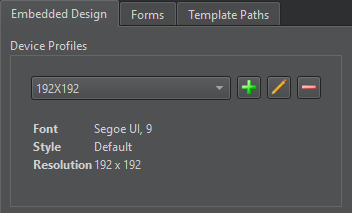
- 在Embedded Design 中,选择
 (Add a profile) 以打开“Add Profile ”对话框。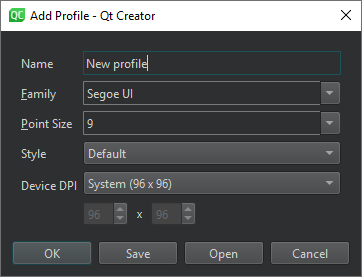
- 在Name 中,为设备输入一个名称。该名称将作为选项显示在Preview In 中。
- 在“Family ”中,选择要使用的字体。
- 在“Point Size ”中,选择字体大小。
- 在“Style ”中,选择一种预定义样式。
- 在“Device DPI ”中,选择预定义的 DPI 值之一,或选择“User defined ”以指定自定义值。
- 选择“OK ”将设备配置文件添加到列表中。
若要从.qdp 文件导入设备配置文件,请选择“Open ”。若要将其保存为.qdp 文件,请选择“Save ”。
Copyright © The Qt Company Ltd. and other contributors. Documentation contributions included herein are the copyrights of their respective owners. The documentation provided herein is licensed under the terms of the GNU Free Documentation License version 1.3 as published by the Free Software Foundation. Qt and respective logos are trademarks of The Qt Company Ltd in Finland and/or other countries worldwide. All other trademarks are property of their respective owners.
