
设置条件
设置when 条件,以评估多个组件属性的真值,并将UI切换至满足这些条件的状态。您可以评估某个条件是真还是假、是否大于或等于另一个值等。您还可以使用“AND”或“OR”等运算符来评估多个组件的真值。
要确定何时应用某个状态:
- 转至“View ” > “Views ” > “States ”。
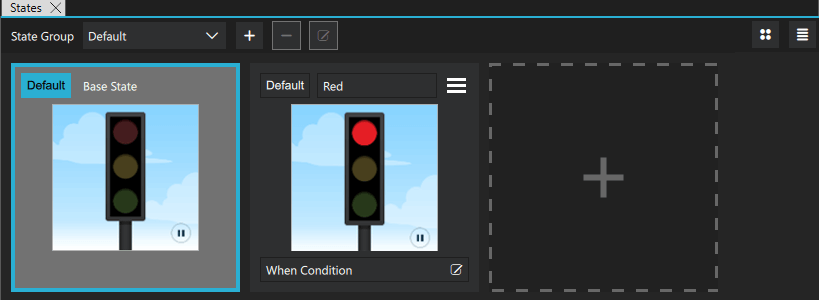
- 在“When Condition ”中,选择“
 ”。
”。 - 在“Binding Editor ”中,为该状态指定一个“when ”属性。
- 将该属性的值设置为一个布尔表达式,当您希望应用该状态时,该表达式的计算结果应为
true。
when 条件从左到右按其在代码中出现的顺序进行评估。因此,如果您有两个针对不同状态的条件,且它们的评估结果均为true ,则应用第一个状态。
创建条件绑定
在Binding Editor 中,选择组件和属性以创建表达式。例如,要更改按钮被按下时的状态,您可以选择一个按钮组件及其 pressed 属性。
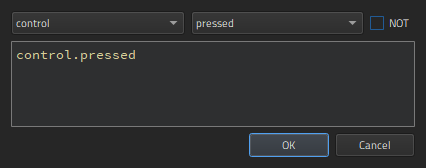
在“Binding Editor ”中编写表达式时,代码补全功能会列出可在表达式中使用的组件及其属性。
逻辑运算符概述
您可以在表达式中使用以下逻辑运算符,将多个条件组合到一个表达式中:
| 运算符 | 含义 | 当满足以下条件时,计算结果为true : |
|---|---|---|
| ! | NOT | 条件未满足。 |
| && | AND | 两个条件均满足。 |
| || | OR | 满足任一条件。 |
| < | 小于 | 左操作数小于右操作数。 |
| > | 大于 | 左侧操作数大于右侧操作数。 |
| >= | 大于或等于 | 左侧被运算数大于或等于右侧被运算数。 |
| <= | 小于或等于 | 左侧被运算符小于或等于右侧被运算符。 |
| == | 等于 | 两个操作数相等。 |
| === | 严格相等 | 操作数相等且类型相同。 |
| != | 不等于 | 操作数不相等。 |
| !== | 严格不等于 | 操作数类型相同但不相等,或者类型不同。 |
此外,您可以在检查之前使用算术运算符来比较数字。不过,我们建议您尽可能为此创建单独的属性。
条件示例
若要在按钮被按下时为其应用状态,请编写:
when: control.pressed
若要在按钮未被按下时应用某个状态,请选择“NOT ”。
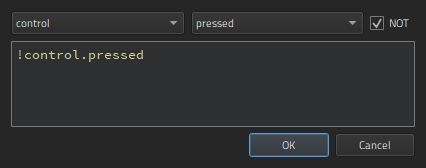
若要在按钮未被按下、未被选中且未悬停时应用状态,请按以下方式组合条件:
when: !control.pressed && !control.checked && !control.hovered
若要在按钮被按下或被选中但未悬停时应用某个状态,请编写:
when: control.pressed || control.checked && !control.hovered
另请参阅 《操作指南:使用状态》、《Qt Quick UI 设计》以及《设计Qt Quick UI》。
Copyright © The Qt Company Ltd. and other contributors. Documentation contributions included herein are the copyrights of their respective owners. The documentation provided herein is licensed under the terms of the GNU Free Documentation License version 1.3 as published by the Free Software Foundation. Qt and respective logos are trademarks of The Qt Company Ltd in Finland and/or other countries worldwide. All other trademarks are property of their respective owners.
