
Bazaar 和 Breezy
Bazaar 是一款由 Canonical 赞助的免费版本控制系统。Breezy 是 Bazaar 的一个分支,与 Bazaar 的磁盘格式和协议向后兼容。不过,Breezy 运行在 Python 3 上,而非 Python 2。
注意:请启用 Bazaar 插件才能使用 Bazaar 或 Breezy。
Bazaar 和 Breezy 的其他功能
除了“使用常见版本控制系统功能”中描述的标准版本控制系统功能外,您还可以在“Tools ” > “Bazaar ”子菜单中选择以下功能。
| 菜单项 | 描述 |
|---|---|
| Pull | 将一个分支转换为另一个分支的镜像。 |
| Push | 更新分支的镜像。 |
| Uncommit | 删除最后一次提交的修订。 |
撤销修订
在 Bazaar 和 Breezy 中,将更改提交到分支会创建一个新修订版本,该版本保存了工作树状态的快照。要删除最后一次提交的修订版本,请选择“Tools ”>“Bazaar ”>“Uncommit ”,并在“Uncommit ”对话框中选择所需选项。
| 选项 | 描述 |
|---|---|
| Keep tags that point to removed revisions | 保留指向已删除修订版本的标签。 |
| Only remove the commits from the local branch when in a checkout | 仅从本地分支中删除提交。 |
| Revision | 删除修订日志中指定条目之前的所有提交。 |
若要在不实际删除任何内容的情况下测试 `Uncommit ` 命令的结果,请选择“Dry Run ”。
Uncommit 这会使工作树处于可进行新提交的状态。它可能做的唯一改动是恢复在提交之前存在的待处理合并。
Bazaar 和 Breezy 首选项
要设置 Bazaar 或 Breezy 首选项,请选择“Preferences ” > “Version Control ” > “Bazaar ”。
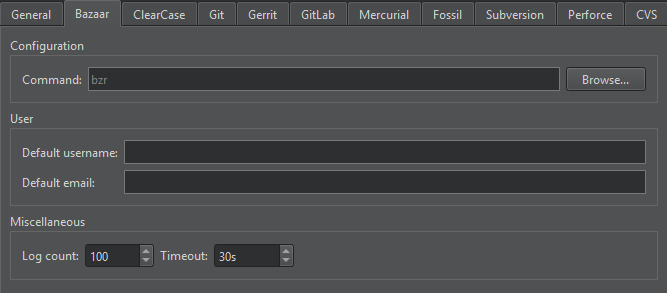
| 首选项 | 描述 |
|---|---|
| Command | 命令行客户端可执行文件的路径。 |
| Default username | 提交更改时默认使用的用户名。 |
| Default email | 提交更改时默认使用的电子邮件地址。 |
| Log count | 日志的最大行数。 |
| Timeout | 版本控制操作的超时时间。 |
另请参阅 “启用和禁用插件”、“设置版本控制系统”、“使用常见的 VCS 功能”以及“版本控制系统”。
Copyright © The Qt Company Ltd. and other contributors. Documentation contributions included herein are the copyrights of their respective owners. The documentation provided herein is licensed under the terms of the GNU Free Documentation License version 1.3 as published by the Free Software Foundation. Qt and respective logos are trademarks of The Qt Company Ltd in Finland and/or other countries worldwide. All other trademarks are property of their respective owners.
