
ClearCase
IBM Rational ClearCase 是 IBM 开发的一款集版本控制、工作区管理、并行开发支持和构建自动化于一体的解决方案。在 Linux 和 Windows 系统上,请使用 ClearCase 客户端插件访问 ClearCase 服务器。
注意:需启用 ClearCase 插件才能使用。
在 ClearCase 中使用 GNU Diffutils
您可以将 GNU Diffutils 工具与 ClearCase 结合使用,以比较文件和活动:
- 下载Diffutils并将其解压到 PATH 环境变量中的某个目录。
- 选择“Preferences ” > “Version Control ” > “ClearCase ”。
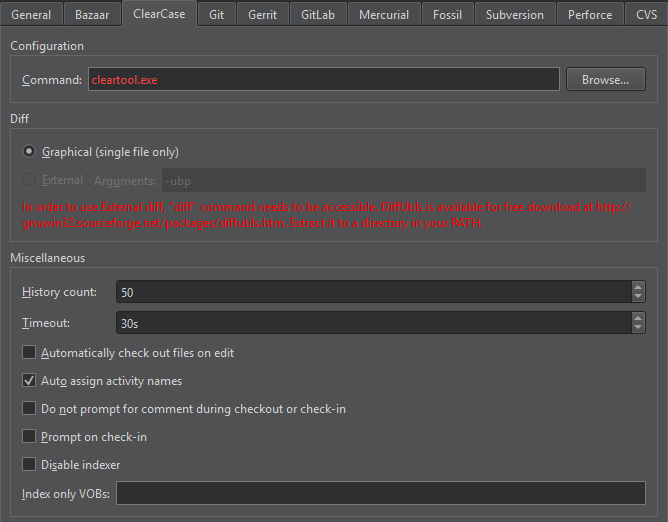
- 选择“External ”单选按钮。如果“
diff”不在 PATH 中,则该单选按钮将处于禁用状态。 - 在“Arguments ”字段中,指定运行
diff的参数。
检出和检入
除了“使用常见 VCS 功能”中描述的标准版本控制系统功能外,您还可以通过“Tools >ClearCase ”访问其他功能。
| 菜单项 | 描述 |
|---|---|
| Check Out | 创建文件的可写副本。如果您在统一变更管理 (UCM) 视图中检出文件,这些文件将被添加到 UCM 活动的变更集中。 |
| Undo Check Out | 取消文件的检出并删除已检出的版本。 |
| Check In Activity | 将当前 UCM 活动变更集中的所有已签出的文件版本签入。 |
| Check In | 为当前文件或版本化对象库 (VOB) 中的所有文件创建一个永久的新版本。 |
| Undo Hijack | 将被劫持的文件还原为其已签入的版本。如果您更改了已加载到快照视图中的文件的只读属性,并在未签出文件的情况下对其进行了修改,则该文件即被劫持。 |
ClearCase 首选项
要设置 ClearCase 首选项,请选择“Preferences ”>“Version Control ”>“ClearCase ”。
| 首选项 | 描述 |
|---|---|
| History count | 在历史记录视图中显示的事件记录数。 |
| Timeout | 版本控制操作的超时时间(以秒为单位)。 |
| Automatically check out files on edit | 编辑文件时自动签出文件。 |
| Auto assign activity names | 为 UCM 活动自动分配名称。 |
| Do not prompt for comment during checkout or check-in | 默认情况下,在检出或检入文件时必须输入注释。此选项可抑制注释提示。 |
| Prompt on check-in | 在选择“Check In ”时,通过显示提示来确认是否要签入文件。 |
| Disable indexer | 禁用 VOB 中文件的索引。若要仅对某些 VOB 进行索引,请在“Index only VOBs ”字段中指定这些 VOB。 |
另请参阅 “启用和禁用插件”、“设置版本控制系统”、“使用常见的 VCS 功能”以及“版本控制系统”。
Copyright © The Qt Company Ltd. and other contributors. Documentation contributions included herein are the copyrights of their respective owners. The documentation provided herein is licensed under the terms of the GNU Free Documentation License version 1.3 as published by the Free Software Foundation. Qt and respective logos are trademarks of The Qt Company Ltd in Finland and/or other countries worldwide. All other trademarks are property of their respective owners.
