
为设计添加注释
您可以将设计作为 QML 文件提交以供审查或进一步开发。您可以在设计上添加注释,为审阅者或开发人员提供有关设计的额外信息。您可以添加适用于整个文件的全局注释,也可以对单个组件进行注释。
一个注释由注释名称和一个或多个评论组成。评论包含标题、作者和评论正文。
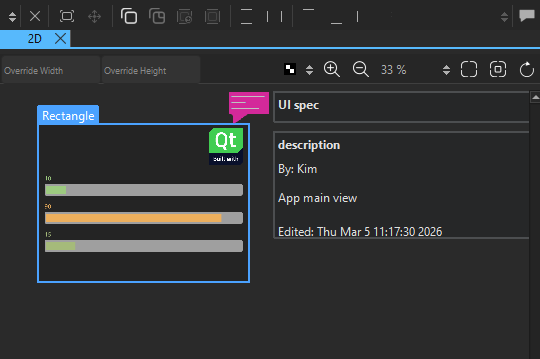
保存文件时,注释会保存在 QML 文件的末尾。它们不会以任何方式影响 QML 的性能。
为组件添加注释
要为组件添加注释:
- 在“Navigator ”或“2D ”视图中选择要添加注释的组件。
- 在“Properties ”中,选择“Add Annotation ”以打开“Annotation Editor ”。
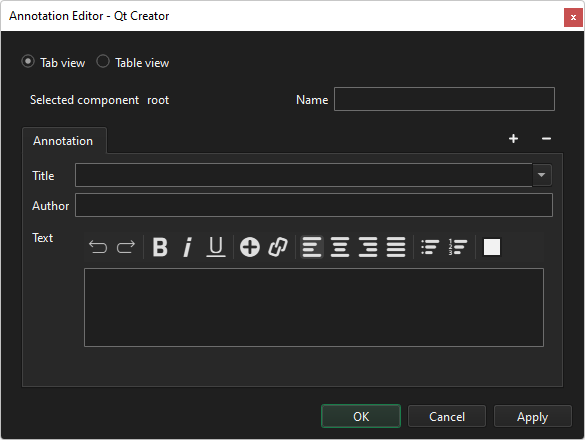
Selected component 显示该组件的 ID。
- 在Name 中,输入一段描述该组件的自由格式文本。
- 在“Title ”中,输入要显示在此注释选项卡中的文本。
- 在“Author ”中,输入作者的姓名。
- 在“Text ”中,输入注释正文。
- 选择“OK ”。
要添加更多关于该组件的注释,请选择“ ”(Add Comment )。
要删除当前选中的注释,请选择“ ”(Remove Comment )。要删除注释,请右键单击注释图标,然后选择“Remove Annotation ”。
要以表格格式查看注释,请选择“Table view ”。
要编辑注释,请在组件的上下文菜单中选择“Edit Annotation ”。
添加全局注释
要添加或编辑全局注释:
- 在顶部工具栏中选择“
 ”。
”。 - 转到“Edit ”,然后选择“Edit Global Annotations ”。
全局注释还具有一个额外的“状态”属性,用于指示您是否仍在设计中、已提交审核,还是可以视为已完成。
要设置状态,请选择“Add Status ”。
另请参阅 《如何:设计Qt Quick 用户界面》、《Qt Quick 用户界面设计》以及《设计Qt Quick 用户界面》。
Copyright © The Qt Company Ltd. and other contributors. Documentation contributions included herein are the copyrights of their respective owners. The documentation provided herein is licensed under the terms of the GNU Free Documentation License version 1.3 as published by the Free Software Foundation. Qt and respective logos are trademarks of The Qt Company Ltd in Finland and/or other countries worldwide. All other trademarks are property of their respective owners.
