
设计Qt Quick 用户界面
Qt Creator 会在Design 模式下,通过可视化编辑器打开QML文件(.qml)和UI文件(.ui.qml)。
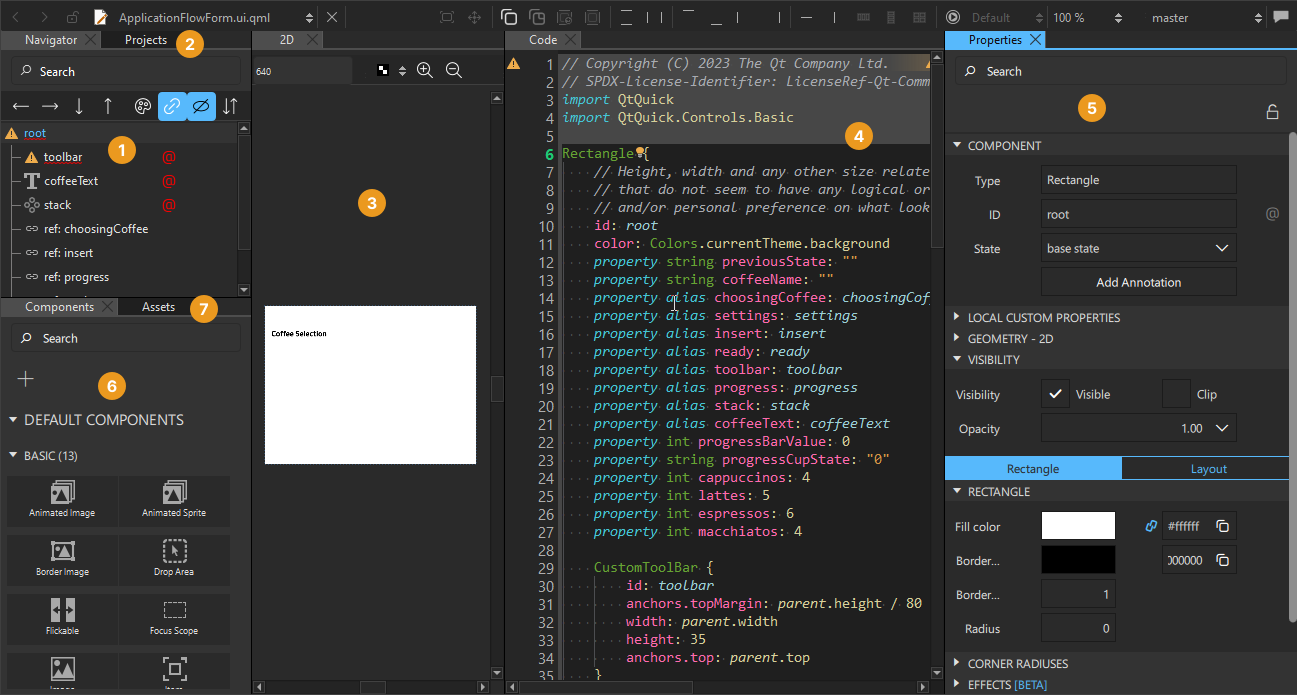
下表描述了默认可见的视图。
| 编号 | 视图 | 用途 | 阅读更多 |
|---|---|---|---|
 | Navigator | 以树形格式查看当前的 QML 文件。 | 浏览组件文件 |
 | Projects | 查看已打开项目中包含的文件列表。 | 项目 |
 | 2D | 设计 2D 用户界面。 | 设计 2D 用户界面 |
 | Code | 查看和修改由可视化编辑器生成的代码。您还可以在“Edit ”模式下编辑代码。 | 编辑代码,操作指南:编辑代码 |
 | Properties | 修改所选组件的属性。 | 更改属性 |
 | Components | 选择预设组件和您自定义的组件,以便在应用程序中使用。 | 使用 UI 组件 ,操作指南:使用 UI 组件 |
 | Assets | 选择要在应用程序中使用的资源,例如图像和字体。 | 添加资源 |
有关 Qt Qml、 Qt Quick以及Qt Qml类型,请参阅在线及Help 模式下提供的Qt参考文档。
打开设计视图
要打开更多视图,请转至“View ” > “Views ”。按照“使用工作区”中的说明,将视图拖动到屏幕上的任意位置,并将其保存为工作区。
另请参阅 《如何:设计Qt Quick 用户界面》和《Qt Quick 用户界面设计》。
Copyright © The Qt Company Ltd. and other contributors. Documentation contributions included herein are the copyrights of their respective owners. The documentation provided herein is licensed under the terms of the GNU Free Documentation License version 1.3 as published by the Free Software Foundation. Qt and respective logos are trademarks of The Qt Company Ltd in Finland and/or other countries worldwide. All other trademarks are property of their respective owners.
