
从以下来源添加设计Figma to Qt
您可以使用 Figma to Qt 将 Figma 设计转换为 QML,并将其下载为Qt Quick UI 项目(.qmlproject ),或者请设计师为您下载。
要在Qt Creator 中继续开发,您可以:
- 在Qt Creator 中打开UI项目。
- 将 UI 项目转换为应用程序。
- 将 UI 项目的内容添加到现有的Qt Quick 应用程序项目中。
- 创建一个新的Qt Quick 应用程序项目,并将UI项目的内容添加到其中。
将Figma to Qt 内容集成到Qt Quick 应用程序中
如果您已有现成的Qt Quick 应用程序项目,则可将下载的内容集成到该项目中。
如果您使用 CMake 构建项目,请设置选项以在Figma to Qt 中生成CMakeLists.txt 文件。该插件会为其创建的每个 QML 模块生成一个CMakeLists.txt ,例如Qt for MCUs 项目中的DesignTokens 模块和FontManager 模块。
Figma to Qt 目前不会生成顶级项目的CMakeLists.txt 文件。因此,您必须将所有不属于模块的 QML 文件手动添加到项目的CMakeLists.txt 文件中。
要将.qmlproject 添加到Qt Quick 应用程序项目中:
- 在 Figma 中,打开设计文件中的Figma to Qt 插件。
- 转到“Settings ” > “Code ”,然后选择“Generate CMakeLists.txt ”。
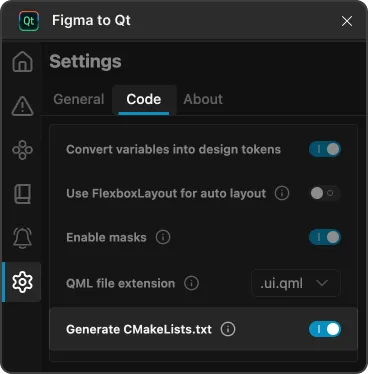
- 选择“Download ”将设计下载为 QML 项目。
- 将下载的 ZIP 文件解压到您的项目文件夹中。
- 在Qt Creator 中,打开Qt Quick 应用程序项目。
- 编辑项目
CMakeLists.txt文件,将所有不属于模块的文件作为资源添加。
为Figma to Qt 内容创建一个Qt Quick 应用程序项目
Qt Quick 使用Qt Creator 20.0 或更高版本创建的应用程序项目,在集成.qmlproject 方面具有一定的自动化功能。将项目内容复制到importedcontent 文件夹中,Qt Creator 将自动使用您添加到该处的CMakeLists.txt 文件。
要为Figma to Qt 内容创建Qt Quick 应用程序项目:
- 在Qt Creator 中,创建一个Qt Quick 应用程序项目。
- 将下载的 ZIP 文件解压到项目文件夹中的
importedcontent文件夹内。 - 为Figma to Qt 内容创建一个
CMakeLists.txt文件,并将其保存在importedcontent文件夹中。
在“设计”模式下编辑转换后的文件
若要在Design 模式下编辑QML代码,还需设置生成.ui.qml 文件的选项(位于Figma to Qt 文件夹中),并在 中启用 Qt Quick DesignerQt Creator 扩展名。
另请参阅 《创建Qt Quick 应用程序》、《将UI项目转换为应用程序》、《如何使用CMake进行构建》、《 打开项目》、《设计Qt Quick UI》、《UI文件》以及 Figma to Qt。
Copyright © The Qt Company Ltd. and other contributors. Documentation contributions included herein are the copyrights of their respective owners. The documentation provided herein is licensed under the terms of the GNU Free Documentation License version 1.3 as published by the Free Software Foundation. Qt and respective logos are trademarks of The Qt Company Ltd in Finland and/or other countries worldwide. All other trademarks are property of their respective owners.
