
选择颜色
要为“Properties ”视图中的某些组件设置颜色属性,请使用颜色选择器。要打开它,请单击“Fill color ”或“Border color ”属性的颜色字段,例如。
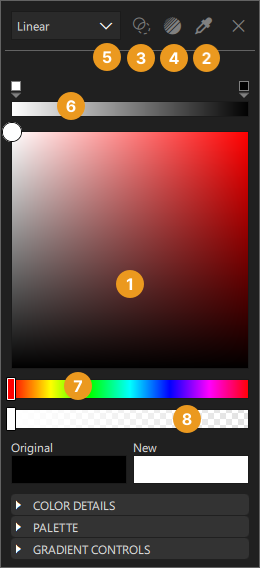
要选择新颜色:
- 在颜色选择器(1)中选择一种颜色。
- 点击“Eye Dropper ”图标 (2),然后选择屏幕上任意可见的颜色进行使用。
“Original ”字段显示组件的原始颜色,而“New ”字段显示当前颜色。
若要使颜色完全透明,请点击“Transparent ”图标 (3)。
若要使用预设的网页渐变,请点击“Gradient Picker ”图标 (4)。
使用下拉菜单 (5) 确定您希望使用的颜色填充类型。您可以选择纯色或渐变色。可用的渐变类型因组件而异。浅灰色列出的项目不适用于所选组件。
当选中渐变时,当前颜色条(6)会显示渐变及其渐变停点。
使用色相滑块(7)或透明度滑块(8)进一步定义新颜色。
点击X 图标可关闭颜色选择器。
颜色详细信息
通过修改颜色选择器中“Color Details ”部分的属性,进一步定义项目中的颜色。
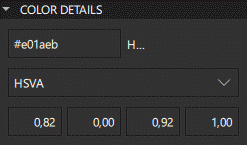
使用“Hex ”属性手动输入新颜色的十六进制值。使用“Hex ”属性为红色、绿色和蓝色定义确切值,以创建项目中使用的不同色调。
默认颜色值模式为 HSVA(色相-饱和度-明度-透明度)。使用下拉菜单将颜色值模式更改为 RGBA(红-绿-蓝-透明度)或 HSLA(色相-饱和度-明度-透明度)。色相以度为单位定义,对应色轮上的不同颜色。饱和度用于调整颜色的浓度。明度决定颜色的亮度。在 HSLA 模式中,明度表示与该颜色混合的白色或黑色比例。
调色板
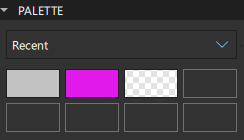
使用颜色选择器中“Palette ”部分的下拉菜单来更改“Palette ”类型。Recent 会显示项目中最近使用的颜色,而Favorites 则显示您已添加到“收藏颜色”中的颜色。您可以通过右键单击Original 、New 中的颜色缩略图,或在Palette >Recent 颜色中选择Add to Favorites ,将颜色添加到Favorites 中。
选择其中一个Palette 颜色缩略图,将其设为新颜色。
另请参阅 《如何设计Qt Quick 用户界面》、《Qt Quick 用户界面设计》以及《 设计Qt Quick 用户界面》。
Copyright © The Qt Company Ltd. and other contributors. Documentation contributions included herein are the copyrights of their respective owners. The documentation provided herein is licensed under the terms of the GNU Free Documentation License version 1.3 as published by the Free Software Foundation. Qt and respective logos are trademarks of The Qt Company Ltd in Finland and/or other countries worldwide. All other trademarks are property of their respective owners.
