
导入模块
在创建项目时,向导会导入此类项目通常所需的 Qt 模块。例如,Qt Quick 应用程序项目包含基本组件和 UI 控件。
要查看可用模块列表,请选择“ ”。最常用的模块按字母顺序排列在列表顶部。您可以在“Search ”字段中输入搜索条件来查找组件和模块。
选择模块将其添加到“Components ”中。
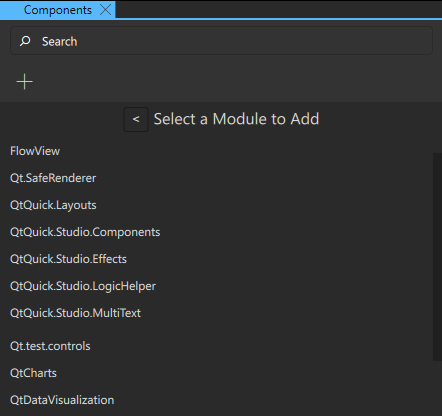
这会在组件代码中添加一个导入语句,您可以在“Code ”视图或“Edit ”模式下查看该语句。例如,如果您添加了QtQuick.Controls 模块,代码中将添加以下导入语句:import QtQuick.Controls 。
由于添加的组件和模块会与您的 UI 一起打包到最终的应用程序包中,因此建议您选择“Remove Module ”(设计视图)以移除项目中未使用的组件和模块。
Copyright © The Qt Company Ltd. and other contributors. Documentation contributions included herein are the copyrights of their respective owners. The documentation provided herein is licensed under the terms of the GNU Free Documentation License version 1.3 as published by the Free Software Foundation. Qt and respective logos are trademarks of The Qt Company Ltd in Finland and/or other countries worldwide. All other trademarks are property of their respective owners.
