
ウィジェットベースのUIの設計
Qt Widgets Designer を使用してウィジェットベースの UI を設計するには:
- Explorer に移動し、.uiファイルを選択します。
- [ Open this file with Qt Widgets Designerを選択します。
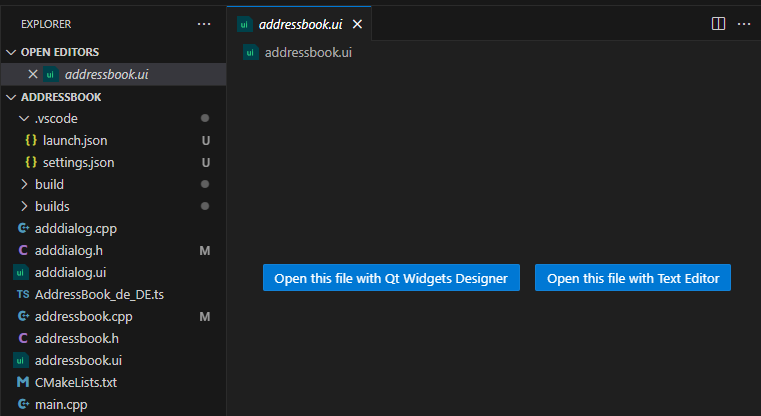
- これを使用して Qt Widgets Designer を使用してUIをデザインします。
Qt Widgets Designer の場所を設定する
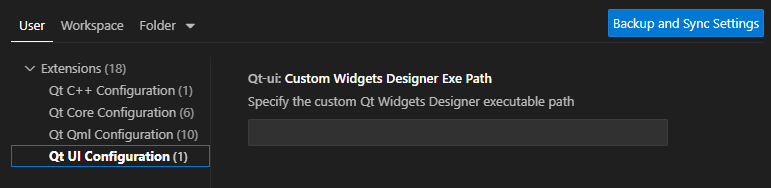
VS Code が `Qt Widgets Designer` を見つけられない場合:
- Command Palette に移動し、「Qt: Open Qt Extension settings 」を選択します。
- Custom Widgets Designer Exe Path で、Qt Widgets Designer をインストールしたフォルダのパスを設定します。
テキストエディタでUIファイルを開く
テキストエディタで UI ファイルを開くには:
- 「Explorer 」を開き、.uiファイルを選択します。
- 「Open this file with Text Editor 」を選択します。
- テキストエディタを使用して UI ファイルを変更します。
「チュートリアル:Qt Widgets アプリケーションとQt 設定」も参照してください 。
© 2026 The Qt Company Ltd. Documentation contributions included herein are the copyrights of their respective owners. The documentation provided herein is licensed under the terms of the GNU Free Documentation License version 1.3 as published by the Free Software Foundation. Qt and respective logos are trademarks of The Qt Company Ltd in Finland and/or other countries worldwide. All other trademarks are property of their respective owners.
