
インストール
VS CodeでQtおよびQt Quick アプリケーションを開発するには、VS Code用のQt拡張機能をインストールしてください。開発するアプリケーションの種類に応じて、適切なQt拡張機能パックを選択してください:
- Qt C++:Qt C++およびQt Quick アプリケーションの開発用
- Qt for Python:以下の言語を使用したアプリケーションの開発用Qt for Python
- Qt WebAssembly: WebAssembly向けアプリケーションの開発
拡張機能パックを使用するか否かにかかわらず、個別の拡張機能をインストールすることも可能です。Qt Extension Packには、すべてのQt拡張機能が含まれています。拡張機能は、プロジェクトで必要になった際に有効化されます。
拡張機能パックのインストール
Qt拡張機能パックをインストールするには:
- Activity Bar で「Extensions 」アイコンを選択するか、Ctrl+Shift+Xを押します。
- Extensions で、Qt拡張パックを検索します。
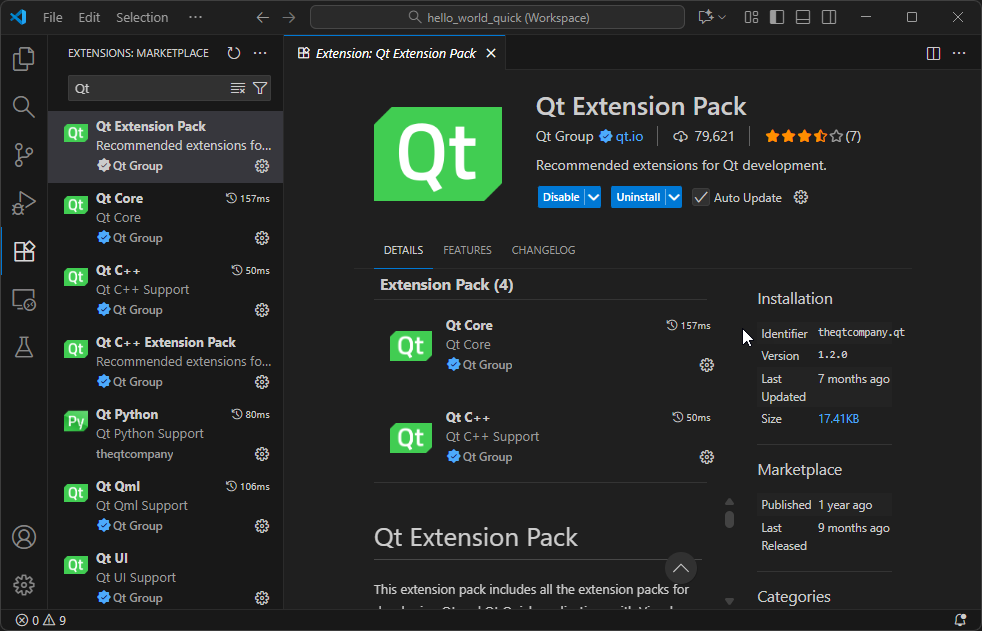
- 「Install 」を選択します。
「CMake For Visual Studio Code」および「CMake Tools」拡張機能が自動的にインストールされます。
拡張機能のステータスを確認する
「Qt Extension for VS Code」の自動更新を有効にしたり、最新リリースとプレリリース版を切り替えたりできます。ただし、各リリースのバージョンを同期させておく必要があります。具体的には、「Qt C++」拡張機能と「Qt Core 」拡張機能で同じリリース版を使用する必要があります。
インストール済みの各拡張機能のバージョンおよび有効化状態を確認するには、「Welcome 」内のバージョン一覧を選択します。
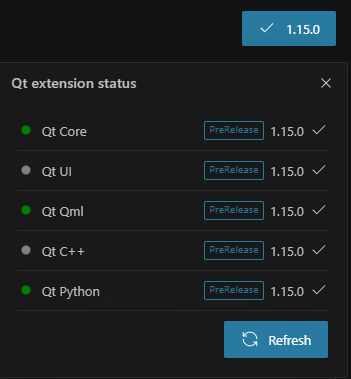
Refresh を選択すると、拡張機能の状態に関する情報が更新されます。
「Qtのインストール登録」および「Python開発環境の設定」も参照してください 。
© 2026 The Qt Company Ltd. Documentation contributions included herein are the copyrights of their respective owners. The documentation provided herein is licensed under the terms of the GNU Free Documentation License version 1.3 as published by the Free Software Foundation. Qt and respective logos are trademarks of The Qt Company Ltd in Finland and/or other countries worldwide. All other trademarks are property of their respective owners.
