
Qtのドキュメントの読み方
Qtまたは Qt for Python ドキュメント(エディタで開いているファイルの種類によって異なります)を開くには、Command Palette にアクセスし、「Qt: Documentation: Open homepage 」を選択してください。
ドキュメントは、Visual Studio Code の Simple Browser で開きます。別のブラウザで開くには、Qt の設定で「Open Online Documentation in External Browser 」を選択してください。
ドキュメントを検索する
エディタで選択した単語(クラス名や関数名など)に関するドキュメントを検索するには:
- エディタ内で単語を選択します。
- 「Command Palette 」に移動し、「Qt: Documentation: Search for the current word 」を選択します。
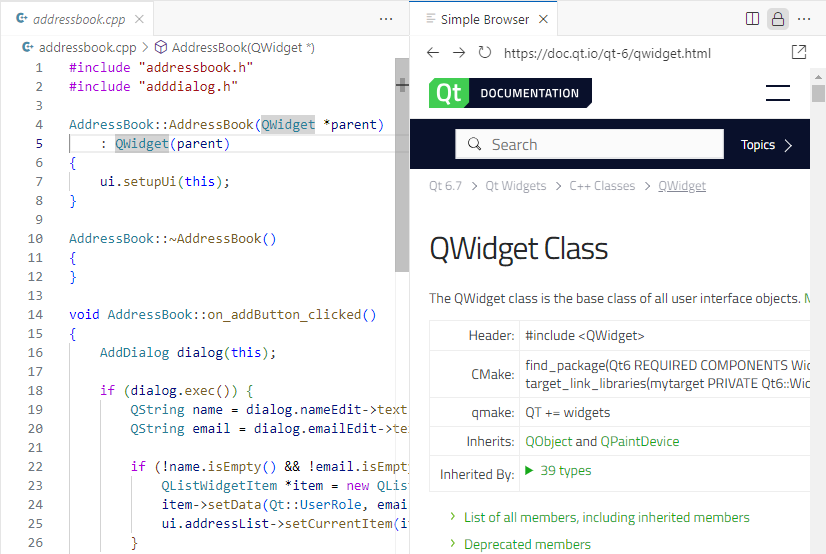
Simple Browser で Qt ドキュメントが開きます。
ドキュメント内の任意のテキストを検索するには:
- Command Palette にアクセスし、「Qt: Documentation: Search 」を選択します。
- 検索文字列を入力し、Enter キーを押します。
「Qtの設定」も参照してください 。
© 2026 The Qt Company Ltd. Documentation contributions included herein are the copyrights of their respective owners. The documentation provided herein is licensed under the terms of the GNU Free Documentation License version 1.3 as published by the Free Software Foundation. Qt and respective logos are trademarks of The Qt Company Ltd in Finland and/or other countries worldwide. All other trademarks are property of their respective owners.
