
2.1. Configuration Files
The configuration system supports the following types of configuration files:
JSON configuration files as generated by the graphical configuration interface
axivion_configPython files
Special “interface” files which are also JSON files but only list other configuration files that should be included
Editing the files generated by the GUI manually is not recommended.
The Python files are imported and executed by the Python interpreter, so in principle they can contain any Python code, but normally they focus on using the Python API provided by the Axivion Suite. Using Python files can be useful if
you require control constructs like if-statements or loops; or
you generate your configuration for multiple projects; or
you need to set a complex option for which the GUI does not yet provide support; or
you want to base your configuration on external input that is more complex than just environment variables.
2.1.1. Layering
The configuration can be split into multiple files with freely chosen names and locations. To put the complete configuration together, you can use external and internal mechanisms. Internal mechanisms inside the configuration files are:
Python files can use Python imports to reference other Python files
JSON interface files list other files to include (all of the above-mentioned file types can be referenced here)
The environment variable BAUHAUS_CONFIG finally lists the configuration
files to be considered by the configuration system.
The order in which configuration files are read in is important, as files that are read in later can override options set by earlier files. This process is called layering. The file that is read in first is called the most global layer, the file that is read in last is called the most local layer.
BAUHAUS_CONFIG separates the layers with the OS-specific path
separator (semi-colon on Windows®, colon on GNU/Linux and macOS®). The most specific
(“most local”, “highest”) layer is listed first, the most generic
(“most global”, “lowest”) layer is listed last (similar to the semantics
of the PATH variable).
If an entry in BAUHAUS_CONFIG refers to a directory rather than a file, this
is equivalent to specifying the file axivion_config.json inside that directory.
2.1.2. Interface layers
Interface layers (also called interface files) can be used to split the configuration into multiple files without having to refer to each file individually. Instead, the interface layer can be referenced by anyone wishing to use the combined configuration.
An interface layer is a JSON file in the following format:
{
     "_Layers":
         [
             "configuration.py",
             "configuration.json"
         ]
}
This first reads the JSON file configuration.json, then the Python file
configuration.py. That is, the most local layer is listed first, similar
to the semantics of the BAUHAUS_CONFIG environment variable. You can
list as many files as you want, including other interface layers, which are expanded
recursively. The list entries can be arbitrary absolute or relative paths. Non-absolute
paths are interpreted relative to the directory containing the interface layer.
{
     "_Layers":
         [
             "more_settings.py",
             "../rule_settings.json",
             "compilers/compiler_configuration.json",
             "\\\\server\\configs\\global_config.json"
         ]
}
This interface layer first loads the file \\server\configs\global_config.json
(please note that backslash characters need to be escaped in JSON files), then the file
compiler_configuration.json from the subdirectory compilers, then
rule_settings.json from the parent directory of the directory containing the
interface layer, and finally more_settings.py in the same directory as the
interface layer.
On Windows® systems, paths can be specified using either backslashes or slashes. Using slashes is recommended to make the file more portable.
Hint
If you list all your configuration files in an interface layer called
axivion_config.json, then it is enough to set BAUHAUS_CONFIG to
the directory containing your interface layer to load your entire configuration.
2.1.2.1. Optional layers
By default, axivion_ci and axivion_config expect all configuration files
that are listed in BAUHAUS_CONFIG or in interface layers to exist. That includes
the default axivion_config.json files inside directories listed in
BAUHAUS_CONFIG, unless the directory has some other relevant content: a license
key (*.key) or some Gravis configuration (a gravis_shortcuts.txt
file or a subdirectory called gravis_scripts or custom_icons).
There are use cases in which not all configuration files are present at the start of the
analysis. For instance, the compiler configuration could be missing initially but then
generated by an early analysis step. To support such use cases, configuration layers can
be marked as optional in BAUHAUS_CONFIG and in interface layers. This is done by
enclosing the filename in square brackets. Missing optional configuration layers do not
cause any errors by default.
For instance, BAUHAUS_CONFIG=[compiler\compiler_config.json];rule_config.json
on Windows® sets up an optional file in compiler\compiler_config.json and a
mandatory file in rule_config.json.
The following interface layer has the same effect:
{
     "_Layers":
         [
             "[compiler/compiler_config.json]",
             "rule_config.json"
         ]
}
Caution
Please note the use of the square brackets inside of the string, not around the string value. The latter would be a JSON sequence, which is not supported in this context.
See Variable Substitution below for the way optional layer markup interacts with variable substitution in interface layers.
The tools axivion_ci and axivion_config have two command-line options to
make the treatment of missing configuration files more tolerant or even stricter:
Option |
Meaning |
|---|---|
|
Treat all configuration files as optional, so there is no error if a configuration file is missing. This restores the behavior of versions 7.11 and below of the Axivion Suite. |
|
Treat all configuration files as mandatory. This switches the tool into strict checking mode,
in which all missing configuration files cause an error, even missing optional layers or
missing |
2.1.2.2. Disabling entries
The recommended way to temporarily disable an entry in an interface layer is to add the
suffix .# to the filename. This is a reliable way of making sure that the
configuration system will not attempt to read the file.
The following interface layer only loads first.json and third.json.
{
     "_Layers":
         [
             "third.json",
             "second.py.#",
             "second.json.#",
             "first.json"
         ]
}
2.1.2.3. Variable substitution
The variable substitution syntax described in Variable Substitution can
be used in interface layers, including the splitpath: entries described in
Variable substitution in sets/lists of strings.
{
     "_Layers":
         [
             "$(splitpath:ADDITIONAL_CONFIG_FILES=)",
             "rule_config.json",
             "compiler_config_$(COMPILER_TYPE=gcc).json",
             "base_config.json"
         ]
}
Supposing COMPILER_TYPE is set to clang and ADDITIONAL_CONFIG_FILES
is unset, then this interface layer loads base_config.json, compiler_config_clang.json
and finally rule_config.json.
If ADDITIONAL_CONFIG_FILES is set to project_rules.json;enterprise_rules.json
on a Windows® system (or project_rules.json:enterprise_rules.json on GNU/Linux and macOS®), then
this also loads enterprise_rules.json and project_rules.json after loading
rule_config.json, so the first entry in the variable is the most local one and therefore loaded
last, similar to the order in the BAUHAUS_CONFIG variable.
You can make the entire result of a splitpath lookup optional (see
Optional layers above) by enclosing the
entire variable reference in square brackets. In addition, each individual component of
the variable contents can also be enclosed in square brackets to make it optional. For
instance, if ADDITIONAL_CONFIG_FILES is set to
[project_rules.json];enterprise_rules.json then project_rules.json is
treated as an optional configuration file.
2.1.2.4. Creating interface layers
The Layer Management feature of the graphical
configuration interface axivion_config allows you to create and edit interface
layers interactively.
axivion_config can also be used to create interface layers on the command-line.
For instance, the following invocation creates the first example file above:
axivion_config --create_interface_layer interface_layer.json configuration.py configuration.json
Please note that this invocation writes the specified names into the interface layers verbatim without attempting to look up or resolve any filenames. For further details see Command-line parameters.
Caution
When creating or editing interface layers manually in an editor, please make sure that the last entry in the list is not followed by a comma, since this is not permitted by the JSON format.
Note
All JSON configuration files, including interface layers, are expected to be UTF-8 encoded.
The following diagram demonstrates the use of the three different types of files, the
way they are referenced by the BAUHAUS_CONFIG environment variable (in this
case, on a Windows® system) and the resulting interpretation order of the files.
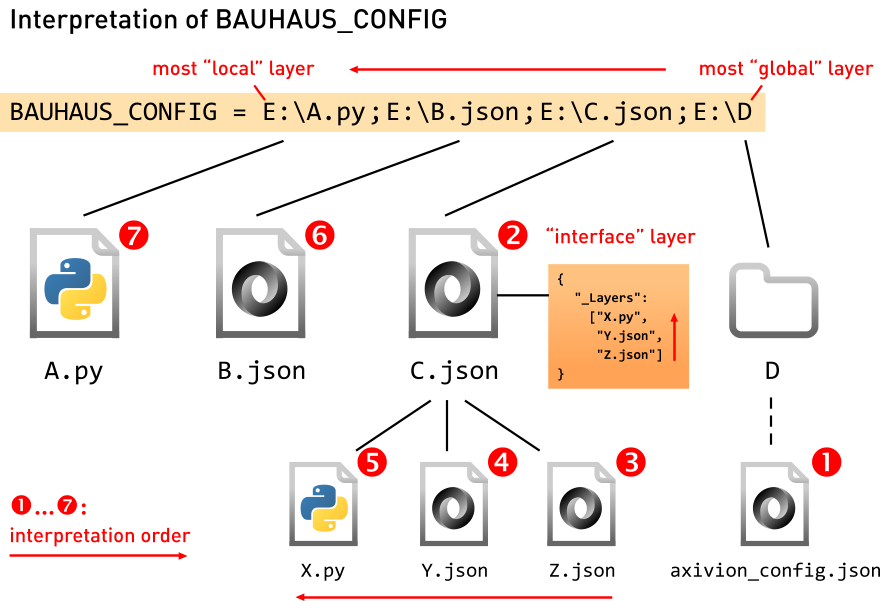
Interpretation of BAUHAUS_CONFIG in the new configuration system
2.1.3. User-specific settings
The interactive graph viewer and editor Gravis has both options that belong to
the project (e.g., visualization settings for project-specific node and edges types)
and user options (e.g., which IDE should be used to display source code). In order to
allow individual users to set tool options just for themselves without having to change
the project-level configuration or the BAUHAUS_CONFIG environment variable,
Gravis implicitly reads one extra configuration file gravis.json in the
.bauhaus directory inside the user’s home directory.
2.1.4. Python API
Python files access the configuration system with a specific API provided by the Axivion Suite. The following points are relevant to get started:
Import the Python module
axivion.configto get access and retrieve the configuration object for the aspect you want to configure.Preamble for Python configuration files¶import axivion.config analysis = axivion.config.get_analysis()
Global options of the configured aspect can be accessed and set with the options attribute.
Setting global options of an aspect in Python¶analysis.options.types.allow_single_bitfield_as_bool = True
Activate rules by their name (without the tree hierarchy shown in the GUI). Only activated rules will be executed. A single call to
activate()can activate one or more rules. You can also directly set rule options using named arguments. These options are then applied to all rules in theactivate()call, and the call will fail if one of the rules does not have such an option.For rules in the group Architecture, the order of the rules is important as they might modify the RFG file, and the order in which they are activated is used as execution order. See Architecture for a more detailed explanation of architecture analysis.
If you activate a rule group, all analyses inside that group will be activated.
After activating a rule group, you can still deactivate individual rules afterwards to exclude them from the analysis. The last change wins!
Activating rules in Python¶analysis.activate('MisraC2012-1.1', 'Architecture-ArchitectureCheck') analysis.activate('MisraC2012-10.3', severity='error')
Access and change rule options with a dict-like access to a rule object. These statements are validated immediately when executed, i.e. the existence of the accessed options and the type of the assigned values is checked. The available rules and their options can be found here or seen in the GUI.
Setting rule options in Python¶analysis['MisraC2012-10.3'].severity='error'
The group to which a rule belongs can also be changed in this way (attribute
rulegroup), for example if you create a rule group for your company’s style guide and wish to add an existing rule to that group.If you need multiple copies of a rule with independent configuration settings, use the configuration object’s
copy()function. When copying, the new rule will start with the configuration at that point of the original rule. After copying, the configuration of the original rule and the copy can diverge, and both can be activated. Copying can also directly specify options with their new values for the copy of the rule.Copying a rule in Python¶analysis.copy('MisraC2012-10.3', 'MyRule-1', severity='note') analysis.activate('MisraC2012-10.3', 'MyRule-1') analysis['MyRule-1'].provider='MyCompany'
In order to move the copied rule to a different place in the hierarchy, you can change its parent group by setting its
rulegroupproperty. In principle, this is possible for all rules, but to avoid confusion it is not recommended to change the hierarchy of the predefined rules.Setting a rule’s parent rule group¶# make a copy of a rule group analysis.copy('MisraC', 'MyCompanyRules') # and move the rule we copied above into it analysis['MyRule-1'].rulegroup = 'MyCompanyRules'
You can check whether a name refers to a rule or a rule group using
analysis.is_rulegroup(rule_name):Checking whether a rule name refers to a rule group¶analysis.is_rulegroup("MisraC") # returns True analysis.is_rulegroup("MisraC2012-10.3") # returns False
If you’ve got additional rules (e.g. self-written rules), announce the directories in which these rules are located, so that they can be found. Relative paths are interpreted relative to the current configuration layer. The expected directories are described in Section Additional Rule Sets.
Using additional rules in Python¶myrulesdir = pathlib.Path('some/where') analysis.add_additional_rules_directory(myrulesdir) analysis.activate('MyOwnRule')
Iterating over all rules or over all rules being active at a point can be done as shown in this example:
Iterating over rules in Python¶for rule_name in analysis: # iterate over all rulegroups and rules print(rule_name) for rule_name in analysis.get_active_rules(): # iterate over all active rules print(rule_name)
Note
for rule_name in analysisiterates over rulegroups and rules. This can lead to surprising results when trying to (de)activate rules based on some condition because (de)activating a rulegroup (de)activates all the rules in the group. In most cases, it is helpful to add an extra check to limit the iteration to leaf rules:Iterating over leaf rules in Python¶for rule_name in analysis: if not analysis.is_rulegroup(rule_name): print(rule_name)
If you want to iterate over all (leaf) rules inside a specific subtree, you can use
analysis.get_rules_in_subtree(). By default, this does not return any groups. If you passinclude_groups=True, then the root group and all intermediate groups are included in the result.For example, the following snippet activates all
CertCrules with severityhigh:Iterating over leaf rules in a subtree¶for rule_name in analysis.get_rules_in_subtree('CertC'): if analysis[rule_name].severity == 'high': analysis.activate(rule_name)
Some more functions exist around active rules.
Additional functions regarding active rules in Python¶analysis.deactivate('MyOwnRule') for rule_name in analysis.get_active_rules(): assert analysis.is_active(rule_name) analysis.clear_active_rules()
2.1.5. Additional Rule Sets
With the Python API or with the graphical interface, you can add directories to the project configuration to load additional rule sets. This can for example be used to add your own rules. See section Adding a Custom Rule for an example and a more detailed description.