
Grabador de vídeo QML
Grabación de audio y vídeo utilizando Qt Quick.
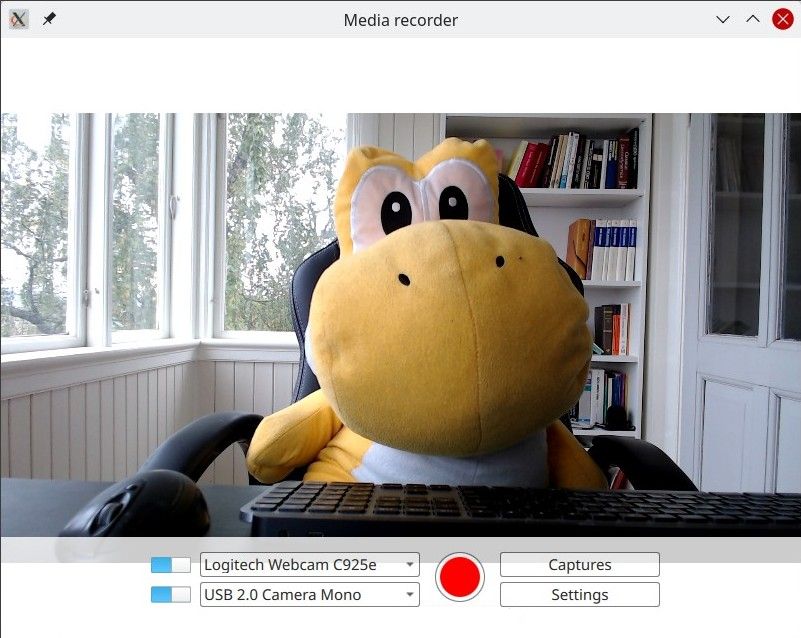
QML Recorder demuestra una sencilla aplicación que puede grabar audio y vídeo por separado o juntos, utilizando un micrófono, una cámara o con captura de pantalla.
Ejecutar el ejemplo
Para ejecutar el ejemplo desde Qt Creator, abra el modo Welcome y seleccione el ejemplo de Examples. Para más información, consulta Qt Creator: Tutorial: Construir y ejecutar.
Visión general
En esencia, se trata de una aplicación QML, véase Introducción a las aplicaciones Qt Quick . Esta documentación se centra en cómo este ejemplo utiliza el módulo Qt Multimedia QML Types.
El ejemplo utiliza los tipos QML Camera y AudioInput conectados a un objeto CaptureSession. A continuación, se utiliza un objeto MediaRecorder para grabar el audio y el vídeo capturados.
Además de QtMultimedia, se utilizan características de Qt Quick Windows, Controls y Layouts para implementar la interfaz gráfica de usuario y la funcionalidad. La reproducción no se cubrirá aquí, para eso vea el Ejemplo de Reproductor Multimedia QML.
El ejemplo demuestra lo siguiente:
- Dispositivos de entrada seleccionables.
- Se puede desactivar un tipo de entrada.
- Ajustes para la captura como la calidad, la elección del códec, el formato de archivo y la asignación de metadatos.
- Los archivos capturados se almacenan y se pueden reproducir.
Grabación
La aplicación implementa la grabación.
captureSession
En Main.qml, captureSession se declara así:
    CaptureSession {
        id: captureSession
        recorder: recorder
        audioInput: controls.audioInput
        camera: controls.camera
        screenCapture: controls.screenCapture
        windowCapture: controls.windowCapture
        videoOutput: videoOutput
    }
grabadora
En Main.qml, la MediaRecorder recorder maneja la grabación de medios así como la captura de una miniatura del archivo y su anexión a un ListModel, mediaList.
    MediaRecorder {
        id: recorder
        onRecorderStateChanged:
            (state) => {
                if (state === MediaRecorder.StoppedState) {
                    root.contentOrientation = Qt.PrimaryOrientation
                    mediaList.append()
                } else if (state === MediaRecorder.RecordingState && captureSession.camera) {
                    // lock orientation while recording and create a preview image
                    root.contentOrientation = Screen.orientation;
                    videoOutput.grabToImage(function(res) { mediaList.mediaThumbnail = res.url })
                }
            }
        onActualLocationChanged: (url) => { mediaList.mediaUrl = url }
        onErrorOccurred: { recorderErrorText.text = recorder.errorString; recorderError.open(); }
    }
mediaList se declara en Frame mediaListFrame
    Frame {
        id: mediaListFrame
        height: 150
        width: parent.width
        anchors.bottom: controlsFrame.top
        x: controls.capturesVisible ? 0 : parent.width
        background: Rectangle {
            anchors.fill: parent
            color: palette.base
            opacity: 0.8
        }

        Behavior on x { NumberAnimation { duration: 200 } }

        MediaList {
            id: mediaList
            anchors.fill: parent
            playback: playback
controles
Estos se definen en Controls.qml y se declaran en Main.qml.
Su raíz es un Row que contiene los Columns inputControls , recordButton, optionButtons, cada uno definido en sus propios archivos .qml.
Selección de una fuente de vídeo
Definido en VideoSourceSelect.qml, VideoSourceSlect se compone de un Switch y un ComboBox y permite al usuario seleccionar entre las cámaras disponibles.
Row {
    id: root
    height: Style.height
    property Camera selectedCamera: cameraAvailable ? camera : null
    property ScreenCapture selectedScreenCapture: screenAvailable ? screenCapture : null
    property WindowCapture selectedWindowCapture: windowAvailable ? windowCapture : null

    property bool sourceAvailable: typeof comboBox.currentValue !== 'undefined' &&
                                   comboBox.currentValue.type !== 'toggler' &&
                                   videoSourceSwitch.checked

    property bool cameraAvailable: sourceAvailable && comboBox.currentValue.type === 'camera'
    property bool screenAvailable: sourceAvailable && comboBox.currentValue.type === 'screen'
    property bool windowAvailable: sourceAvailable && comboBox.currentValue.type === 'window'

    Component.onCompleted: {
        videoSourceModel.populate()

        for (var i = 0; i < videoSourceModel.count; i++) {
            if (videoSourceModel.get(i).value.type !== 'toggler') {
                comboBox.currentIndex = i
                break
            }
        }
    }

    Camera {
        id: camera
        active:
            root.cameraAvailable
            && PermissionHelper.cameraStatus === Qt.PermissionStatus.Granted
    }

    ScreenCapture {
        id: screenCapture
        active: root.screenAvailable
    }

    WindowCapture {
        id: windowCapture
        active: root.windowAvailable
    }

    MediaDevices { id: mediaDevices
        onVideoInputsChanged: {

            videoSourceModel.populate()

            for (var i = 0; i < videoSourceModel.count; i++) {
                if (videoSourceModel.get(i).value.type !== 'toggler') {
                    comboBox.currentIndex = i
                    break
                }
            }
        }
    }

    Switch {
        id: videoSourceSwitch
        anchors.verticalCenter: parent.verticalCenter
        checked: true
    }

    ListModel {
        id: videoSourceModel
        property var enabledSources: {
            'camera': true,
            'screen': true,
            'window': false
        }

        function toggleEnabledSource(type) {
            enabledSources[type] = !enabledSources[type]
            populate()
        }

        function appendItem(text, value) {
            append({ text: text, value: value})
        }

        function appendToggler(name, sourceType) {
            appendItem((enabledSources[sourceType] ? "- Hide " : "+ Show ") + name,
                       { type: 'toggler', 'sourceType': sourceType })
        }

        function populate() {
            clear()

            appendToggler('Cameras', 'camera')
            if (enabledSources['camera'])
                for (var camera of mediaDevices.videoInputs)
                    appendItem(camera.description, { type: 'camera', camera: camera })

            appendToggler('Screens', 'screen')
            if (enabledSources['screen'])
                for (var screen of Application.screens)
                    appendItem(screen.name, { type: 'screen', screen: screen })

            appendToggler('Windows', 'window')
            if (enabledSources['window'])
                for (var window of windowCapture.capturableWindows())
                    appendItem(window.description, { type: 'window', window: window })
        }
    }
comboBox, declarado en el fragmento anterior, asigna la fuente de vídeo actual.
    ComboBox {
        id: comboBox
        width: Style.widthLong
        height: Style.height
        background: StyleRectangle { anchors.fill: parent }
        model: videoSourceModel
        displayText: typeof currentValue === 'undefined' ||
                     currentValue.type === 'toggler' ? "Unavailable" : currentText
        font.pointSize: Style.fontSize
        textRole: "text"
        valueRole: "value"
        onCurrentValueChanged: {
            if (typeof currentValue === 'undefined')
                return
            if (currentValue.type === 'screen')
                screenCapture.screen = currentValue.screen
            else if (currentValue.type === 'camera')
                camera.cameraDevice = currentValue.camera
Seleccionar una entrada de audio
Se implementa de la misma forma que la selección de una fuente de vídeo y se define en AudioInputSelect.qml de la siguiente manera:
Row {
    id: root
    height: Style.height
    property AudioInput selected: available ? audioInput : null
    property bool available: (typeof comboBox.currentValue !== 'undefined') && audioSwitch.checked

    Component.onCompleted: {
        audioInputModel.populate()
        comboBox.currentIndex = 0
    }

    MediaDevices { id: mediaDevices }

    AudioInput { id: audioInput; muted: !audioSwitch.checked }

    Switch {
        id: audioSwitch;
        height: Style.height;
        checked: true
    }

    ListModel {
        id: audioInputModel
        property var audioInputs: mediaDevices.audioInputs

        function populate() {
            audioInputModel.clear()

            for (var audioDevice of audioInputs)
                audioInputModel.append({ text: audioDevice.description, value:
                                        { type: 'audioDevice', audioDevice: audioDevice } })
        }
    }
    ComboBox {
        id: comboBox
        width: Style.widthLong
        height: Style.height
        background: StyleRectangle { anchors.fill: parent }
        model: audioInputModel
        textRole: "text"
        font.pointSize: Style.fontSize
        displayText: typeof currentValue === 'undefined' ? "unavailable" : currentText
        valueRole: "value"
© 2026 The Qt Company Ltd. Documentation contributions included herein are the copyrights of their respective owners. The documentation provided herein is licensed under the terms of the GNU Free Documentation License version 1.3 as published by the Free Software Foundation. Qt and respective logos are trademarks of The Qt Company Ltd. in Finland and/or other countries worldwide. All other trademarks are property of their respective owners.
