
Qt Quick 3D - Ejemplo de Extensión Stencil Outline
Demuestra cómo se puede utilizar la extensión de renderizado QtQuick3D para implementar el contorno de esténcil.
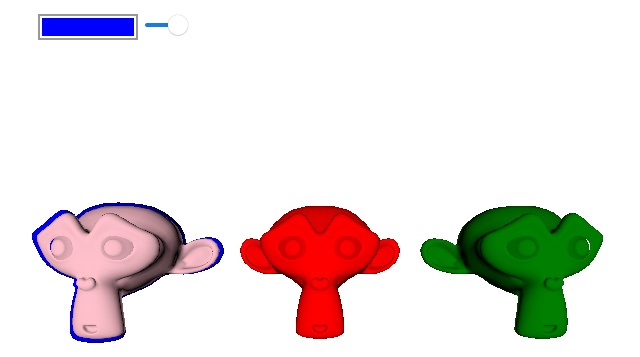
Este ejemplo muestra cómo se pueden utilizar las extensiones de renderizado de QtQuick3D para añadir soporte para el contorno de esténcil.
El primer paso es implementar el elemento front-end creando un nuevo elemento Render Extension que exponga las propiedades necesarias a QML. En este ejemplo exponemos 3 propiedades, una target que toma el model que queremos contornear, el material que queremos usar para el contorno, y un valor scale para ajustar el tamaño del contorno.
class OutlineRenderExtension : public QQuick3DRenderExtension
{
    Q_OBJECT
    Q_PROPERTY(QQuick3DObject * target READ target WRITE setTarget NOTIFY targetChanged)
    Q_PROPERTY(QQuick3DObject * outlineMaterial READ outlineMaterial WRITE setOutlineMaterial NOTIFY outlineMaterialChanged)
    Q_PROPERTY(float outlineScale READ outlineScale WRITE setOutlineScale NOTIFY outlineScaleChanged)
    QML_ELEMENT

public:
    OutlineRenderExtension() = default;
    ~OutlineRenderExtension() override;

    float outlineScale() const;
    void setOutlineScale(float newOutlineScale);

    QQuick3DObject *target() const;
    void setTarget(QQuick3DObject *newTarget);

    QQuick3DObject *outlineMaterial() const;
    void setOutlineMaterial(QQuick3DObject *newOutlineMaterial);

signals:
    void outlineColorChanged();
    void outlineScaleChanged();
    void targetChanged();
    void outlineMaterialChanged();

protected:
    QSSGRenderGraphObject *updateSpatialNode(QSSGRenderGraphObject *node) override;

private:
    enum Dirty : quint8
    {
        Target = 1 << 0,
        OutlineMaterial = 1 << 1,
        OutlineScale = 1 << 2
    };

    using DirtyT = std::underlying_type_t<Dirty>;

    void markDirty(Dirty v);

    QPointer<QQuick3DObject> m_target;
    QPointer<QQuick3DObject> m_outlineMaterial;
    float m_outlineScale = 1.05f;
    DirtyT m_dirtyFlag {};
};
El segundo paso es implementar la clase back-end Render Extension, esta es la clase que contiene el código que será ejecutado por QtQuick3D.
Para esta extensión renderizaremos after con el pase de color incorporado, y querremos renderizar como parte del pase de render principal, por lo que devolveremos PostColor y Main en nuestras funciones QSSGRenderExtension::stage() y QSSGRenderExtension::mode() respectivamente.
class OutlineRenderer : public QSSGRenderExtension
{
public:
    OutlineRenderer() = default;

    bool prepareData(QSSGFrameData &data) override;
    void prepareRender(QSSGFrameData &data) override;
    void render(QSSGFrameData &data) override;
    void resetForFrame() override;
    RenderMode mode() const override { return RenderMode::Main; }
    RenderStage stage() const override { return RenderStage::PostColor; };

    QSSGPrepContextId stencilPrepContext { QSSGPrepContextId::Invalid };
    QSSGPrepContextId outlinePrepContext { QSSGPrepContextId::Invalid };
    QSSGPrepResultId stencilPrepResult { QSSGPrepResultId::Invalid };
    QSSGPrepResultId outlinePrepResult { QSSGPrepResultId::Invalid };
    QPointer<QQuick3DObject> model;
    QSSGNodeId modelId { QSSGNodeId::Invalid };
    QPointer<QQuick3DObject> material;
    QSSGResourceId outlineMaterialId {};
    float outlineScale = 1.05f;

    QSSGRenderablesId stencilRenderables;
    QSSGRenderablesId outlineRenderables;
};
La siguiente función que necesita ser implementada es QSSGRenderExtension::prepareData(), esta función debe recoger y configurar los datos que esta extensión utilizará para el renderizado. Si no hay nada que renderizar esta función debe devolver false.
bool OutlineRenderer::prepareData(QSSGFrameData &data)
{
    // Make sure we have a model and a material.
    if (!model || !material)
        return false;

    modelId = QQuick3DExtensionHelpers::getNodeId(*model);
    if (modelId == QSSGNodeId::Invalid)
        return false;

    outlineMaterialId = QQuick3DExtensionHelpers::getResourceId(*material);
    if (outlineMaterialId == QSSGResourceId::Invalid)
        return false;

    // This is the active camera for the scene (the camera used to render the QtQuick3D scene)
    QSSGCameraId camera = data.activeCamera();
    if (camera == QSSGCameraId::Invalid)
        return false;

    // We are going to render the same renderable(s) twice so we need to create two contexts.
    stencilPrepContext = QSSGRenderHelpers::prepareForRender(data, *this, camera, 0);
    outlinePrepContext = QSSGRenderHelpers::prepareForRender(data, *this, camera, 1);
    // Create the renderables for the target model. One for the original with stencil write, and one for the outline model.
    // Note that we 'Steal' the model here, that tells QtQuick3D that we'll take over the rendering of the model.
    stencilRenderables = QSSGRenderHelpers::createRenderables(data, stencilPrepContext, { modelId }, QSSGRenderHelpers::CreateFlag::Steal);
    outlineRenderables = QSSGRenderHelpers::createRenderables(data, outlinePrepContext, { modelId });

    // Now we can start setting the data for our models.
    // Here we set a material and a scale for the outline
    QSSGModelHelpers::setModelMaterials(data, outlineRenderables, modelId, { outlineMaterialId });
    QMatrix4x4 globalTransform = QSSGModelHelpers::getGlobalTransform(data, modelId);
    globalTransform.scale(outlineScale);
    QSSGModelHelpers::setGlobalTransform(data, outlineRenderables, modelId, globalTransform);

    // When all changes are done, we need to commit the changes.
    stencilPrepResult = QSSGRenderHelpers::commit(data, stencilPrepContext, stencilRenderables);
    outlinePrepResult = QSSGRenderHelpers::commit(data, outlinePrepContext, outlineRenderables);

    // If there's something to be rendered we return true.
    const bool dataReady = (stencilPrepResult != QSSGPrepResultId::Invalid && outlinePrepResult != QSSGPrepResultId::Invalid);

    return dataReady;
}
Si QSSGRenderExtension::prepareData() devuelve true la siguiente función a llamar es QSSGRenderExtension::prepareRender(). En esta función configuraremos pipeline state para nuestros dos renderizables y le diremos a QtQuick3D que prepare las primitivas etc. para los renderizables llamando a QSSGRenderHelpers::prepareRenderables().
void OutlineRenderer::prepareRender(QSSGFrameData &data)
{
    Q_ASSERT(modelId != QSSGNodeId::Invalid);
    Q_ASSERT(stencilPrepResult != QSSGPrepResultId::Invalid && outlinePrepResult != QSSGPrepResultId::Invalid);

    const auto &ctx = data.contextInterface();

    if (const auto &rhiCtx = ctx->rhiContext()) {
        const QSSGRhiGraphicsPipelineState basePs = data.getPipelineState();
        QRhiRenderPassDescriptor *rpDesc = rhiCtx->mainRenderPassDescriptor();
        const int samples = rhiCtx->mainPassSampleCount();

        { // Original model - Write to the stencil buffer.
            QSSGRhiGraphicsPipelineState ps = basePs;
            ps.flags |= { QSSGRhiGraphicsPipelineState::Flag::BlendEnabled,
                          QSSGRhiGraphicsPipelineState::Flag::DepthWriteEnabled,
                          QSSGRhiGraphicsPipelineState::Flag::UsesStencilRef,
                          QSSGRhiGraphicsPipelineState::Flag::DepthTestEnabled };
            ps.stencilWriteMask = 0xff;
            ps.stencilRef = 1;
            ps.samples = samples;
            ps.cullMode = QRhiGraphicsPipeline::Back;

            ps.stencilOpFrontState = { QRhiGraphicsPipeline::Keep,
                                       QRhiGraphicsPipeline::Keep,
                                       QRhiGraphicsPipeline::Replace,
                                       QRhiGraphicsPipeline::Always };

            QSSGRenderHelpers::prepareRenderables(data, stencilPrepResult, rpDesc, ps);
        }

        { // Scaled version - Only draw outside the original.
            QSSGRhiGraphicsPipelineState ps = basePs;
            ps.flags |= { QSSGRhiGraphicsPipelineState::Flag::BlendEnabled,
                          QSSGRhiGraphicsPipelineState::Flag::UsesStencilRef,
                          QSSGRhiGraphicsPipelineState::Flag::DepthTestEnabled };
            ps.flags.setFlag(QSSGRhiGraphicsPipelineState::Flag::DepthWriteEnabled, false);
            ps.stencilWriteMask = 0;
            ps.stencilRef = 1;
            ps.cullMode = QRhiGraphicsPipeline::Back;

            ps.stencilOpFrontState = { QRhiGraphicsPipeline::Keep,
                                       QRhiGraphicsPipeline::Keep,
                                       QRhiGraphicsPipeline::Replace,
                                       QRhiGraphicsPipeline::NotEqual };

            QSSGRenderHelpers::prepareRenderables(data, outlinePrepResult, rpDesc, ps);
        }
    }
}
Cuando el motor esté listo para grabar las llamadas de renderizado para nuestra extensión, llamará a la función virtual QSSGRenderExtension::render(). En este ejemplo podemos simplemente llamar a QSSGRenderHelpers::renderRenderables() para los dos modelos, entonces serán renderizados de la misma manera que QtQuick3D lo habría hecho internamente, sólo que esta vez con nuestra configuración.
void OutlineRenderer::render(QSSGFrameData &data)
{
    Q_ASSERT(stencilPrepResult != QSSGPrepResultId::Invalid);

    const auto &ctx = data.contextInterface();
    if (const auto &rhiCtx = ctx->rhiContext()) {
        QRhiCommandBuffer *cb = rhiCtx->commandBuffer();
        cb->debugMarkBegin(QByteArrayLiteral("Stencil outline pass"));
        QSSGRenderHelpers::renderRenderables(data, stencilPrepResult);
        QSSGRenderHelpers::renderRenderables(data, outlinePrepResult);
        cb->debugMarkEnd();
    }
}
El OutlineRenderExtension se activa añadiéndolo a la propiedad View3D's extensions .
View3D {
    id: view3d
    anchors.topMargin: 100
    anchors.fill: parent
    extensions: [ OutlineRenderExtension {
            id: outlineRenderer
            outlineMaterial: outlineMaterial
        }
    ]
Ahora, cuando un model es elegido, sólo tenemos que establecer el model elegido como el target para el OutlineRenderExtension para tenerlo renderizado con un contorno.
    MouseArea {
        anchors.fill: view3d
        onClicked: (mouse)=> {
              let hit = view3d.pick(mouse.x, mouse.y)
              outlineRenderer.target = hit.objectHit
        }
    }
© 2026 The Qt Company Ltd. Documentation contributions included herein are the copyrights of their respective owners. The documentation provided herein is licensed under the terms of the GNU Free Documentation License version 1.3 as published by the Free Software Foundation. Qt and respective logos are trademarks of The Qt Company Ltd. in Finland and/or other countries worldwide. All other trademarks are property of their respective owners.
