
Qt Quick 3D - Ejemplo de HelloCube
Demuestra cómo renderizar objetos 2D y 3D juntos en Qt Quick 3D.
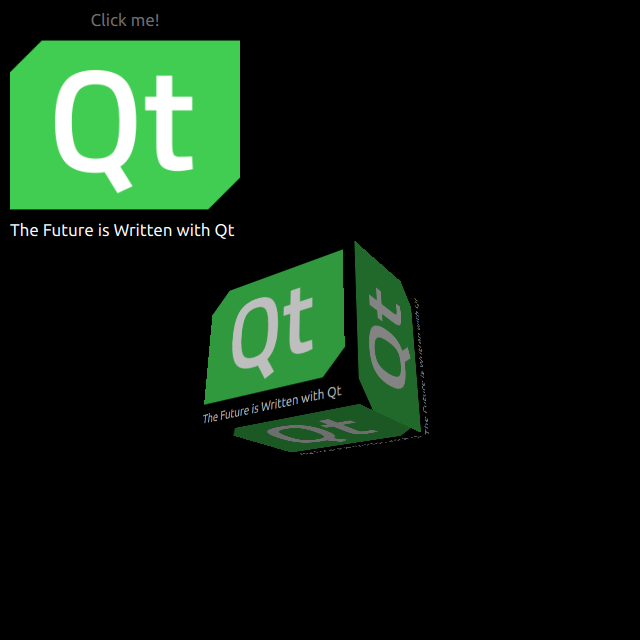
HelloCube demuestra cómo renderizar un cubo 3D con elementos 2D en Qt Quick 3D.
Dibujar Objetos 2D
Configuramos toda la escena en el archivo main.qml.
Para poder utilizar los tipos del módulo QtQuick3D, debemos importarlo:
import QtQuick3D
Definimos QtQuick Items simples con una Imagen y un Texto en un Rectángulo.
Image {
    anchors.fill: parent
    source: "qt_logo.png"
}
Text {
    anchors.bottom: parent.bottom
    anchors.left: parent.left
    color: "white"
    font.pixelSize: 17
    text: qsTr("The Future is Written with Qt")
}
Este rectángulo simple tiene dos animaciones para voltearse verticalmente.
transform: Rotation {
    id: rotation
    origin.x: qt_logo.width / 2
    origin.y: qt_logo.height / 2
    axis { x: 1; y: 0; z: 0 }
}

PropertyAnimation {
    id: flip1
    target: rotation
    property: "angle"
    duration: 600
    to: 180
    from: 0
}
PropertyAnimation {
    id: flip2
    target: rotation
    property: "angle"
    duration: 600
    to: 360
    from: 180
}
Dibujar un Cubo 3D
Dibujar un cubo es muy sencillo. Después de definir un Camera, y un Light, hacemos un cubo con un Model incorporado. En este ejemplo, renderizamos el Rectángulo 2D anterior sobre la superficie del cubo como un Texture difuso. En nuestro Rectángulo, establecemos layer.enabled a true.
layer.enabled: true
Cuando se activa, esta propiedad hace que el elemento 2D se renderice en una superficie fuera de pantalla, que luego usamos como textura para nuestro cubo.
id: cube
source: "#Cube"
materials: PrincipledMaterial {
    baseColorMap: Texture {
        sourceItem: qt_logo
    }
}
eulerRotation.y: 90
© 2026 The Qt Company Ltd. Documentation contributions included herein are the copyrights of their respective owners. The documentation provided herein is licensed under the terms of the GNU Free Documentation License version 1.3 as published by the Free Software Foundation. Qt and respective logos are trademarks of The Qt Company Ltd. in Finland and/or other countries worldwide. All other trademarks are property of their respective owners.
