
Qt Quick 3D - Ejemplo de textura procedimental
Demuestra cómo proporcionar datos de textura personalizados desde C++ o QML.
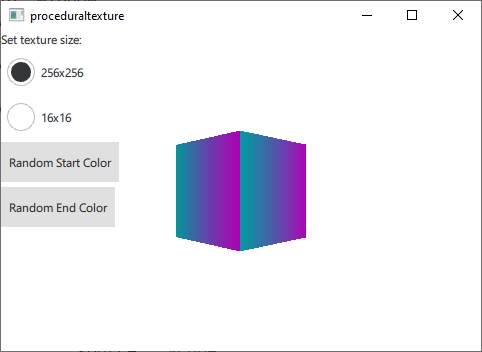
Esto demuestra las diversas formas de proporcionar datos de textura generados dinámicamente en tiempo de ejecución en lugar de cargarlos desde un activo estático. Para propósitos de demostración, este ejemplo genera texturas de gradiente vertical a partir de los colores inicial y final proporcionados.
Primero definimos una clase C++ para nuestros datos de textura. La convertimos en una subclase de QQuick3DTextureData. Esto no es estrictamente necesario, ya que no hay funciones virtuales, pero es mucho más conveniente tener todo en una sola clase. Definimos las propiedades que vamos a utilizar, y añadimos QML_NAMED_ELEMENT para que esté disponible desde QML:
class GradientTexture : public QQuick3DTextureData
{
    Q_OBJECT
    Q_PROPERTY(int height READ height WRITE setHeight NOTIFY heightChanged)
    Q_PROPERTY(int width READ width WRITE setWidth NOTIFY widthChanged)
    Q_PROPERTY(QColor startColor READ startColor WRITE setStartColor NOTIFY startColorChanged)
    Q_PROPERTY(QColor endColor READ endColor WRITE setEndColor NOTIFY endColorChanged)
    QML_NAMED_ELEMENT(GradientTexture)
    ...
Añadimos una función para actualizar la textura. Utiliza setSize, y setFormat para configurar la textura, y setTextureData para configurar los datos de la imagen:
void GradientTexture::updateTexture()
{
    setSize(QSize(m_width, m_height));
    setFormat(QQuick3DTextureData::RGBA8);
    setHasTransparency(false);
    setTextureData(generateTexture());
}
La función generateTexture crea un QByteArray del tamaño correcto, y lo rellena con los datos de la imagen:
QByteArray GradientTexture::generateTexture()
{
    QByteArray imageData;
    // Create a horizontal gradient between startColor and endColor

    // Create a single scanline and reuse that data for each
    QByteArray gradientScanline;
    gradientScanline.resize(m_width * 4); // RGBA8

    for (int x = 0; x < m_width; ++x) {
        QColor color = linearInterpolate(m_startColor, m_endColor, x / float(m_width));
        int offset = x * 4;
        gradientScanline.data()[offset + 0] = char(color.red());
        gradientScanline.data()[offset + 1] = char(color.green());
        gradientScanline.data()[offset + 2] = char(color.blue());
        gradientScanline.data()[offset + 3] = char(255);
    }

    for (int y = 0; y < m_height; ++y)
        imageData += gradientScanline;

    return imageData;
}
Llamamos a updateTexture cada vez que se cambia una propiedad:
void GradientTexture::setStartColor(QColor startColor)
{
    if (m_startColor == startColor)
        return;

    m_startColor = startColor;
    emit startColorChanged(m_startColor);
    updateTexture();
}
Finalmente, podemos usar nuestra nueva textura desde QML:
Texture {
    id: textureFromCpp

    minFilter: applicationState.filterMode
    magFilter: applicationState.filterMode
    textureData: gradientTexture

    GradientTexture {
        id: gradientTexture
        startColor: applicationState.startColor
        endColor: applicationState.endColor
        width: applicationState.size
        height: width
    }
}
También es posible generar los mismos datos de textura en QML. En este caso utilizamos el componente ProceduralTextureData:
Texture {
    id: textureFromQML
    minFilter: applicationState.filterMode
    magFilter: applicationState.filterMode
    textureData: gradientTextureDataQML

    ProceduralTextureData {
        id: gradientTextureDataQML

        property color startColor: applicationState.startColor
        property color endColor: applicationState.endColor
        width: applicationState.size
        height: width
        textureData: generateTextureData()

        function linearInterpolate(startColor : color, endColor : color, fraction : real) : color{
            return Qt.rgba(
                        startColor.r + (endColor.r - startColor.r) * fraction,
                        startColor.g + (endColor.g - startColor.g) * fraction,
                        startColor.b + (endColor.b - startColor.b) * fraction,
                        startColor.a + (endColor.a - startColor.a) * fraction
                        );
        }

        function generateTextureData() {
            let dataBuffer = new ArrayBuffer(width * height * 4)
            let data = new Uint8Array(dataBuffer)

            let gradientScanline = new Uint8Array(width * 4);

            for (let x = 0; x < width; ++x) {
                let color = linearInterpolate(startColor, endColor, x / width);
                let offset = x * 4;
                gradientScanline[offset + 0] = color.r * 255;
                gradientScanline[offset + 1] = color.g * 255;
                gradientScanline[offset + 2] = color.b * 255;
                gradientScanline[offset + 3] = color.a * 255;
            }

            for (let y = 0; y < height; ++y) {
                data.set(gradientScanline, y * width * 4);
            }

            return dataBuffer;
        }
    }
}
Al igual que en C++ rellenamos un QByteArray con datos de imagen que reflejen el tamaño y formato de la textura. Al hacer esto desde QML utiliza el tipo ArrayBuffer para evitar conversiones de tipo innecesarias.
En los dos ejemplos anteriores, todos los datos de la textura se generan en la CPU y luego se cargan en la GPU para utilizarlos como datos de textura. También es posible generar los datos de textura directamente en la GPU. En este caso utilizamos la subclase de QQuick3DTextureProviderExtension en su lugar.
class GradientTextureProvider : public QQuick3DTextureProviderExtension
{
    Q_OBJECT
    Q_PROPERTY(int height READ height WRITE setHeight NOTIFY heightChanged)
    Q_PROPERTY(int width READ width WRITE setWidth NOTIFY widthChanged)
    Q_PROPERTY(QColor startColor READ startColor WRITE setStartColor NOTIFY startColorChanged)
    Q_PROPERTY(QColor endColor READ endColor WRITE setEndColor NOTIFY endColorChanged)
    QML_ELEMENT
QQuick3DTextureProviderExtension definen extensiones de renderizado utilizando la API RHI de Qt. La subclase debe devolver un objeto basado en QSSGRenderExtension cuando se llama a QQuick3DTextureProviderExtension::updateSpatialNode().
QSSGRenderGraphObject *GradientTextureProvider::updateSpatialNode(QSSGRenderGraphObject *node)
{
    if (!node)
        node = new GradientTextureProviderNode(this);

    // Update the state of the backend node
    auto gradientNode = static_cast<GradientTextureProviderNode *>(node);
    gradientNode->m_isDirty = true;
    gradientNode->m_width = m_width;
    gradientNode->m_height = m_height;
    gradientNode->m_startColor = m_startColor;
    gradientNode->m_endColor = m_endColor;

    return node;
}
Lo que realmente se renderiza es definido por esta subclase QSSGRenderExtension:
class GradientTextureProviderNode : public QSSGRenderTextureProviderExtension
{
public:
    explicit GradientTextureProviderNode(GradientTextureProvider *ext);
    ~GradientTextureProviderNode() override;
    bool prepareData(QSSGFrameData &data) override;
    void prepareRender(QSSGFrameData &data) override;
    void render(QSSGFrameData &data) override;
    void resetForFrame() override;

    bool m_isDirty = false;

    // state
    int m_width = 256;
    int m_height = 256;
    QColor m_startColor = QColor(Qt::red);
    QColor m_endColor = QColor(Qt::blue);

private:

    QPointer<GradientTextureProvider> m_ext;
    QSSGExtensionId extensionId {};

    std::unique_ptr<QRhiBuffer> quadGeometryVertexBuffer;
    std::unique_ptr<QRhiBuffer> quadGeometryIndexBuffer;

    //
    std::unique_ptr<QRhiTexture> outputTexture; // the final output texture
    std::unique_ptr<QRhiTextureRenderTarget> outputTextureRenderTarget;
    std::unique_ptr<QRhiRenderPassDescriptor> ouputTextureRenderPassDescriptor;

    std::unique_ptr<QRhiBuffer> gradientTextureUniformBuffer;
    std::unique_ptr<QRhiShaderResourceBindings> gradientTextureShaderResouceBindings;
    std::unique_ptr<QRhiGraphicsPipeline> gradientTexture2dPipeline;
};
Implementando las interfaces de QSSGRenderExtension, la extensión puede renderizar los datos de textura directamente en la GPU. La implementación prepareDate se asegura de que la textura de salida se crea con el tamaño y formato correctos, así como registra la textura de salida como la textura que se está proporcionando.
bool GradientTextureProviderNode::prepareData(QSSGFrameData &data)
{
    if (!m_isDirty)
        return false;

    const auto &ctxIfx = data.contextInterface();
    const auto &rhiCtx = ctxIfx->rhiContext();
    QRhi *rhi = rhiCtx->rhi();

    // If there is no available rhi context, then we can't create the texture
    if (!rhiCtx)
        return false;

    extensionId = m_ext ? QQuick3DExtensionHelpers::getExtensionId(*m_ext) : QSSGExtensionId{};
    if (QQuick3DExtensionHelpers::isNull(extensionId))
        return false;

    // Make sure that the output texture is created and registered as the texture provider
    if (!outputTexture ||
        outputTexture->pixelSize().width() != m_width ||
        outputTexture->pixelSize().height() != m_height) {
        outputTexture.reset(rhi->newTexture(QRhiTexture::Format::RGBA8, QSize(m_width, m_height), 1, QRhiTexture::RenderTarget | QRhiTexture::sRGB));
        outputTexture->create();

        outputTextureRenderTarget.reset(rhi->newTextureRenderTarget({ outputTexture.get() }));
        ouputTextureRenderPassDescriptor.reset(outputTextureRenderTarget->newCompatibleRenderPassDescriptor());
        outputTextureRenderTarget->setRenderPassDescriptor(ouputTextureRenderPassDescriptor.get());
        outputTextureRenderTarget->create();

        // Register the output as the texture provider
        QSSGRenderExtensionHelpers::registerRenderResult(data, extensionId, outputTexture.get());

        gradientTexture2dPipeline.reset();
    }

    // If m_isDirty is true than prepareRender and render will actually get called.
    return m_isDirty;
}
El prepareRender es donde se crean los pipelines, y se actualizan los buffers uniformes.
void GradientTextureProviderNode::prepareRender(QSSGFrameData &data)
{
    const auto &ctxIfx = data.contextInterface();
    const auto &rhiCtx = ctxIfx->rhiContext();
    if (!rhiCtx)
        return;

    QRhi *rhi = rhiCtx->rhi();
    QRhiCommandBuffer *cb = rhiCtx->commandBuffer();
    QRhiResourceUpdateBatch *resourceUpdates = rhi->nextResourceUpdateBatch();

    // Create the pipeline if necessary
    if (!gradientTexture2dPipeline) {
        // 1 quad (2 trianges), pos + uv.  4 vertices, 5 values each (x, y, z, u, v)
        quadGeometryVertexBuffer.reset(rhi->newBuffer(QRhiBuffer::Immutable, QRhiBuffer::VertexBuffer, 5 * 4 * sizeof(float)));
        quadGeometryVertexBuffer->create();

        // 6 indexes (2 triangles)
        quadGeometryIndexBuffer.reset(rhi->newBuffer(QRhiBuffer::Immutable, QRhiBuffer::IndexBuffer, 6 * sizeof(uint16_t)));
        quadGeometryIndexBuffer->create();

        // Uniform buffer: packed into 2 * vec4 (2 RGBA colors)
        const size_t uBufSize = (sizeof(float) * 4) * 2;
        gradientTextureUniformBuffer.reset(rhi->newBuffer(QRhiBuffer::Dynamic, QRhiBuffer::UniformBuffer, uBufSize));
        gradientTextureUniformBuffer->create();

        // Uniform buffer is only bound/used in Fragment Shader
        gradientTextureShaderResouceBindings.reset(rhi->newShaderResourceBindings());
        gradientTextureShaderResouceBindings->setBindings({
                QRhiShaderResourceBinding::uniformBuffer(0, QRhiShaderResourceBinding::FragmentStage, gradientTextureUniformBuffer.get()),
        });
        gradientTextureShaderResouceBindings->create();

        gradientTexture2dPipeline.reset(rhi->newGraphicsPipeline());
        gradientTexture2dPipeline->setShaderStages({
                { QRhiShaderStage::Vertex, getShader(QLatin1String(":/shaders/gradient.vert.qsb")) },
                { QRhiShaderStage::Fragment, getShader(QLatin1String(":/shaders/gradient.frag.qsb")) }
        });
        // 2 Attributes, Position (vec3) + UV (vec2)
        QRhiVertexInputLayout inputLayout;
        inputLayout.setBindings({
                { 5 * sizeof(float) }
        });
        inputLayout.setAttributes({
                { 0, 0, QRhiVertexInputAttribute::Float3, 0 },
                { 0, 1, QRhiVertexInputAttribute::Float2, 3 * sizeof(float) }
        });
        gradientTexture2dPipeline->setVertexInputLayout(inputLayout);
        gradientTexture2dPipeline->setShaderResourceBindings(gradientTextureShaderResouceBindings.get());
        gradientTexture2dPipeline->setRenderPassDescriptor(ouputTextureRenderPassDescriptor.get());
        gradientTexture2dPipeline->create();

        // Upload the static quad geometry part
        resourceUpdates->uploadStaticBuffer(quadGeometryVertexBuffer.get(), g_vertexData);
        resourceUpdates->uploadStaticBuffer(quadGeometryIndexBuffer.get(), g_indexData);
    }

    // Upload the uniform buffer data
    const float colorData[8] = {
        m_startColor.redF(), m_startColor.greenF(), m_startColor.blueF(), m_startColor.alphaF(),
        m_endColor.redF(), m_endColor.greenF(), m_endColor.blueF(), m_endColor.alphaF()
    };
    resourceUpdates->updateDynamicBuffer(gradientTextureUniformBuffer.get(), 0, sizeof(colorData), colorData);

    cb->resourceUpdate(resourceUpdates);
    m_isDirty = false;
}
El renderizado real del pase se define en la función render.
void GradientTextureProviderNode::render(QSSGFrameData &data)
{
    const auto &ctxIfx = data.contextInterface();
    const auto &rhiCtx = ctxIfx->rhiContext();
    if (!rhiCtx)
        return;

    QRhiCommandBuffer *cb = rhiCtx->commandBuffer();

    // Render the quad with our pipeline to the outputTexture
    cb->beginPass(outputTextureRenderTarget.get(), Qt::black, { 1.0f, 0 }, nullptr, rhiCtx->commonPassFlags());
    cb->setViewport(QRhiViewport(0, 0, m_width, m_height));
    cb->setGraphicsPipeline(gradientTexture2dPipeline.get());
    cb->setShaderResources(gradientTextureShaderResouceBindings.get());
    QRhiCommandBuffer::VertexInput vb(quadGeometryVertexBuffer.get(), 0);
    cb->setVertexInput(0, 1, &vb, quadGeometryIndexBuffer.get(), QRhiCommandBuffer::IndexFormat::IndexUInt16);
    cb->drawIndexed(6);
    cb->endPass();
}
El ejemplo utiliza el proveedor de texturas en QML así:
Texture {
    id: textureFromGPU
    minFilter: applicationState.filterMode
    magFilter: applicationState.filterMode
    textureProvider: GradientTextureProvider {
        startColor: applicationState.startColor
        endColor: applicationState.endColor
        width: applicationState.size
        height: width
    }
}
© 2026 The Qt Company Ltd. Documentation contributions included herein are the copyrights of their respective owners. The documentation provided herein is licensed under the terms of the GNU Free Documentation License version 1.3 as published by the Free Software Foundation. Qt and respective logos are trademarks of The Qt Company Ltd. in Finland and/or other countries worldwide. All other trademarks are property of their respective owners.
