
Ejemplo de habla rápida
El ejemplo de Quick Speech lee en voz alta el texto proporcionado por el usuario.
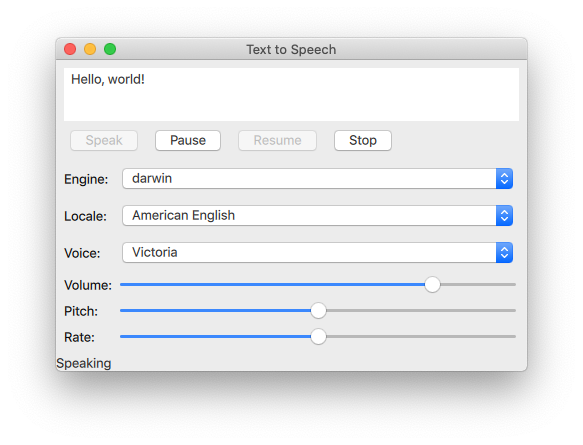
El ejemplo Quick Speech muestra cómo se puede utilizar el tipo TextToSpeech en una aplicación Qt Quick aplicación para leer texto y controlar el habla.
El ejemplo utiliza Qt Quick Controls para controlar el tono, el volumen y la velocidad del habla. También permite al usuario seleccionar un motor, un idioma y una voz.
Inicialización de TextToSpeech
En primer lugar, inicializamos el objeto de texto a voz tts:
    TextToSpeech {
        id: tts
        volume: volumeSlider.value
        pitch: pitchSlider.value
        rate: rateSlider.value
Obtener el estado
Los casos de cambio se utilizan para actualizar la etiqueta statusLabel en el pie de página.
        onStateChanged: updateStateLabel(state)

        function updateStateLabel(state)
        {
            switch (state) {
                case TextToSpeech.Ready:
                    statusLabel.text = qsTr("Ready")
                    break
                case TextToSpeech.Speaking:
                    statusLabel.text = qsTr("Speaking")
                    break
                case TextToSpeech.Paused:
                    statusLabel.text = qsTr("Paused...")
                    break
                case TextToSpeech.Error:
                    statusLabel.text = qsTr("Error!")
                    break
            }
        }
Resaltar las palabras a medida que se pronuncian
El TextArea input se utiliza para obtener el texto a introducir y la señal onSayingWord como disparador y también para conocer la posición para resaltar las palabras a medida que se pronuncian.
        onSayingWord: (word, id, start, length)=> {
            input.select(start, start + length)
        }
El TextArea input se declara aquí:
    ColumnLayout {
        anchors.fill: parent
        anchors.margins: 8
        id: inputForm

        TextArea {
            id: input
            wrapMode: TextEdit.WordWrap
            text: qsTr("Hello, world!")
            Layout.fillWidth: true
            Layout.minimumHeight: implicitHeight
            font.pointSize: 24
        }
Control del habla
Button se disponen con un RowLayout y se configuran para controlar el TextToSpeech tts .
El botón hablar
Se crea un Button con la etiqueta "Hablar". Se activa si la propiedad de estado de tts es Paused o Ready. Cuando se hace clic en el botón, se recuperan las voces disponibles en los dispositivos de destino y tts.voice se establece en la voz seleccionada actualmente de voicesComboBox. A continuación, se llama a TextToSpeech::say() y se le pasa el texto de inputbox.
        RowLayout {
            Button {
                text: qsTr("Speak")
                enabled: [TextToSpeech.Paused, TextToSpeech.Ready].includes(tts.state)
                onClicked: {
                    let voices = tts.availableVoices()
                    tts.voice = voices[voicesComboBox.currentIndex]
                    tts.say(input.text)
                }
            }
Botones de pausa, reanudación y parada
La implementación de estos botones es similar a la del botón Speak:
            Button {
                text: qsTr("Pause")
                enabled: tts.state == TextToSpeech.Speaking
                onClicked: tts.pause()
                visible: tts.engineCapabilities & TextToSpeech.Capabilities.PauseResume
            }
            Button {
                text: qsTr("Resume")
                enabled: tts.state == TextToSpeech.Paused
                onClicked: tts.resume()
                visible: tts.engineCapabilities & TextToSpeech.Capabilities.PauseResume
            }
            Button {
                text: qsTr("Stop")
                enabled: [TextToSpeech.Speaking, TextToSpeech.Paused].includes(tts.state)
                onClicked: tts.stop()
            }
Selección de opciones de conversión de texto a voz
En GridLayout se organizan los controles y las etiquetas para seleccionar las opciones de motor, configuración regional, voz, volumen, tono y velocidad de la síntesis de texto a voz.
Selección del motor, la configuración regional y la voz
Para seleccionar estos parámetros se utiliza un grupo de componentes ComboBox.
Para la selección del motor se utiliza ComboBox, tts.availableEngines() como modelo.
onActivated activa la asignación a tts.engine del texto actual en el índice actual de ComboBoxes.
            Label {
                text: qsTr("Engine:")
            }
            ComboBox {
                id: enginesComboBox
                Layout.fillWidth: true
                model: tts.availableEngines()
                onActivated: {
                    tts.engine = textAt(currentIndex)
                    updateLocales()
                    updateVoices()
                }
            }
Las dos últimas líneas del fragmento de código anterior muestran que las configuraciones regionales y las voces disponibles también se actualizan en este punto, ya que dependen del motor seleccionado. Estas funciones se tratan en la siguiente sección.
localesComboBox se implementa de la misma manera que engineComboBox, pero sin actualizar los motores disponibles.
            Label {
                text: qsTr("Locale:")
            }
            ComboBox {
                id: localesComboBox
                Layout.fillWidth: true
                onActivated: {
                    let locales = tts.availableLocales()
                    tts.locale = locales[currentIndex]
                    updateVoices()
                }
            }
            Label {
                text: qsTr("Voice:")
            }
            ComboBox {
                id: voicesComboBox
                Layout.fillWidth: true
            }
Selección de volumen, tono y velocidad
Estos controles se implementan con Sliders de la siguiente manera:
            Label {
                text: qsTr("Volume:")
            }
            Slider {
                id: volumeSlider
                from: 0
                to: 1.0
                stepSize: 0.2
                value: 0.8
                Layout.fillWidth: true
            }
            Label {
                text: qsTr("Pitch:")
            }
            Slider {
                id: pitchSlider
                from: -1.0
                to: 1.0
                stepSize: 0.5
                value: 0
                Layout.fillWidth: true
            }
            Label {
                text: qsTr("Rate:")
            }
            Slider {
                id: rateSlider
                from: -1.0
                to: 1.0
                stepSize: 0.5
                value: 0
                Layout.fillWidth: true
            }
        }
    }
Actualización de las opciones disponibles
Utilizando la señal Component.onCompleted, una vez instanciada la raíz ApplicationWindow se hace lo siguiente.
- El índice
enginesComboBoxse establece en el motor actual detts. - Se actualizan las locales y voces disponibles.
- Se señala el estado actual de
tts.
    Component.onCompleted: {
        enginesComboBox.currentIndex = tts.availableEngines().indexOf(tts.engine)
        // some engines initialize asynchronously
        if (tts.state == TextToSpeech.Ready) {
            engineReady()
Utilizadas en toda la aplicación, las funciones updateLocales() y updateVoice() se implementan de la siguiente manera:
        } else {
            tts.stateChanged.connect(root.engineReady)
        }

        tts.updateStateLabel(tts.state)
    }

    function engineReady() {
        tts.stateChanged.disconnect(root.engineReady)
        if (tts.state != TextToSpeech.Ready) {
            tts.updateStateLabel(tts.state)
            return;
        }
        updateLocales()
        updateVoices()
    }

    function updateLocales() {
        let allLocales = tts.availableLocales().map((locale) => locale.nativeLanguageName)
        let currentLocaleIndex = allLocales.indexOf(tts.locale.nativeLanguageName)
        localesComboBox.model = allLocales
        localesComboBox.currentIndex = currentLocaleIndex
    }

    function updateVoices() {
        voicesComboBox.model = tts.availableVoices().map((voice) => voice.name)
        let indexOfVoice = tts.availableVoices().indexOf(tts.voice)
        voicesComboBox.currentIndex = indexOfVoice
Ejecución del ejemplo
Para ejecutar el ejemplo desde Qt Creatorabra el modo Welcome y seleccione el ejemplo de Examples. Para más información, consulte Qt Creator: Tutorial: Construir y ejecutar.
© 2026 The Qt Company Ltd. Documentation contributions included herein are the copyrights of their respective owners. The documentation provided herein is licensed under the terms of the GNU Free Documentation License version 1.3 as published by the Free Software Foundation. Qt and respective logos are trademarks of The Qt Company Ltd. in Finland and/or other countries worldwide. All other trademarks are property of their respective owners.
