
Enregistreur vidéo QML
Enregistrement audio et vidéo à l'aide d'Qt Quick.
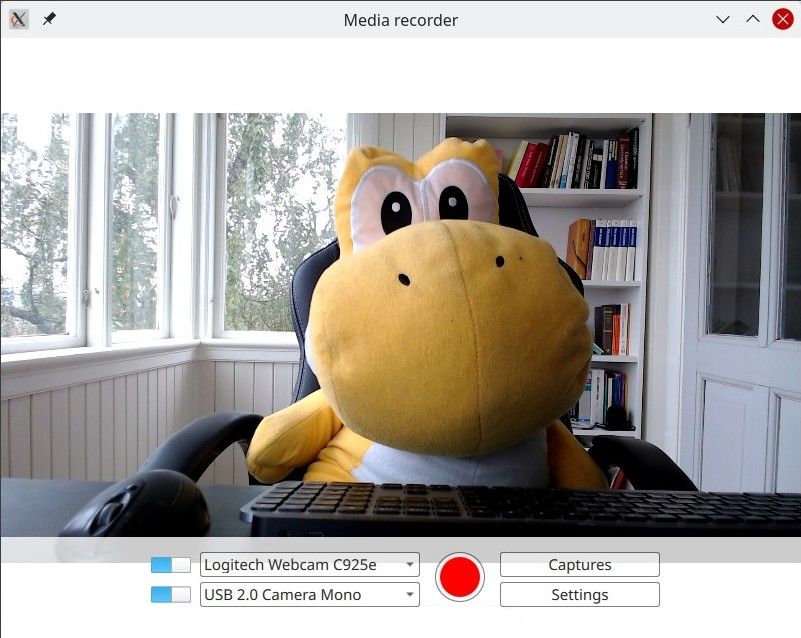
QML Recorder présente une application simple permettant d'enregistrer séparément ou simultanément le son et la vidéo, à l'aide d'un microphone, d'une caméra ou par capture d'écran.
Exécution de l'exemple
Vous pouvez exécuter l'exemple à partir de :
- Qt Creator
Ouvrez le mode « Welcome » et sélectionnez l’exemple dans « Examples ». Pour plus d’informations, consultez Qt Creator: Tutoriel : Compiler et exécuter.
- Qt Extension for Visual Studio Code
Exécutez la commande « Qt: Open Qt examples » à partir de Command Palette, puis sélectionnez l’exemple dans la liste. Pour plus d’informations, consultez Qt Extension for Visual Studio Code: Tutoriel : Compiler et exécuter.
Présentation
Il s’agit essentiellement d’une application QML ; voir « Premiers pas avec les applications Qt Quick ». Cette documentation se concentre sur la manière dont cet exemple utilise le Qt Multimedia QML Types.
L’exemple utilise les types QML Camera et AudioInput, connectés à un CaptureSession. Un objet MediaRecorder est ensuite utilisé pour enregistrer l’audio et la vidéo capturés.
Outre QtMultimedia, les fonctionnalités de Qt Quick (fenêtres, contrôles et mises en page) sont utilisées pour implémenter l’interface utilisateur graphique et les fonctionnalités. La lecture ne sera pas abordée ici ; pour cela, consultez l’exemple QML Media Player.
Cet exemple illustre les points suivants :
- La possibilité de sélectionner des périphériques d’entrée.
- Un type d’entrée peut être désactivé.
- Les paramètres de capture, tels que la qualité, le choix du codec, le format de fichier et l’attribution de métadonnées.
- Les fichiers capturés sont stockés et peuvent être lus.
Enregistrement
L'application prend en charge l'enregistrement.
captureSession
Dans ` Main.qml`, la classe ` captureSession ` est déclarée comme suit :
    CaptureSession {
        id: captureSession
        recorder: recorder
        audioInput: controls.audioInput
        camera: controls.camera
        screenCapture: controls.screenCapture
        windowCapture: controls.windowCapture
        videoOutput: videoOutput
    }
recorder
Dans ` Main.qml`, l'recorder ` MediaRecorder ` gère l'enregistrement multimédia ainsi que la capture d'une vignette pour le fichier et son ajout à un `ListModel`, ` mediaList`.
    MediaRecorder {
        id: recorder
        onRecorderStateChanged:
            (state) => {
                if (state === MediaRecorder.StoppedState) {
                    root.contentOrientation = Qt.PrimaryOrientation
                    mediaList.append()
                } else if (state === MediaRecorder.RecordingState && captureSession.camera) {
                    // lock orientation while recording and create a preview image
                    root.contentOrientation = Screen.orientation;
                    videoOutput.grabToImage(function(res) { mediaList.mediaThumbnail = res.url })
                }
            }
        onActualLocationChanged: (url) => { mediaList.mediaUrl = url }
        onErrorOccurred: { recorderErrorText.text = recorder.errorString; recorderError.open(); }
    }
mediaList est déclaré dans le fichier Frame mediaListFrame
    Frame {
        id: mediaListFrame
        height: 150
        width: parent.width
        anchors.bottom: controlsFrame.top
        x: controls.capturesVisible ? 0 : parent.width
        background: Rectangle {
            anchors.fill: parent
            color: palette.base
            opacity: 0.8
        }

        Behavior on x { NumberAnimation { duration: 200 } }

        MediaList {
            id: mediaList
            anchors.fill: parent
            playback: playback
contrôles
Ceux-ci sont définis dans Controls.qml et déclarés dans Main.qml.
Sa racine est un Row qui contient les éléments Columns inputControls , recordButton, optionButtons, chacun étant défini dans son propre fichier .qml.
Sélection d’une source vidéo
Défini dans VideoSourceSelect.qml, VideoSourceSlect se compose d’un Switch et d’un ComboBox et permet à l’utilisateur de choisir parmi les caméras disponibles.
Row {
    id: root
    height: Style.height
    property Camera selectedCamera: cameraAvailable ? camera : null
    property ScreenCapture selectedScreenCapture: screenAvailable ? screenCapture : null
    property WindowCapture selectedWindowCapture: windowAvailable ? windowCapture : null

    property bool sourceAvailable: typeof comboBox.currentValue !== 'undefined' &&
                                   comboBox.currentValue.type !== 'toggler' &&
                                   videoSourceSwitch.checked

    property bool cameraAvailable: sourceAvailable && comboBox.currentValue.type === 'camera'
    property bool screenAvailable: sourceAvailable && comboBox.currentValue.type === 'screen'
    property bool windowAvailable: sourceAvailable && comboBox.currentValue.type === 'window'

    Component.onCompleted: {
        videoSourceModel.populate()

        for (var i = 0; i < videoSourceModel.count; i++) {
            if (videoSourceModel.get(i).value.type !== 'toggler') {
                comboBox.currentIndex = i
                break
            }
        }
    }

    Camera {
        id: camera
        active:
            root.cameraAvailable
            && PermissionHelper.cameraStatus === Qt.PermissionStatus.Granted
    }

    ScreenCapture {
        id: screenCapture
        active: root.screenAvailable
    }

    WindowCapture {
        id: windowCapture
        active: root.windowAvailable
    }

    MediaDevices { id: mediaDevices
        onVideoInputsChanged: {

            videoSourceModel.populate()

            for (var i = 0; i < videoSourceModel.count; i++) {
                if (videoSourceModel.get(i).value.type !== 'toggler') {
                    comboBox.currentIndex = i
                    break
                }
            }
        }
    }

    Switch {
        id: videoSourceSwitch
        anchors.verticalCenter: parent.verticalCenter
        checked: true
    }

    ListModel {
        id: videoSourceModel
        property var enabledSources: {
            'camera': true,
            'screen': true,
            'window': false
        }

        function toggleEnabledSource(type) {
            enabledSources[type] = !enabledSources[type]
            populate()
        }

        function appendItem(text, value) {
            append({ text: text, value: value})
        }

        function appendToggler(name, sourceType) {
            appendItem((enabledSources[sourceType] ? "- Hide " : "+ Show ") + name,
                       { type: 'toggler', 'sourceType': sourceType })
        }

        function populate() {
            clear()

            appendToggler('Cameras', 'camera')
            if (enabledSources['camera'])
                for (var camera of mediaDevices.videoInputs)
                    appendItem(camera.description, { type: 'camera', camera: camera })

            appendToggler('Screens', 'screen')
            if (enabledSources['screen'])
                for (var screen of Application.screens)
                    appendItem(screen.name, { type: 'screen', screen: screen })

            appendToggler('Windows', 'window')
            if (enabledSources['window'])
                for (var window of windowCapture.capturableWindows())
                    appendItem(window.description, { type: 'window', window: window })
        }
}comboBox, déclaré dans l’extrait de code ci-dessus, attribue la source vidéo actuelle.
    ComboBox {
        id: comboBox
        width: Style.widthLong
        height: Style.height
        background: StyleRectangle { anchors.fill: parent }
        model: videoSourceModel
        displayText: typeof currentValue === 'undefined' ||
                     currentValue.type === 'toggler' ? "Unavailable" : currentText
        font.pointSize: Style.fontSize
        textRole: "text"
        valueRole: "value"
        onCurrentValueChanged: {
            if (typeof currentValue === 'undefined')
                return
            if (currentValue.type === 'screen')
                screenCapture.screen = currentValue.screen
            else if (currentValue.type === 'camera')
                camera.cameraDevice = currentValue.camera
Sélection d’une entrée audio
Implémentée de la même manière que la sélection d’une source vidéo et définie dans AudioInputSelect.qml comme suit :
Row {
    id: root
    height: Style.height
    property AudioInput selected: available ? audioInput : null
    property bool available: (typeof comboBox.currentValue !== 'undefined') && audioSwitch.checked

    Component.onCompleted: {
        audioInputModel.populate()
        comboBox.currentIndex = 0
    }

    MediaDevices { id: mediaDevices }

    AudioInput { id: audioInput; muted: !audioSwitch.checked }

    Switch {
        id: audioSwitch;
        height: Style.height;
        checked: true
    }

    ListModel {
        id: audioInputModel
        property var audioInputs: mediaDevices.audioInputs

        function populate() {
            audioInputModel.clear()

            for (var audioDevice of audioInputs)
                audioInputModel.append({ text: audioDevice.description, value:
                                        { type: 'audioDevice', audioDevice: audioDevice } })
        }
    }
    ComboBox {
        id: comboBox
        width: Style.widthLong
        height: Style.height
        background: StyleRectangle { anchors.fill: parent }
        model: audioInputModel
        textRole: "text"
        font.pointSize: Style.fontSize
        displayText: typeof currentValue === 'undefined' ? "unavailable" : currentText
valueRole: "value"© 2026 The Qt Company Ltd. Documentation contributions included herein are the copyrights of their respective owners. The documentation provided herein is licensed under the terms of the GNU Free Documentation License version 1.3 as published by the Free Software Foundation. Qt and respective logos are trademarks of The Qt Company Ltd. in Finland and/or other countries worldwide. All other trademarks are property of their respective owners.
