
Qt Quick 3D Physics - Exemple de canon
Montre comment créer des objets physiques.
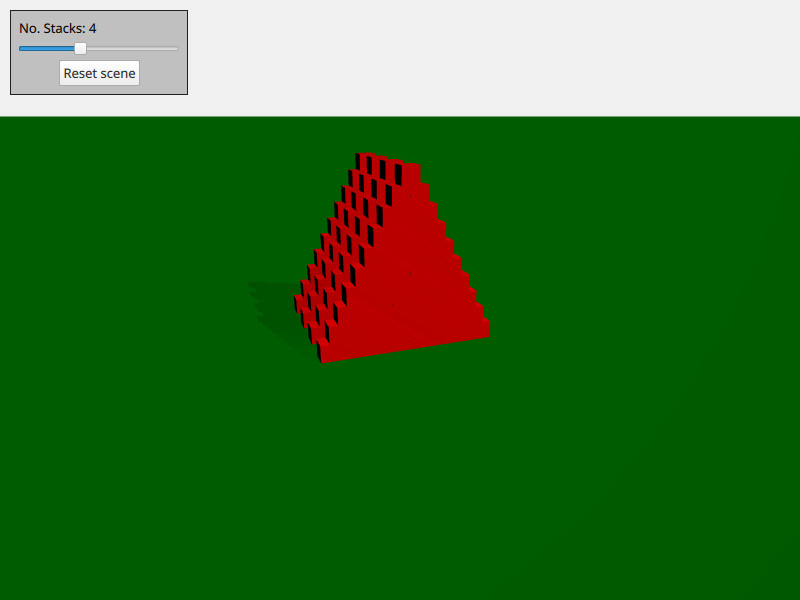
Cet exemple montre comment créer et supprimer des objets physiques à la demande. La scène se compose de plusieurs piles de boîtes. Vous pouvez vous déplacer à l'aide de la touche « WASD » et de la souris, et tirer une balle en appuyant sur la touche « space ».
La scène est configurée avec les objets 3D habituels d'Qt Quick, tels que la vue, la caméra et la lumière :
PerspectiveCamera {
    id: camera
    position: Qt.vector3d(-4000, 5000, 10000)
    eulerRotation: Qt.vector3d(-20, -20, 0)
    clipFar: 200000
    clipNear: 100
}
DirectionalLight {
    eulerRotation: Qt.vector3d(-45, 45, 0)
    castsShadow: true
    brightness: 1
    shadowMapQuality: Light.ShadowMapQualityVeryHigh
    shadowMapFar: camera.clipFar
    shadowFactor: 50
    csmNumSplits: 2
    csmSplit1: 0.1
    csmSplit2: 0.3
    softShadowQuality: Light.PCF4
}
Nous ajoutons également un sol statique :
StaticRigidBody {
    eulerRotation: Qt.vector3d(-90, 0, 0)
    collisionShapes: PlaneShape {}
    Model {
        source: "#Rectangle"
        scale: Qt.vector3d(2000, 2000, 1)
        materials: PrincipledMaterial {
            baseColor: "green"
        }
        castsShadows: false
        receivesShadows: true
    }
}
Nous créons un nœud que nous utilisons comme générateur d'objets et dans lequel nous plaçons notre vue :
Node {
    id: shapeSpawner
    property var instancesBoxes: []
    property var instancesSpheres: []
    property int stackCount: 0
    property var boxComponent: Qt.createComponent("Box.qml")
    property var sphereComponent: Qt.createComponent("Sphere.qml")

    function createStack(stackZ, numStacks) {
        let size = 10
        let extents = 400

        for (let i = 0; i < size; i++) {
            for (let j = 0; j < size - i; j++) {
                let x = j * 2 - size + i
                let y = i * 2 + 1
                let z = 5 * (stackZ - numStacks)
                let center = Qt.vector3d(x, y, z).times(0.5 * extents)
                let box = boxComponent.incubateObject(shapeSpawner, {
                                                          "position": center,
                                                          "xyzExtents": extents
                                                      })
                instancesBoxes.push(box)
            }
        }
    }

    function createBall(position, forward) {
        const diameter = 600
        const speed = 20000
        let settings = {
            "position": position,
            "sphereDiameter": diameter
        }
        let sphere = sphereComponent.createObject(shapeSpawner, settings)
        sphere.setLinearVelocity(forward.times(speed))
        instancesSpheres.push(sphere)

        if (sphere === null) {
            console.log("Error creating object")
        }
    }

    function reset() {
        // Only run method if previous stack has been created fully
        for (let i = 0; i < instancesBoxes.length; i++)
            if (!instancesBoxes[i].object)
                return

        instancesSpheres.forEach(sphere => {
                                     sphere.collisionShapes = []
                                     sphere.destroy()
                                 })
        instancesBoxes.forEach(box => {
                                   box.object.collisionShapes = []
                                   box.object.destroy()
                               })
        instancesSpheres = []
        instancesBoxes = []

        for (let stackI = 0; stackI < stackSlider.value; stackI++) {
            shapeSpawner.createStack(stackI, stackSlider.value)
        }
    }
}
Nous disposons de trois méthodes : ` createStack ` pour créer une pile, ` createBall ` pour créer une balle avec une vitesse et ` reset ` pour réinitialiser la scène. La boîte et la sphère générées sont stockées dans leurs propres fichiers QML (box.qml et sphere.qml).
Fichiers :
© 2026 The Qt Company Ltd. Documentation contributions included herein are the copyrights of their respective owners. The documentation provided herein is licensed under the terms of the GNU Free Documentation License version 1.3 as published by the Free Software Foundation. Qt and respective logos are trademarks of The Qt Company Ltd. in Finland and/or other countries worldwide. All other trademarks are property of their respective owners.
