Qt Quick 3D Physics - Exemple de formes personnalisées
Démonstration de l'utilisation de différentes formes.
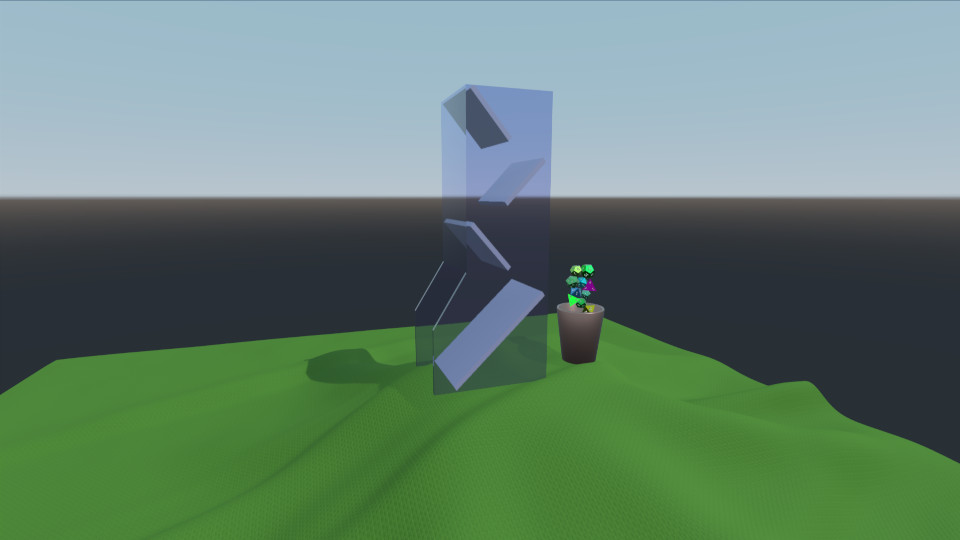
Cet exemple montre comment charger et générer plusieurs maillages de corps rigides, ainsi que les animer. La scène se compose d’une tour à dés, d’une nappe, d’une tasse et d’une poignée de dés. La tasse est animée de manière à récupérer les dés générés et à les placer dans la tour à dés. Les dés roulent ensuite vers le bas et tombent sur la nappe.
Environnement
Comme d’habitude, nous disposons d’un fichier « PhysicsWorld » et d’un fichier « View3D ». Dans le fichier « View3D », notre environnement configure une sonde de lumière (lightprobe) :
environment: SceneEnvironment {
    clearColor: "white"
    backgroundMode: SceneEnvironment.SkyBox
    antialiasingMode: SceneEnvironment.MSAA
    antialiasingQuality: SceneEnvironment.High
    lightProbe: proceduralSky
}
Textures
Nous définissons quatre textures qui seront utilisées pour la skybox, la nappe et les chiffres sur les dés :
Texture {
    id: proceduralSky
    textureData: ProceduralSkyTextureData {
        sunLongitude: -115
    }
}

Texture {
    id: weaveNormal
    source: "maps/weave.png"
    scaleU: 200
    scaleV: 200
    generateMipmaps: true
    mipFilter: Texture.Linear
}
Texture {
    id: numberNormal
    source: "maps/numbers-normal.png"
}

Texture {
    id: numberFill
    source: "maps/numbers.png"
    generateMipmaps: true
    mipFilter: Texture.Linear
}
Scène
Nous disposons d’un nœud contenant notre scène avec la caméra et une lumière directionnelle :
id: scene
scale: Qt.vector3d(2, 2, 2)
PerspectiveCamera {
    id: camera
    position: Qt.vector3d(-45, 25, 60)
    eulerRotation: Qt.vector3d(-6, -33, 0)
    clipFar: 1000
    clipNear: 0.1
}

DirectionalLight {
    eulerRotation: Qt.vector3d(-45, 25, 0)
    castsShadow: true
    brightness: 1
    shadowMapQuality: Light.ShadowMapQualityHigh
    pcfFactor: 0.1
    shadowBias: 1
}
Nappe
Nous ajoutons la nappe, qui est une « StaticRigidBody » composée d’un modèle avec une texture de tissage et d’un « HeightFieldShape » pour la collision.
StaticRigidBody {
    position: Qt.vector3d(-15, -8, 0)
    id: tablecloth

    Model {
        geometry: HeightFieldGeometry {
            id: tableclothGeometry
            extents: Qt.vector3d(150, 20, 150)
            source: "maps/cloth-heightmap.png"
            smoothShading: false
        }
        materials: PrincipledMaterial {
            baseColor: "#447722"
            roughness: 0.8
            normalMap: weaveNormal
            normalStrength: 0.7
        }
    }

    collisionShapes: HeightFieldShape {
        id: hfShape
        extents: tableclothGeometry.extents
        source: "maps/cloth-heightmap.png"
    }
}
Tasse
Nous définissons la tasse comme une « DynamicRigidBody » avec un modèle et une « TriangleMeshShape » comme forme de collision. Elle dispose d’un comportement sur les propriétés « eulerRotation » et « position », car celles-ci font partie d’une animation.
DynamicRigidBody {
    id: diceCup
    isKinematic: true
    mass: 0
    property vector3d bottomPos: Qt.vector3d(11, 6, 0)
    property vector3d topPos: Qt.vector3d(11, 45, 0)
    property vector3d unloadPos: Qt.vector3d(0, 45, 0)
    position: bottomPos
    kinematicPivot: Qt.vector3d(0, 6, 0)
    kinematicPosition: bottomPos
    collisionShapes: TriangleMeshShape {
        id: cupShape
        source: "meshes/simpleCup.mesh"
    }
    Model {
        source: "meshes/cup.mesh"
        materials: PrincipledMaterial {
            baseColor: "#cc9988"
            roughness: 0.3
            metalness: 1
        }
    }
}
Tour
La tour est simplement une « StaticRigidBody » dotée d’un « Model » et d’un « TriangleMeshShape » pour la collision.
StaticRigidBody {
    id: diceTower
    x: -4
    Model {
        id: testModel
        source: "meshes/tower.mesh"
        materials: [
            PrincipledMaterial {
                baseColor: "#ccccce"
                roughness: 0.3
            },
            PrincipledMaterial {
                id: glassMaterial
                baseColor: "#aaaacc"
                transmissionFactor: 0.95
                thicknessFactor: 1
                roughness: 0.05
            }
        ]
    }
    collisionShapes: TriangleMeshShape {
        id: triShape
        source: "meshes/tower.mesh"
    }
}
Dés
Pour générer les dés, nous utilisons un composant (Component) avec un objet QML « Die » personnalisé et un « Repeater3D ».
Component {
    id: diceComponent
    Die {}
}

Repeater3D {
    id: dicePool
    model: 25
    delegate: diceComponent
    delegateModelAccess: DelegateModel.ReadWrite
    function restore() {
        for (let i = 0; i < count; i++) {
            (objectAt(i) as Die).restore()
        }
    }
}
L’objet « Die » contient un « DynamicRigidBody » doté d’un « ConvexMeshShape » et d’un « Model ». La position, la couleur, l’échelle et la source du maillage sont générées aléatoirement pour chaque dé.
DynamicRigidBody {
    id: thisBody
    required property int index

    Texture {
        id: numberNormal
        source: "maps/numbers-normal.png"
    }

    Texture {
        id: numberFill
        source: "maps/numbers.png"
        generateMipmaps: true
        mipFilter: Texture.Linear
    }

    function randomInRange(min, max) {
        return Math.random() * (max - min) + min
    }

    function restore() {
        reset(initialPosition, eulerRotation)
    }

    scale: Qt.vector3d(scaleFactor, scaleFactor, scaleFactor)
    eulerRotation: Qt.vector3d(randomInRange(0, 360),
                               randomInRange(0, 360),
                               randomInRange(0, 360))

    property vector3d initialPosition: Qt.vector3d(11 + 1.5 * Math.cos(index/(Math.PI/4)),
                                                   6 + index * 1.5,
                                                   0)
    position: initialPosition

    property real scaleFactor: randomInRange(0.8, 1.4)
    property color baseCol: Qt.hsla(randomInRange(0, 1),
                                    randomInRange(0.6, 1.0),
                                    randomInRange(0.4, 0.7),
                                    1.0)

    collisionShapes: ConvexMeshShape {
        id: diceShape
        source: Math.random() < 0.25 ? "meshes/icosahedron.mesh"
              : Math.random() < 0.5 ? "meshes/dodecahedron.mesh"
              : Math.random() < 0.75 ? "meshes/octahedron.mesh"
                                     : "meshes/tetrahedron.mesh"
    }

    Model {
        id: thisModel
        source: diceShape.source
        receivesShadows: false
        materials: PrincipledMaterial {
            metalness: 1.0
            roughness: thisBody.randomInRange(0.2, 0.6)
            baseColor: thisBody.baseCol
            emissiveMap: numberFill
            emissiveFactor: Qt.vector3d(1, 1, 1)
            normalMap: numberNormal
            normalStrength: 0.75
        }
    }
}
Animation
Pour faire passer les dés du gobelet à la tour à dés, nous animons le gobelet en le faisant monter puis en le renversant. Afin de garantir que l’animation reste synchronisée avec la simulation physique, nous utilisons un « AnimationController » que nous connectons au signal « onFrameDone » de l’ PhysicsWorld. Après chaque image simulée, nous faisons avancer l’animation en fonction du pas de temps écoulé.
Connections {
    target: physicsWorld
    property real totalAnimationTime: 7500
    function onFrameDone(timeStep) {
        let progressStep = timeStep / totalAnimationTime
        animationController.progress += progressStep
        if (animationController.progress >= 1) {
            animationController.completeToEnd()
            animationController.reload()
            animationController.progress = 0
        }
    }
}

AnimationController {
    id: animationController
    animation: SequentialAnimation {
        PauseAnimation { duration: 2500 }
        PropertyAnimation {
            target: diceCup
            property: "kinematicPosition"
            to: diceCup.topPos
            duration: 2500
        }
        ParallelAnimation {
            PropertyAnimation {
                target: diceCup
                property: "kinematicEulerRotation.z"
                to: 130
                duration: 1500
            }
            PropertyAnimation {
                target: diceCup
                property: "kinematicPosition"
                to: diceCup.unloadPos
                duration: 1500
            }
        }
        PauseAnimation { duration: 1000 }
        ParallelAnimation {
            PropertyAnimation {
                target: diceCup
                property: "kinematicEulerRotation.z"
                to: 0
                duration: 1500
            }
            PropertyAnimation {
                target: diceCup
                property: "kinematicPosition"
                to: diceCup.topPos
                duration: 1500
            }
        }
        PropertyAnimation { target: diceCup; property: "kinematicPosition"; to: diceCup.bottomPos; duration: 1500 }
        PauseAnimation { duration: 2000 }
        ScriptAction { script: dicePool.restore() }
    }
}
Contrôleur
Enfin, un WasdController est ajouté pour pouvoir contrôler la caméra à l’aide d’un clavier :
WasdController {
    keysEnabled: true
    controlledObject: camera
    speed: 0.2
}
Fichiers :
- customshapes/CMakeLists.txt
- customshapes/Die.qml
- customshapes/customshapes.pro
- customshapes/main.cpp
- customshapes/main.qml
- customshapes/qml.qrc
- customshapes/resources.qrc
Images :
© 2026 The Qt Company Ltd. Documentation contributions included herein are the copyrights of their respective owners. The documentation provided herein is licensed under the terms of the GNU Free Documentation License version 1.3 as published by the Free Software Foundation. Qt and respective logos are trademarks of The Qt Company Ltd. in Finland and/or other countries worldwide. All other trademarks are property of their respective owners.