
ウィジェットベースのアプリケーションにおけるQt Widgets
ウィジェットベースのアプリケーションにおける「Graphs for 2D」の使用方法。
Graphs 2Dは、Qt Quick アプリケーションのみをサポートしています。この例では、QQuickWidget を使用して、Qt Widgets アプリケーションに簡単な2D円グラフを表示する方法を示します。
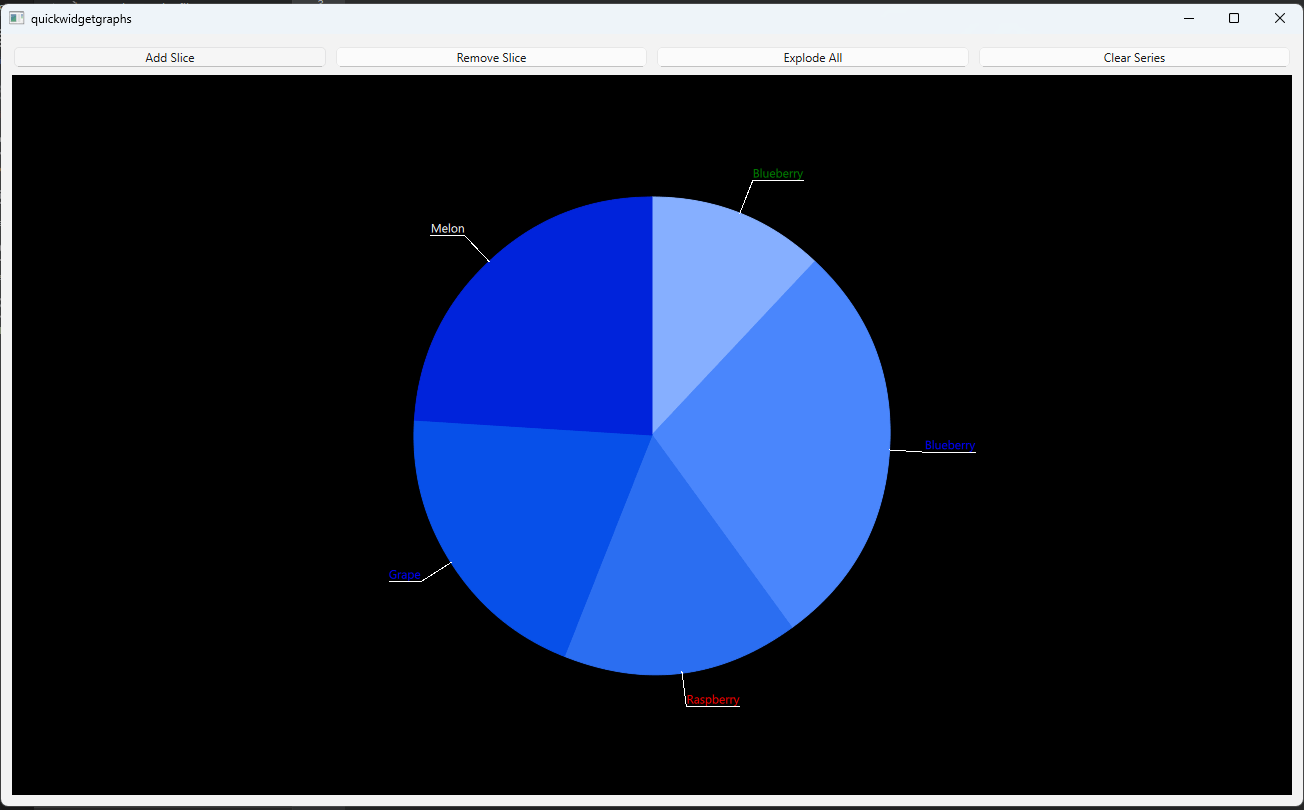
例の動作
このサンプルは、以下の手順で実行できます。
- Qt Creator
Welcome モードを開き、Examples からこの例を選択します。詳細については、『Qt Creator :チュートリアル:ビルドと実行』を参照してください。
- Qt Extension for Visual Studio Code
「Command Palette 」から「Qt: Open Qt examples 」コマンドを実行し、リストからサンプルを選択します。詳細については、「Qt Extension for Visual Studio Code: チュートリアル: ビルドと実行」を参照してください。
メインビュー
PieWidgetクラスは、デモアプリケーションのメインビューを実装しています。PieWidgetクラス内で、アプリケーションのレイアウトやUI要素を実装するために使用するウィジェットをインスタンス化してください。m_quickWidget = new QQuickWidget; m_widget = new QWidget; m_vLayout = new QVBoxLayout(m_widget); m_hLayout = new QHBoxLayout; ...PieGraphクラスは、スライスの追加や削除に関するロジックを処理するために使用され、その他の機能も備えています。m_pieGraph = new PieGraph; ...- ボタンを初期化し、レイアウトに追加します。
void PieWidget::initializeButtons()
{
    QPushButton *addButton = new QPushButton("Add Slice");
    QPushButton *removeButton = new QPushButton("Remove Slice");
    QPushButton *explodeButton = new QPushButton("Explode All");
    QPushButton *clearButton = new QPushButton("Clear Series");

    m_hLayout->addWidget(addButton);
    m_hLayout->addWidget(removeButton);
    m_hLayout->addWidget(explodeButton);
    m_hLayout->addWidget(clearButton);

    QObject::connect(addButton, &QPushButton::clicked, m_pieGraph, &PieGraph::onAddSlice);
    QObject::connect(removeButton, &QPushButton::clicked, m_pieGraph, &PieGraph::onRemoveSlice);
    QObject::connect(explodeButton, &QPushButton::clicked, m_pieGraph, &PieGraph::onExplode);
    QObject::connect(clearButton, &QPushButton::clicked, m_pieGraph, &PieGraph::onClearSeries);
}
グラフデータの操作
PieGraph クラスは、この例におけるグラフデータの操作に関するすべてのロジックを実装しています。
PieGraphクラス内で、pieSeriesプロパティを宣言します。... Q_PROPERTY(QPieSeries *pieSeries READ pieSeries WRITE setPieSeries NOTIFY pieSeriesChanged FINAL) ...- スライスの追加、削除、展開、およびパイ系列のクリアを行う関数を作成します。
... public: ... void appendSlice(); void removeSlice(); void explodeSlices(); void clearSeries(); void fillSliceInfo(); public Q_SLOTS: void onAddSlice(); void onRemoveSlice(); void onExplode(); void onClearSeries(); ... - コンストラクタ内でパイ・シリーズをインスタンス化し、いくつかのスライスを追加します。
... m_pieSeries = new QPieSeries; fillSliceInfo(); for (int i = 1; i < 5; ++i) { QPieSlice *slice = new QPieSlice; slice->setValue(m_sliceInfo.value.at(QRandomGenerator::global()->bounded(0, 6))); slice->setLabel(m_sliceInfo.label.at(QRandomGenerator::global()->bounded(0, 6))); slice->setLabelColor(m_sliceInfo.color.at(QRandomGenerator::global()->bounded(0, 6))); m_pieSeries->append(slice); } m_pieSeries->setLabelsVisible(true); ... appendSlice関数は、QPieSlice を作成し、そのプロパティの一部を設定した上で、それをパイシリーズに追加します。ラベルの可視性を
trueに設定していても、後でパイシリーズに追加されたスライスにはこの設定が反映されない点に注意してください。追加する各スライスについて、作成時に可視性をtrueに設定する必要があります。QPieSlice *slice = new QPieSlice; slice->setValue(m_sliceInfo.value.at(QRandomGenerator::global()->bounded(0, 6))); slice->setLabel(m_sliceInfo.label.at(QRandomGenerator::global()->bounded(0, 6))); slice->setLabelColor(m_sliceInfo.color.at(QRandomGenerator::global()->bounded(0, 6))); slice->setLabelVisible(true); m_pieSeries->append(slice);removeSlice関数内で、QPieSeries::remove() を呼び出します。explodeSlices関数内で、すべてのスライスをループ処理し、現在の状態に応じてQPieSlice::setExploded()をtrueまたはfalseに設定してください。clearSeries関数内で、QPieSeries::clear()を呼び出します。これにより、円グラフシリーズからすべてのスライスが削除されます。なお、この関数は円グラフシリーズ自体を削除するものではない点に注意してください。
GraphsViewの初期化
GraphsView のテーマをカスタマイズするには、カスタムQGraphsTheme を作成します。
auto theme = new QGraphsTheme(m_quickWidget);
theme->setTheme(QGraphsTheme::Theme::BlueSeries);
theme->setLabelBorderVisible(true);
theme->setLabelBackgroundVisible(true);
theme->setBackgroundColor(Qt::black);QQuickWidget::loadFromModule() を使用して、GraphsView を読み込みます。QGraphsTheme およびQPieSeries をQQuickWidget::setInitialProperties() に渡すことで、そのtheme およびseriesList プロパティを初期化します。
m_quickWidget->setResizeMode(QQuickWidget::SizeRootObjectToView);
m_quickWidget->resize(1280, 720);
m_quickWidget->setInitialProperties({
    {"theme", QVariant::fromValue(theme) },
    {"seriesList", QVariant::fromValue(m_pieGraph->pieSeries()) }
});
m_quickWidget->loadFromModule("QtGraphs", "GraphsView");© 2026 The Qt Company Ltd. Documentation contributions included herein are the copyrights of their respective owners. The documentation provided herein is licensed under the terms of the GNU Free Documentation License version 1.3 as published by the Free Software Foundation. Qt and respective logos are trademarks of The Qt Company Ltd. in Finland and/or other countries worldwide. All other trademarks are property of their respective owners.
