
Qt Quick 例 - テキスト
こちらは、テキストに関連するQMLのサンプル集です。
「テキスト」は、テキストに関連する簡単なQMLの例を集めたものです。各例は小さなQMLファイルで構成されており、通常、特定のタイプや機能を扱ったり、強調したりしています。各例を実行して、その動作を確認することができます。
Hello
「Hello」は、Text タイプの文字間隔を変更し、アニメーションをかける方法を示しています。この例では、シーケンシャルアニメーションを使用して、まずfont.letterSpacingプロパティを0 から50 へと3秒かけてアニメーションさせ、その後、テキストを画面上のランダムな位置に移動させます:
            SequentialAnimation on font.letterSpacing {
                loops: Animation.Infinite
                NumberAnimation {
                    from: 0
                    to: 50
                    easing.type: Easing.InQuad
                    duration: 3000
                }
                ScriptAction {
                    script: {
                        container.y = (screen.height / 4) + (Math.random() * screen.height / 2)
                        container.x = (screen.width / 4) + (Math.random() * screen.width / 2)
                    }
                }
            }
フォント
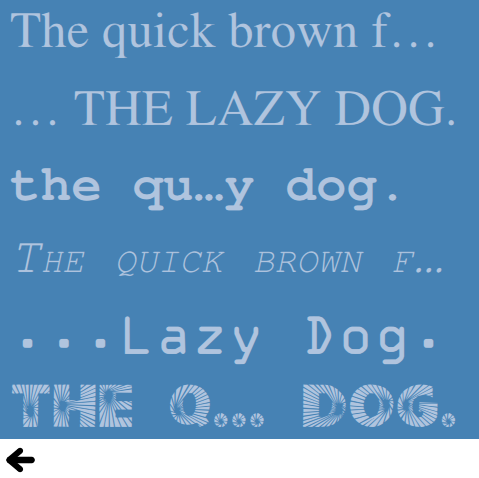
「Fonts」では、Text タイプでフォントを使用するさまざまな方法を示しています。単にフォント名を指定して、font.familyプロパティを直接使用する方法:
font.family: "Times"あるいは、FontLoader を使用してローカルのフォントファイルを指定する方法:
    FontLoader {
        id: localFont
        source: "content/fonts/tarzeau_ocr_a.ttf"
}あるいは、FontLoader を使用してリモートフォントファイルを指定する方法:
    FontLoader {
        id: webFont
        source: "https://www.princexml.com/fonts/steffmann/Starburst.ttf"
    }
利用可能なフォント
「利用可能なフォント」では、Qt グローバルオブジェクトとリストビューを使用して、システム上で利用可能なすべてのフォントを表示する方法を示します。ListView 型は、利用可能なフォントのリストをモデルとして使用します:
model: Qt.fontFamilies()デリゲート内では、modelData を使用してフォントファミリーが設定されます:
font.family: parent.modelDataバナー
「Banner」は、一連のテキストタイプとNumberAnimation を使用してバナーを作成する方法を示す簡単な例です。
Imgタグ
Imgタグは、<img> タグを使用してテキストオブジェクト内に画像を表示するさまざまな方法を示しています。
テキストレイアウト
「テキストレイアウト」では、テキスト項目のより複雑なレイアウトを作成する方法を示しています。この例では、各行の位置やサイズを変更できる `onLineLaidOut` ハンドラを使用して、テキストを2列にレイアウトしています:
        onLineLaidOut: (line) => {
            line.width = width / 2  - main.margin

            if (line.y + line.height >= height) {
                line.y -= height - main.margin
                line.x = width / 2 + main.margin
            }

            if (line.isLast) {
                lastLineMarker.x = line.x + line.implicitWidth
                lastLineMarker.y = line.y + (line.height - lastLineMarker.height) / 2
            }
}© 2026 The Qt Company Ltd. Documentation contributions included herein are the copyrights of their respective owners. The documentation provided herein is licensed under the terms of the GNU Free Documentation License version 1.3 as published by the Free Software Foundation. Qt and respective logos are trademarks of The Qt Company Ltd. in Finland and/or other countries worldwide. All other trademarks are property of their respective owners.
