
Qt Quick 3D - シンプルな RuntimeLoader の例
実行時に3Dアセットを読み込み、そのシーンオブジェクトを取得する方法を示します。
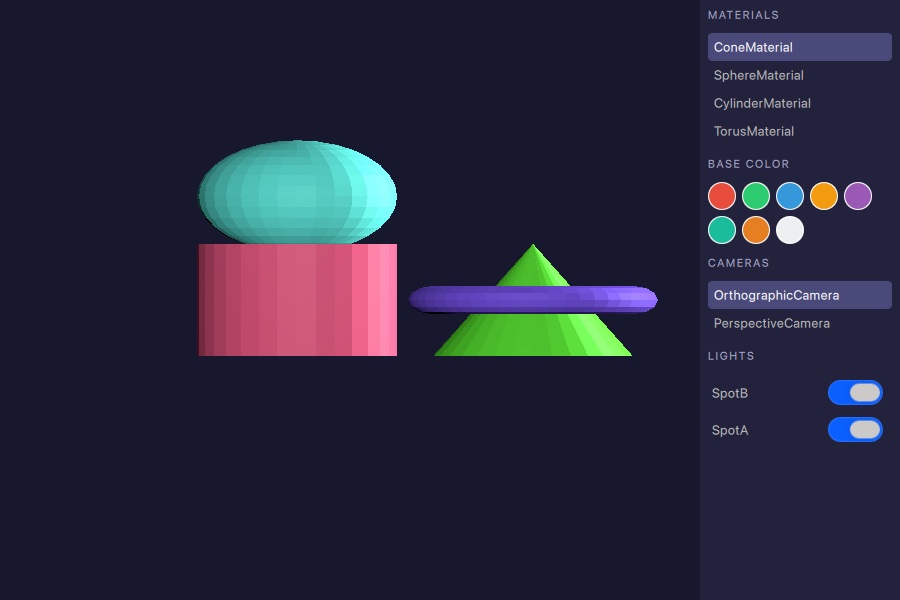
このサンプルでは、RuntimeLoader を使用してランタイムに 3D アセットを読み込む方法と、query の関数を使用して、読み込まれたシーンに含まれるマテリアル、カメラ、ライトを取得する方法を示しています。
アセットの読み込み
RuntimeLoader アイテムは、glTF 2.0アセットを読み込み、対応するQt Quick 3Dオブジェクトをその子として作成します。source プロパティは、アセットファイルを指しています:
RuntimeLoader {
    id: loader
    source: "torus_and_cone.glb"

    onStatusChanged: {
        if (status !== RuntimeLoader.Success)
            return
        root.sceneMaterials = loader.queryAll(RuntimeLoader.Materials)
        root.sceneCameras = loader.queryAll(RuntimeLoader.Cameras)
        root.sceneLights = loader.queryAll(RuntimeLoader.Lights)
        if (root.sceneCameras.length > 0)
            view3d.camera = root.sceneCameras[0]
        if (root.sceneMaterials.length > 0)
            root.selectedMaterial = root.sceneMaterials[0]
    }
}「status 」が「RuntimeLoader.Success 」に変わると、シーンの準備が完了し、クエリ関数を呼び出すことができます。
シーンオブジェクトのクエリ
読み込みが成功すると、queryAll() は、指定されたQueryFilter に一致するすべてのシーンオブジェクトのリストを返します。この例では、マテリアル、カメラ、ライトを一度に取得しています:
root.sceneMaterials = loader.queryAll(RuntimeLoader.Materials)
root.sceneCameras = loader.queryAll(RuntimeLoader.Cameras)
root.sceneLights = loader.queryAll(RuntimeLoader.Lights)返されるリストは、QQuick3DObject 参照を含む純粋な JavaScript 配列です。これらはListView model に直接代入したり、View3D.camera などのアクティブなシーンプロパティを設定するために使用したりできます。
シーンオブジェクトとのやり取り
マテリアル
マテリアルリストの各エントリを選択し、カラースウォッチのいずれかを適用できます。ヘルパー関数は、colorプロパティに書き込む前に、返されたオブジェクトを正しいマテリアル型にキャストします:
function applyColorToSelected(color) {
    if (!root.selectedMaterial)
        return
    if (root.selectedMaterial instanceof PrincipledMaterial)
        (root.selectedMaterial as PrincipledMaterial).baseColor = color
    else if (root.selectedMaterial instanceof SpecularGlossyMaterial)
        (root.selectedMaterial as SpecularGlossyMaterial).albedoColor = color
}
カメラ
サイドパネルのカメラエントリをクリックすると、それがView3D.camera に割り当てられ、アクティブな視点が即座に切り替わります。
ライト
サイドパネルの各ライトには、ライトのvisible プロパティを設定するトグルがあり、シーンから削除することなくライトを有効または無効にできます:
Switch {
    checked: modelData.visible
    onToggled: modelData.visible = checked
}© 2026 The Qt Company Ltd. Documentation contributions included herein are the copyrights of their respective owners. The documentation provided herein is licensed under the terms of the GNU Free Documentation License version 1.3 as published by the Free Software Foundation. Qt and respective logos are trademarks of The Qt Company Ltd. in Finland and/or other countries worldwide. All other trademarks are property of their respective owners.
