
TableViewDelegate QML Type
TableView 에 할당할 수 있는 델리게이트. 더 보기...
| Import Statement: | import QtQuick.Controls |
| Since: | Qt 6.9 |
| Inherits: | |
| Inherited By: |
속성
상세 설명
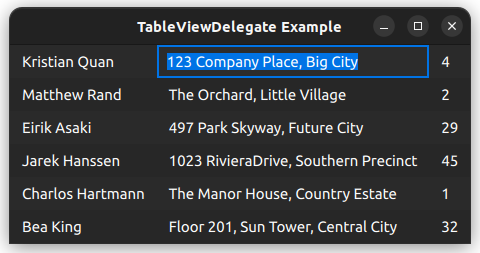
TableViewDelegate는 TableView 의 delegate property 에 할당할 수 있는 델리게이트입니다. 이 델리게이트는 애플리케이션 스타일을 사용하여 뷰 내 테이블의 각 셀을 렌더링합니다.
TableView {
    anchors.fill: parent
    delegate: TableViewDelegate {}
    // model: yourModel
}
TableViewDelegate는 ItemDelegate 을 상속받으므로, background 과 contentItem 이라는 두 가지 요소로 구성됩니다.
contentItem의 위치는 padding 을 통해 제어됩니다.
포인터와의 상호작용
TableViewDelegate는 ItemDelegate 를 상속받습니다. 즉, 사용자가 델리게이트를 클릭하면 clicked 와 같은 신호가 발생합니다. 이 신호에 연결하여 애플리케이션별 기능을 구현할 수 있습니다.
그러나 ` ItemDelegate ` API는 클릭 위치나 누르고 있는 수정 키에 대한 정보를 제공하지 않습니다. 이러한 정보가 필요한 경우, 포인터 핸들러를 사용하는 것이 더 나은 방법입니다. 예를 들면 다음과 같습니다:
TableView {
    id: tableView
    delegate: TableViewDelegate {
        TapHandler {
            acceptedButtons: Qt.RightButton
            onTapped: someContextMenu.open()
        }

        TapHandler {
            acceptedModifiers: Qt.ControlModifier
            onTapped: tableView.doSomethingToCell(row, column)
        }
    }
}
참고: 사용자가 델리게이트를 클릭했을 때 발생하는 기본 동작(예: 현재 인덱스 변경)을비활성화하려면 pointerNavigationEnabled 을 false 로 설정하면 됩니다.
테이블의 셀 편집
TableViewDelegate에는 기본 edit delegate 가 할당되어 있습니다. TableView 에 edit triggers 가 설정되어 있고, model 가 editing model items 를 지원하는 경우, 사용자는 편집 트리거 중 하나를 활성화하여 current 테이블 셀의 텍스트를 편집할 수 있습니다.
기본 편집 델리게이트는 Qt.EditRole 을 사용하여 model 에 데이터를 읽고 씁니다. 다른 역할을 사용해야 하거나 기본 편집 델리게이트가 제공하는 기능 이외의 요구 사항이 있는 경우, 언제든지 TableView.editDelegate 에 사용자 정의 델리게이트를 할당할 수 있습니다.
‘TableViewDelegate 및 TableView사용자 정의 ’항목도 참조하십시오 .
속성 설명서
current : bool
이 속성은 델리게이트가 ` selection model`에서 ` current index `을 나타내는지 여부와 관계없이 유지됩니다.
editing : bool
이 속성은 델리게이트가 ` edited` 상태인지 여부와 관계없이 유지됩니다.
selected : bool
이 속성은 델리게이트가 ` selection model` 내의 ` selected index `을 나타내는지 여부와 관계없이 유효합니다.
tableView : TableView
이 속성은 델리게이트 항목을 포함하는 TableView 을 가리킵니다.
© 2026 The Qt Company Ltd. Documentation contributions included herein are the copyrights of their respective owners. The documentation provided herein is licensed under the terms of the GNU Free Documentation License version 1.3 as published by the Free Software Foundation. Qt and respective logos are trademarks of The Qt Company Ltd. in Finland and/or other countries worldwide. All other trademarks are property of their respective owners.
