
범례 마커 사용
참고: 이 내용은 ‘위젯이 포함된 차트’ 갤러리 예제의 일부입니다.
이 예제에서는 QLegendMarker의 clicked 신호를 사용하여 차트에서 해당 시리즈를 표시하거나 숨기는 애플리케이션을 만듭니다. ‘마커 연결’ 버튼은 범례 내 모든 마커의 clicked 신호를 handleMarkerClicked 슬롯에 연결합니다.
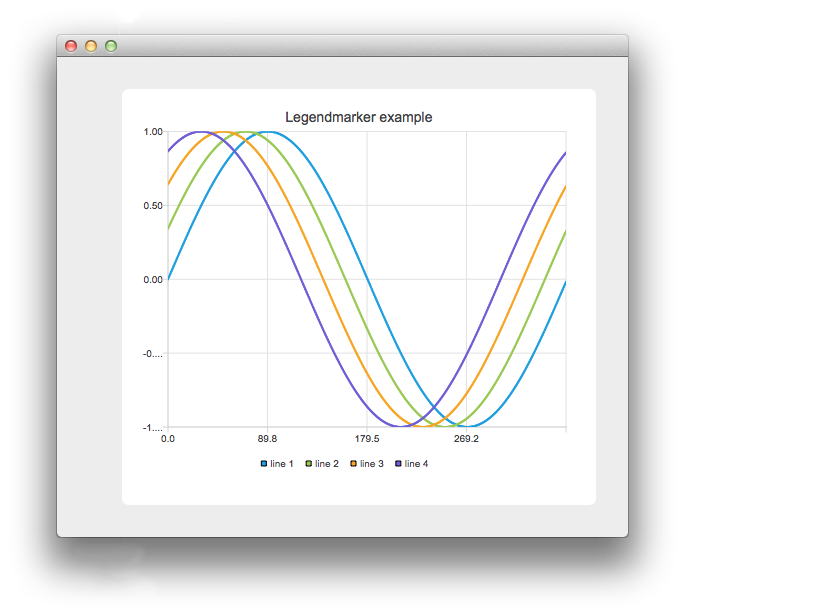
이 애플리케이션에는 차트의 시리즈를 추가하거나 제거하는 버튼과, 범례 마커의 clicked 신호를 핸들러에 연결하거나 연결을 해제하는 버튼이 있습니다. 위 이미지에서는 마커를 연결한 후 그중 하나를 클릭한 상태입니다.
    // Connect all markers to handler
    const auto markers = m_chart->legend()->markers();
    for (QLegendMarker *marker : markers) {
        // Disconnect possible existing connection to avoid multiple connections
        QObject::disconnect(marker, &QLegendMarker::clicked,
                            this, &LegendMarkersWidget::handleMarkerClicked);
        QObject::connect(marker, &QLegendMarker::clicked,
                         this, &LegendMarkersWidget::handleMarkerClicked);
    }
여기서는 레전드의 마커들을 핸들러에 연결합니다. 동일한 마커가 두 번 이상 연결되는 것을 방지하기 위해, 먼저 연결을 해제합니다.
    const auto markers = m_chart->legend()->markers();
    for (QLegendMarker *marker : markers) {
        QObject::disconnect(marker, &QLegendMarker::clicked,
                            this, &LegendMarkersWidget::handleMarkerClicked);
    }
여기서는 모든 마커를 핸들러에서 분리합니다.
    auto marker = qobject_cast<QLegendMarker *>(sender());
    Q_ASSERT(marker);
핸들러에서는 먼저 이벤트의 발신자를 QLegendMarker로 형변환합니다.
switch (marker->type())그런 다음 마커의 유형을 확인합니다. 마커의 세부 메서드에 접근하고 올바른 유형으로 형변환하려면 이 과정이 필요합니다. QAbstractSeries에 대한 포인터만 필요한 경우에는 형변환이 필요하지 않습니다. 파이 차트나 막대 차트의 경우, 관련 QPieSlice 또는 QBarSet에 대한 포인터가 필요할 수 있습니다.
        // Toggle visibility of series
        marker->series()->setVisible(!marker->series()->isVisible());

        // Turn legend marker back to visible, since hiding series also hides the marker
        // and we don't want it to happen now.
        marker->setVisible(true);
마커가 클릭되면 시리즈의 표시 여부를 전환하고자 합니다. 이를 위해 마커로부터 관련 시리즈에 대한 포인터를 얻어 표시 여부를 전환합니다. 레전드 마커는 기본적으로 시리즈의 표시 상태를 따르기 때문에, 마커의 표시 상태도 다시 ‘표시됨’으로 설정합니다. 이렇게 하지 않으면 범례에서 마커가 보이지 않게 되어 더 이상 클릭할 수 없게 됩니다.
        // Dim the marker, if series is not visible
        qreal alpha = 1.0;

        if (!marker->series()->isVisible())
            alpha = 0.5;

        QColor color;
        QBrush brush = marker->labelBrush();
        color = brush.color();
        color.setAlphaF(alpha);
        brush.setColor(color);
        marker->setLabelBrush(brush);

        brush = marker->brush();
        color = brush.color();
        color.setAlphaF(alpha);
        brush.setColor(color);
        marker->setBrush(brush);

        QPen pen = marker->pen();
        color = pen.color();
        color.setAlphaF(alpha);
        pen.setColor(color);
        marker->setPen(pen);
시리즈가 숨겨졌을 때 마커를 완전히 숨기는 대신, 마커의 색상을 어둡게 처리합니다. 여기서는 laberBrush의 색상을 수정하여 이를 구현합니다.
© 2026 The Qt Company Ltd. Documentation contributions included herein are the copyrights of their respective owners. The documentation provided herein is licensed under the terms of the GNU Free Documentation License version 1.3 as published by the Free Software Foundation. Qt and respective logos are trademarks of The Qt Company Ltd. in Finland and/or other countries worldwide. All other trademarks are property of their respective owners.
