
선 그래프 만들기
참고: 이 내용은 '위젯 갤러리를 활용한 차트' 예제의 일부입니다.
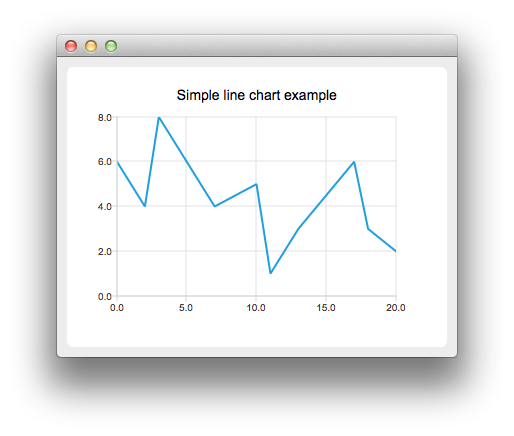
선 차트를 만들려면 QLineSeries 인스턴스가 필요합니다. 하나 만들어 봅시다.
auto series = new QLineSeries;그런 다음 시리즈에 데이터를 추가합니다. append() 멤버 함수를 사용하거나 스트림 연산자를 사용할 수 있습니다.
series->append(0, 6);
series->append(2, 4);
series->append(3, 8);
series->append(7, 4);
series->append(10, 5);
*series << QPointF(11, 1) << QPointF(13, 3) << QPointF(17, 6) << QPointF(18, 3) << QPointF(20, 2);
차트에 데이터를 표시하려면 QChart 인스턴스가 필요합니다. 여기에 시리즈를 추가하고, 기본 축을 생성한 다음, 차트의 제목을 설정합니다.
auto chart = new QChart;
chart->legend()->hide();
chart->addSeries(series);
chart->createDefaultAxes();
chart->setTitle("Simple Line Chart");
그런 다음 QChart를 매개변수로 사용하여 QChartView 객체를 생성합니다. 이렇게 하면 ' QGraphicsView ' 장면을 직접 생성할 필요가 없습니다.
createDefaultChartView(chart);이제 차트를 표시할 준비가 되었습니다.
© 2026 The Qt Company Ltd. Documentation contributions included herein are the copyrights of their respective owners. The documentation provided herein is licensed under the terms of the GNU Free Documentation License version 1.3 as published by the Free Software Foundation. Qt and respective logos are trademarks of The Qt Company Ltd. in Finland and/or other countries worldwide. All other trademarks are property of their respective owners.
