
프라임 카운터
동시 작업의 진행 상황을 모니터링하는 방법을 보여줍니다.
다음 예제는 ` QFutureWatcher ` 클래스와 ` filteredReduced ` 함수를 사용하여 대화형이며 비차단 방식의 QtWidgets 애플리케이션을 만드는 방법을 보여줍니다. Qt Concurrent. 이 예제를 통해 사용자는 크기를 조정할 수 있는 정수형 QList 를 생성할 수 있습니다. 이 리스트는 1부터 n까지의 자연수로 자동으로 채워집니다. 그런 다음 프로그램은 리스트 내에서 소수를 확인하고 발견된 소수의 총 개수를 표시합니다.
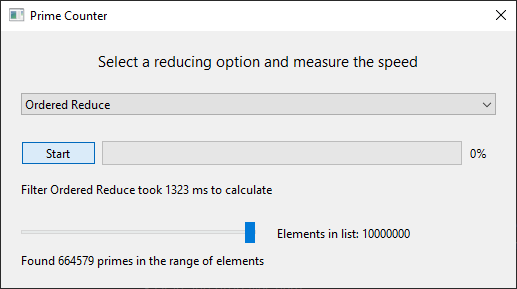
예제 실행
다음 경로에서 예제를 실행할 수 있습니다:
- Qt Creator
Welcome 모드를 열고 Examples 에서 예제를 선택하십시오. 자세한 내용은 Qt Creator: 튜토리얼: 빌드 및 실행을 참조하십시오.
- Qt Extension for Visual Studio Code
Command Palette 에서 Qt: Open Qt examples 명령을 실행하고, 목록에서 예제를 선택하십시오. 자세한 내용은 Qt Extension for Visual Studio Code: 튜토리얼: 빌드 및 실행을 참조하십시오.
연결 설정
이 Qt Concurrent 이 라이브러리는 ` filteredReduced ` 함수를 제공하며, 이 함수는 두 가지 모드( OrderedReduce and UnorderedReduce)로 작동할 수 있습니다. ` OrderedReduce ` 모드에서는 축소 함수가 원본 시퀀스의 순서대로 호출되는 반면, ` UnorderedReduce ` 모드에서는 요소에 무작위로 접근합니다.
원하는 요소로 UI를 구성한 후에는 Qt 신호 및 슬롯(Signals & Slots ) 메커니즘을 사용하여 이를 동시 작업의 신호에 연결해야 합니다. 이 예제에서는 ` QFutureWatcher ` 클래스를 사용하여 동시 작업의 진행 상황을 모니터링하고, 대화형 GUI를 구현하는 데 필요한 신호를 제공합니다.
    ...
connect(ui->pushButton, &QPushButton::clicked,
        this, [this] { start(); });
connect(&watcher, &QFutureWatcher<Element>::finished,
        this, [this] { finish(); });
connect(&watcher, &QFutureWatcher<Element>::progressRangeChanged,
        ui->progressBar, &QProgressBar::setRange);
connect(&watcher, &QFutureWatcher<Element>::progressValueChanged,
        ui->progressBar, &QProgressBar::setValue);
    ...
QFutureWatcher 클래스는 동시 작업의 변경 사항에 반응하여 UI를 업데이트하는 데 필요한 신호를 제공하므로, 이 예제에서 매우 중요한 역할을 합니다.
병렬 작업 시작
모든 신호 및 슬롯을 연결한 후, 사용자가 QPushButton을 누르면 start() 함수가 호출됩니다.
start() 함수 내에서, Qt Concurrent 의 filteredReduced 함수를 호출하고 QFutureWatcher 멤버에 퓨처를 설정합니다. 이 작업이 진정한 동시성으로 실행되도록 보장하기 위해, 첫 번째 매개변수로 별도의 QThreadPool 를 지정합니다. 이 접근 방식은 전역 스레드 풀에서 발생할 수 있는 차단 현상도 방지합니다. 정수형 ` QList `을 컨테이너로 전달하고, 정적 `filter` 및 `reduce` 함수를 전달한 뒤, 마지막으로 ` ReduceOption ` 플래그를 전달합니다.
    ...
void PrimeCounter::start()
{
    if (ui->pushButton->isChecked()) {
        ui->comboBox->setEnabled(false);
        ui->pushButton->setText(tr("Cancel"));
        ui->labelResult->setText(tr("Calculating ..."));
        ui->labelFilter->setText(tr("Selected Reduce Option: %1").arg(ui->comboBox->currentText()));
        fillElementList(ui->horizontalSlider->value() * stepSize);

        timer.start();
        watcher.setFuture(
            QtConcurrent::filteredReduced(
                &pool,
                elementList,
                filterFunction,
                reduceFunction,
                currentReduceOpt | QtConcurrent::SequentialReduce));
    ...
이제 filter 함수와 reduce 함수를 살펴보겠습니다. 이 예제에서 이 함수들은 멤버 변수에 의존하지 않기 때문에 static으로 선언되었습니다. 하지만 람다나 멤버 함수로도 쉽게 지정할 수 있습니다.
필터 함수는 리듀스 함수를 통해 후속 리듀션 처리를 위해 요소를 선별합니다. 이 구현은 간단한 소수 필터입니다. 이 함수는 const 참조를 인수로 받기 때문에, 대상 컨테이너에 대해 스레드 안전하게 작동할 수 있습니다.
    ...
bool PrimeCounter::filterFunction(const Element &element)
{
    // Filter for primes
    if (element <= 1)
        return false;
    for (Element i = 2; i*i <= element; ++i) {
        if (element % i == 0)
            return false;
    }
    return true;
}
    ...
reduce 함수는 조작 대상 컨테이너와 동일한 유형의 수정 가능한 참조를 첫 번째 매개변수로 받습니다. 두 번째 매개변수는 filter 함수를 통해 미리 필터링된 요소입니다. 이 예제에서는 소수의 개수를 세어 봅니다.
    ...
void PrimeCounter::reduceFunction(Element &out, const Element &value)
{
    // Count the amount of primes.
    Q_UNUSED(value);
    ++out;
}
...© 2026 The Qt Company Ltd. Documentation contributions included herein are the copyrights of their respective owners. The documentation provided herein is licensed under the terms of the GNU Free Documentation License version 1.3 as published by the Free Software Foundation. Qt and respective logos are trademarks of The Qt Company Ltd. in Finland and/or other countries worldwide. All other trademarks are property of their respective owners.
