
Android용 Qt 알림 기능
Android 애플리케이션에서 Qt를 통해 Java 코드를 호출하는 방법을 보여줍니다.
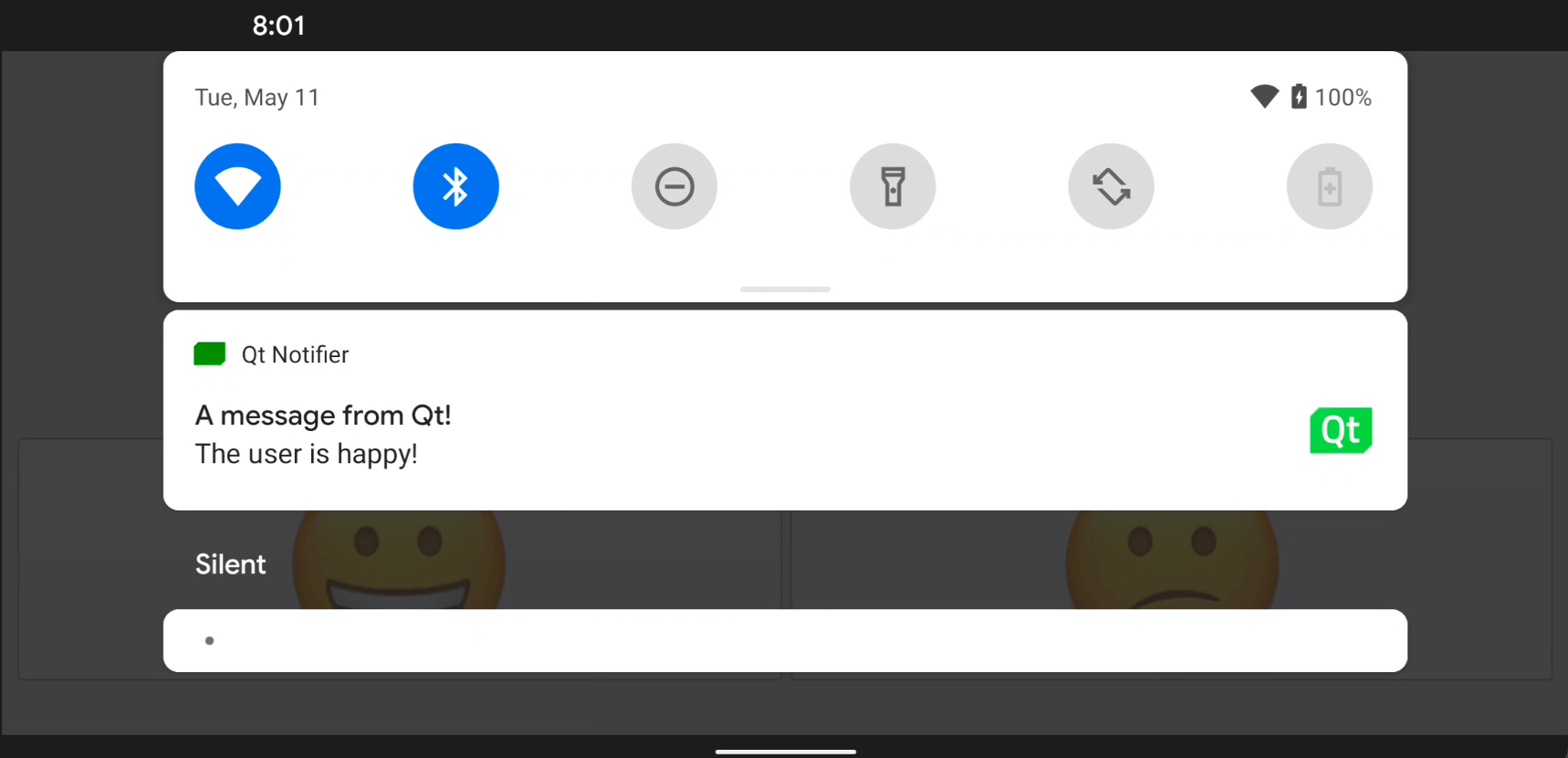
이 예제는 Android 애플리케이션에 사용자 정의 Java 클래스를 추가하는 방법과 Qt의 JNI 편의 API를 사용하여 이를 호출하는 방법을 보여줍니다.
스마일 이모티콘 중 하나를 클릭하면 Android 화면의 상태 표시줄에 알림이 전송됩니다.
예제 실행
다음 경로에서 예제를 실행할 수 있습니다.
- Qt Creator
Welcome 모드를 열고 Examples 에서 예제를 선택하십시오. 자세한 내용은 Qt Creator 의 ‘튜토리얼: 빌드 및 실행’을 참조하십시오.
- Qt Extension for Visual Studio Code
Command Palette 에서 ` Qt: Open Qt examples ` 명령을 실행하고 목록에서 예제를 선택하십시오. 자세한 내용은 Qt Extension for Visual Studio Code: 튜토리얼: 빌드 및 실행을 참조하십시오.
C++ 코드에서 Java 메서드 호출하기
NotificationClient.java 파일에서 NotificationClient 라는 사용자 정의 Java 클래스를 정의합니다.
package org.qtproject.example.androidnotifier;

import android.app.Notification;
import android.app.NotificationManager;
import android.content.Context;
import android.graphics.Bitmap;
import android.graphics.Color;
import android.graphics.BitmapFactory;
import android.app.NotificationChannel;

public class NotificationClient
{
    public static void notify(Context context, String message) {
        try {
            NotificationManager m_notificationManager = (NotificationManager)
                    context.getSystemService(Context.NOTIFICATION_SERVICE);

            Notification.Builder m_builder;
            if (android.os.Build.VERSION.SDK_INT >= android.os.Build.VERSION_CODES.O) {
                int importance = NotificationManager.IMPORTANCE_DEFAULT;
                NotificationChannel notificationChannel;
                notificationChannel = new NotificationChannel("Qt", "Qt Notifier", importance);
                m_notificationManager.createNotificationChannel(notificationChannel);
                m_builder = new Notification.Builder(context, notificationChannel.getId());
            } else {
                m_builder = new Notification.Builder(context);
            }

            Bitmap icon = BitmapFactory.decodeResource(context.getResources(), R.drawable.icon);
            m_builder.setSmallIcon(R.drawable.icon)
                    .setLargeIcon(icon)
                    .setContentTitle("A message from Qt!")
                    .setContentText(message)
                    .setDefaults(Notification.DEFAULT_SOUND)
                    .setColor(Color.GREEN)
                    .setAutoCancel(true);

            m_notificationManager.notify(0, m_builder.build());
        } catch (Exception e) {
            e.printStackTrace();
        }
    }
}
NotificationClient C++ 클래스 헤더 파일인 notificationclient.h 에서, Android 기기에 알림을 표시하기 위한 간단한 C++ API를 선언합니다. 이 API는 단일 문자열 속성인 notification 과 Java 코드를 호출하는 슬롯인 updateAndroidNotification() 으로 구성됩니다:
class NotificationClient : public QObject
{
Q_OBJECT
public:
explicit NotificationClient(QObject *parent = 0);
void setNotification(const QString ¬ification);
QString notification() const;
signals:
void notificationChanged();
private slots:
void updateAndroidNotification();
private:
QString m_notification;
};notificationChanged() 신호를 updateAndroidNotification() 슬롯에 연결하여, notification 의 텍스트가 변경될 때 알림 텍스트를 업데이트합니다:
    m_notification = notification;
    emit notificationChanged();
updateAndroidNotification() 함수는 Android 플랫폼 API를 통해 알림을 전송하는 역할을 하는 Java 메서드를 호출합니다. 먼저 알림 문자열을 바탕으로 Java 문자열 jstring 을 생성한 다음, jstring 객체를 매개변수로 전달하여 Java의 notify() 메서드를 호출합니다:
void NotificationClient::updateAndroidNotification()
{
    QJniObject javaNotification = QJniObject::fromString(m_notification);
    QJniObject::callStaticMethod<void>(
                    "org/qtproject/example/androidnotifier/NotificationClient",
                    "notify",
                    "(Landroid/content/Context;Ljava/lang/String;)V",
                    QNativeInterface::QAndroidApplication::context(),
                    javaNotification.object<jstring>());
}
이 Java 메서드 호출은 Java Native Interface(JNI) API를 통해 Java와 통신하는 ` QJniObject `를 사용합니다. 또한, 앞의 코드 조각에서는 앱의 컨텍스트 객체를 전달하고 있는데, 정적 Java 코드는 이를 통해 앱의 특정 속성과 API에 접근할 수 있습니다.
스마일 버튼이 의도한 대로 작동하는지 확인하기 위해, 버튼 중 하나가 클릭되면 알림 텍스트를 변경하는 다음 코드를 추가합니다:
    QObject::connect(&happyButton, &QPushButton::clicked, &happyButton, []() {
        NotificationClient().setNotification("The user is happy!");
    });

    QObject::connect(&sadButton, &QPushButton::clicked, &happyButton, []() {
        NotificationClient().setNotification("The user is sad!");
});Qt for Android도 참조하세요 .
© 2026 The Qt Company Ltd. Documentation contributions included herein are the copyrights of their respective owners. The documentation provided herein is licensed under the terms of the GNU Free Documentation License version 1.3 as published by the Free Software Foundation. Qt and respective logos are trademarks of The Qt Company Ltd. in Finland and/or other countries worldwide. All other trademarks are property of their respective owners.
