
CBOR 데이터 구문 분석 및 표시
CBOR 형식의 파일을 구문 분석하는 방법에 대한 데모입니다.
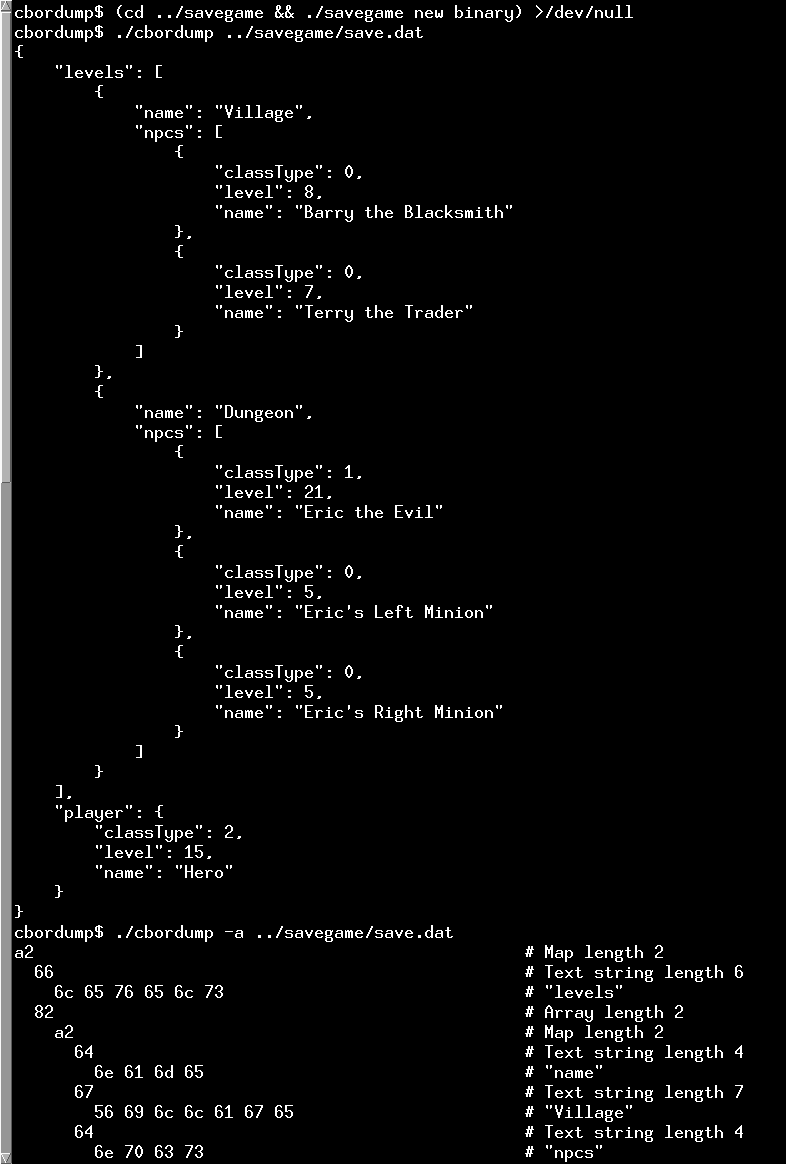
이 예제는 ` QCborStreamReader ` 클래스를 직접 사용하여 CBOR 콘텐츠를 파싱하는 방법을 보여줍니다. cbordump 프로그램은 파일이나 표준 입력에서 CBOR 형식의 콘텐츠를 읽어들이고, 디코딩된 콘텐츠를 사람이 읽기 쉬운 형식으로 stdout에 출력합니다. 이 프로그램은 CBOR 진단 표기법(JSON과 유사)으로 출력하거나, 입력된 각 바이트를 해당 인코딩 정보와 함께 표시하는 상세 출력을 생성할 수 있습니다.
CborDumper 클래스
CborDumper 클래스에는 CborDumper 생성자에 전달된 QFile 객체 인자를 사용하여 초기화된 QCborStreamReader 객체가 포함되어 있습니다. 인자에 따라 dump 함수는 dumpOne() 또는 dumpOneDetailed()를 호출하여 내용을 표준 출력으로 덤프합니다.
struct CborDumper
{
    enum DumpOption { ShowCompact = 0x01, ShowWidthIndicators = 0x02, ShowAnnotated = 0x04 };
    Q_DECLARE_FLAGS(DumpOptions, DumpOption)

    CborDumper(QFile *f, DumpOptions opts_);
    QCborError dump();

private:
    void dumpOne(int nestingLevel);
    void dumpOneDetailed(int nestingLevel);

    void printByteArray(const QByteArray &ba);
    void printWidthIndicator(quint64 value, char space = '\0');
    void printStringWidthIndicator(quint64 value);

    QCborStreamReader reader;
    QByteArray data;
    QStack<quint8> byteArrayEncoding;
    qint64 offset = 0;
    DumpOptions opts;
};
dumpOne() 함수
QCborStreamReader::type()을 활성화하면 스트림 내 현재 값의 유형에 적합한 형식으로 출력할 수 있습니다. 유형이 배열이나 맵인 경우, 값의 내용을 순회하며 각 항목에 대해 딥 수준 인수를 증가시켜 재귀적으로 dumpOne() 함수를 호출합니다. 타입이 태그인 경우, 해당 값이 출력되고 들여쓰기 인수를 늘리지 않은 채 dumpOne()이 한 번 호출됩니다.
dumpOneDetailed() 함수
이 함수는 수신된 바이트와 디코딩된 내용을 같은 줄에 출력합니다. 이 함수는 람다 함수를 사용하여 바이트와 디코딩된 내용을 출력하지만, 그 외에는 dumpOne()과 유사한 구조를 가집니다.
CborTagDescription
사용 가능한 CBOR 태그를 설명하는 ` tagDescriptions ` 테이블은 iana.org 웹사이트에서 제공되는 XML 파일을 기반으로 자동으로 생성됩니다. ` dumpOneDetailed() `가 태그를 보고할 때, 이 테이블에 있는 설명을 사용합니다.
QCborStreamReader 및 Qt의 CBOR 지원항목도 참조하십시오 .
© 2026 The Qt Company Ltd. Documentation contributions included herein are the copyrights of their respective owners. The documentation provided herein is licensed under the terms of the GNU Free Documentation License version 1.3 as published by the Free Software Foundation. Qt and respective logos are trademarks of The Qt Company Ltd. in Finland and/or other countries worldwide. All other trademarks are property of their respective owners.
