
자동차 구성 도구
카메라, 확장된 장면 환경 및 Qt Quick 3D 카메라, 확장된 장면 환경 및 Qt Quick 3D 를 활용하는 자동차 모델 예시입니다.
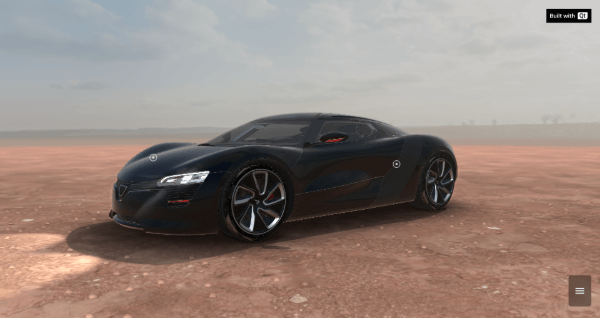
자동차 구성 도구는 다양한 장면 환경과 색상으로 자동차를 보여줍니다. 이 도구는 Qml로 구현되었으며 여러 Qt 모듈을 활용하는데, 그중에서도 특히 Qt Quick 와 Qt Quick 3D를 사용합니다.
예제 실행
다음 경로에서 예제를 실행할 수 있습니다:
- Qt Creator
Welcome 모드를 열고 Examples 에서 예제를 선택합니다. 자세한 내용은 Qt Creator: 튜토리얼: 빌드 및 실행을 참조하십시오.
- Qt Extension for Visual Studio Code
Command Palette 에서 Qt: Open Qt examples 명령을 실행하고 목록에서 예제를 선택하십시오. 자세한 내용은 Qt Extension for Visual Studio Code: 튜토리얼: 빌드 및 실행을 참조하십시오.
플랫폼 관련 참고 사항
이 예제는 실행 시 인터넷 서버에서 일부 자산을 다운로드합니다. 따라서 처음 실행할 때는 인터넷 연결이 필요합니다.
자동차 모델과 상호작용할 수 있는 두 가지 모드가 있습니다:
- 데모 모드
- 사용자 모드
데모 모드
카메라 시점이 다양한 경로를 따라 이동하며 자동차의 다양한 각도를 보여줍니다.
사용자 모드
사용자는 마우스나 터치 입력을 사용하여 차량 주위를 회전할 수 있습니다.
카메라 재설정
카메라가 초기 위치로 이동합니다.
씬 환경
이 예제에서는 네 가지 씬 환경을 사용할 수 있습니다:
- 차고
- 사막
- 애니메이션
- 스튜디오
차고 환경
차고 환경은 기본 설정으로 제공되며, 깔끔하고 산업적인 느낌의 전시 공간을 제공합니다:
ExtendedSceneEnvironment {
    id: showhall

    glowBloom: 0
    glowStrength: 0
    glowEnabled: false
    depthOfFieldFocusDistance: 600
    depthOfFieldFocusRange: 627
    depthOfFieldBlurAmount: 19.97
    depthOfFieldEnabled: false
    exposure: 1.2

    lightProbe: _Hall
    backgroundMode: SceneEnvironment.SkyBox
    tonemapMode: SceneEnvironment.TonemapModeLinear
    probeExposure: 1
    depthPrePassEnabled: false
    depthTestEnabled: true
    antialiasingMode: SceneEnvironment.MSAA
    antialiasingQuality: root.perfMode ? SceneEnvironment.Medium : SceneEnvironment.VeryHigh
    clearColor: "#000000"
    probeHorizon: 0.5

    Texture {
        id: _Hall
        source: root.downloadBase + "/content/images/HDR/_Hall.ktx"
        mipFilter: Texture.Linear
        scaleV: 2
    }
    temporalAAEnabled: false
}
사막 환경
사막 환경은 HDR 스카이 돔 조명, 분위기 있는 안개 효과, 그리고 특수하게 설계된 지형 지오메트리를 특징으로 합니다:
ExtendedSceneEnvironment {
    id: desert

    lightProbe: _Desert
    glowStrength: 2
    glowBloom: 0.11191
    glowEnabled: true

    depthPrePassEnabled: false
    probeExposure: btnRain.checked ? 1.0 : 1.5
    tonemapMode: SceneEnvironment.TonemapModeLinear
    backgroundMode: SceneEnvironment.SkyBox
    depthTestEnabled: true
    antialiasingMode: SceneEnvironment.MSAA
    antialiasingQuality: root.perfMode ? SceneEnvironment.Medium : SceneEnvironment.VeryHigh
    clearColor: "#000000"
    probeHorizon: 0.5
    temporalAAEnabled: false
    fog: Fog {}
}
애니메이션 환경
애니메이션 환경은 비디오 월 효과를 통해 역동적인 콘텐츠를 선보입니다:
ExtendedSceneEnvironment {
    id: videoRoom

    aoSoftness: 0
    aoDistance: 0
    probeExposure: 1
    tonemapMode: SceneEnvironment.TonemapModeLinear
    antialiasingMode: SceneEnvironment.MSAA
    antialiasingQuality: root.perfMode ? SceneEnvironment.Medium : SceneEnvironment.VeryHigh
    clearColor: "#000000"
    depthPrePassEnabled: false
    backgroundMode: SceneEnvironment.Color
    depthTestEnabled: true
    probeHorizon: 0
    Vignette {
        id: vignette
        vignetteStrength: 15
        vignetteColor: Qt.vector3d(0, 0, 0)
    }
    temporalAAEnabled: false
}
스튜디오 환경
스튜디오 환경은 조명을 정밀하게 제어하여 깔끔하고 전문적인 프레젠테이션 공간을 제공합니다:
ExtendedSceneEnvironment {
    id: studio
    aoEnabled: false
    antialiasingQuality: SceneEnvironment.VeryHigh
    antialiasingMode: SceneEnvironment.MSAA

    tonemapMode: SceneEnvironment.TonemapModeLinear
    probeExposure: 1
    probeHorizon: 1
    clearColor: "#000000"
    temporalAAEnabled: false
    depthTestEnabled: true
    backgroundMode: SceneEnvironment.Color
    depthPrePassEnabled: false
}
차량 색상
차량 색상은 총 네 가지 중에서 선택할 수 있습니다:
- 흰색
- 검정
- 노랑
- 빨강
조명
자동차의 조명을 켜고 끌 수 있습니다.
소스 파일
참조: 모든 Qt 예제.
© 2026 The Qt Company Ltd. Documentation contributions included herein are the copyrights of their respective owners. The documentation provided herein is licensed under the terms of the GNU Free Documentation License version 1.3 as published by the Free Software Foundation. Qt and respective logos are trademarks of The Qt Company Ltd. in Finland and/or other countries worldwide. All other trademarks are property of their respective owners.
