
Qt Quick 구독
Qt Quick Controls 를 사용하여 MQTT 토픽을 구독할 수 있는 애플리케이션을 만듭니다.
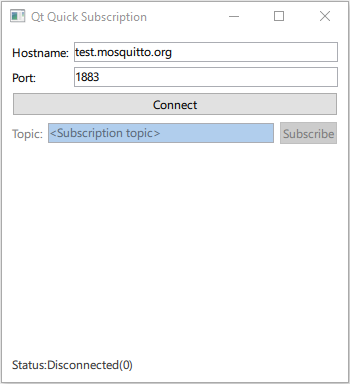
Qt Quick 'Subscription' 예제는 QMqttClient 을 QML 유형으로 등록하고 Qt Quick 애플리케이션에서 사용하는 방법을 보여줍니다.
Qt MQTT 현재 버전에서는 QML API를 제공하지 않습니다. 그러나 모듈의 C++ 클래스를 QML에서 사용할 수 있도록 할 수 있습니다.
클라이언트 생성
브로커로 전송되는 모든 메시지를 수신하려면 QMqttSubscription::messageReceived( )에 연결합니다:
QmlMqttSubscription::QmlMqttSubscription(QMqttSubscription *s, QmlMqttClient *c)
    : sub(s)
    , client(c)
{
    connect(sub, &QMqttSubscription::messageReceived, this, &QmlMqttSubscription::handleMessage);
}
QMqttClient 클래스를 기본 클래스로 하여 QmlMqttClient 클래스를 생성합니다:
QmlMqttClient::QmlMqttClient(QObject *parent)
    : QObject(parent)
{
    connect(&m_client, &QMqttClient::hostnameChanged, this, &QmlMqttClient::hostnameChanged);
    connect(&m_client, &QMqttClient::portChanged, this, &QmlMqttClient::portChanged);
    connect(&m_client, &QMqttClient::stateChanged, this, &QmlMqttClient::stateChanged);
}
subscribe() 함수를 사용하여 구독 객체를 생성합니다:
QmlMqttSubscription* QmlMqttClient::subscribe(const QString &topic)
{
    auto sub = m_client.subscribe(topic, 0);
    auto result = new QmlMqttSubscription(sub, this);
    return result;
}
QMqttMessage 객체를 사용하여 수신된 메시지의 페이로드를 저장합니다:
void QmlMqttSubscription::handleMessage(const QMqttMessage &qmsg)
{
    emit messageReceived(qmsg.payload());
}
QML에서 클래스 등록하기
main.cpp 파일에서 subscription 모듈의 QML 타입 Main을 불러옵니다:
    QGuiApplication app(argc, argv);
    QQmlApplicationEngine engine;

    QObject::connect(
            &engine, &QQmlApplicationEngine::objectCreationFailed, &app,
            []() { QCoreApplication::exit(EXIT_FAILURE); }, Qt::QueuedConnection);

    engine.loadFromModule(u"subscription"_s, u"Main"_s);
이제 ` Main.qml ` 파일에서 `MqttClient` 타입을 사용하여 MQTT 클라이언트를 생성합니다:
    MqttClient {
        id: client
        hostname: hostnameField.text
        port: portField.text
    }
파일:
© 2026 The Qt Company Ltd. Documentation contributions included herein are the copyrights of their respective owners. The documentation provided herein is licensed under the terms of the GNU Free Documentation License version 1.3 as published by the Free Software Foundation. Qt and respective logos are trademarks of The Qt Company Ltd. in Finland and/or other countries worldwide. All other trademarks are property of their respective owners.
