
MQTT 구독
MQTT 브로커와 통신하는 애플리케이션 만들기.
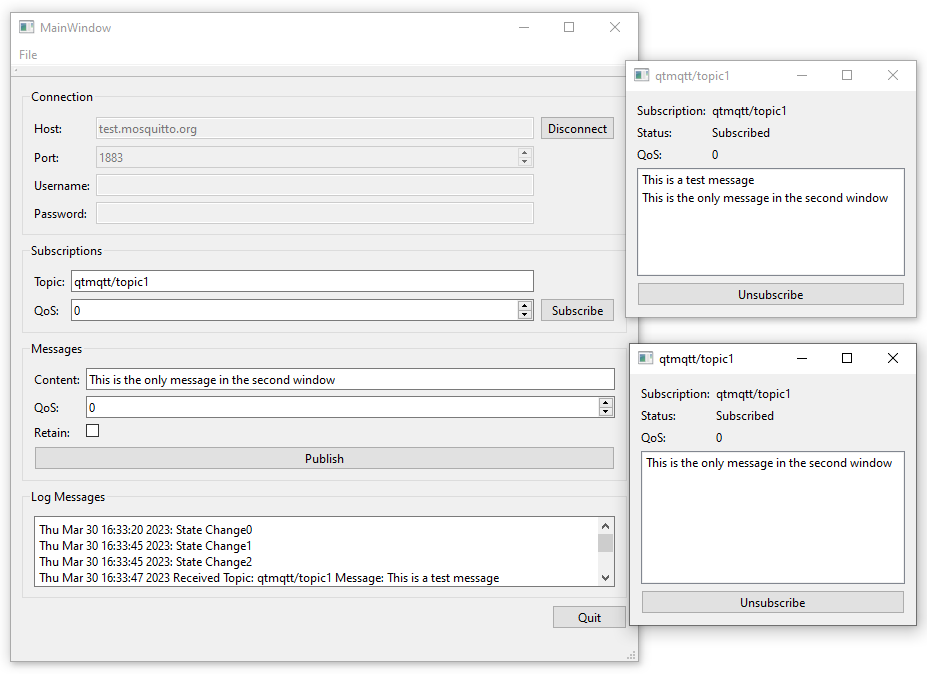
'MQTT 구독'에서는 MQTT 브로커와 통신하는 애플리케이션을 만드는 방법을 보여줍니다. 각 구독마다 새로운 대화 상자가 열리며, 여기서 구독한 토픽의 메시지를 확인할 수 있습니다.
클라이언트 생성
QMqttClient 클래스를 사용하여 MQTT 클라이언트를 생성하고, 연결에 사용할 브로커 호스트 이름과 포트를 설정합니다:
    m_client = new QMqttClient(this);
    m_client->setHostname(ui->lineEditHost->text());
    m_client->setPort(static_cast<quint16>(ui->spinBoxPort->value()));
토픽 구독
사용자가 클라이언트에서 토픽을 구독하면 새로운 구독 객체가 생성됩니다:
void MainWindow::on_buttonSubscribe_clicked()
{
    auto subscription = m_client->subscribe(ui->lineEditTopic->text(),
                                            static_cast<quint8>(ui->spinQoS->text().toUInt()));
    if (!subscription) {
        QMessageBox::critical(this, u"Error"_s,
                              u"Could not subscribe. Is there a valid connection?"_s);
        return;
    }
    auto subWindow = new SubscriptionWindow(subscription);
    subWindow->setWindowTitle(subscription->topic().filter());
    subWindow->show();
}
QMqttSubscription 클래스를 사용하여 구독의 토픽, 상태 및 QoS 수준을 저장합니다:
SubscriptionWindow::SubscriptionWindow(QMqttSubscription *sub, QWidget *parent) :
    QWidget(parent),
    ui(new Ui::SubscriptionWindow),
    m_sub(sub)
{
    ui->setupUi(this);

    ui->labelSub->setText(m_sub->topic().filter());
    ui->labelQoS->setText(QString::number(m_sub->qos()));
    updateStatus(m_sub->state());
    connect(m_sub, &QMqttSubscription::messageReceived, this, &SubscriptionWindow::updateMessage);
    connect(m_sub, &QMqttSubscription::stateChanged, this, &SubscriptionWindow::updateStatus);
    connect(m_sub, &QMqttSubscription::qosChanged, [this](quint8 qos) {
        ui->labelQoS->setText(QString::number(qos));
    });
    connect(ui->pushButton, &QAbstractButton::clicked, m_sub, &QMqttSubscription::unsubscribe);
}
QoS 수준은 메시지와 구독에 대해 별도로 설정할 수 있습니다. 구독에 설정된 QoS 수준이 최소 QoS 수준을 결정합니다. 더 높은 QoS 수준으로 메시지가 전송되면 브로커는 해당 메시지의 QoS를 더 높은 수준으로 상향 조정합니다. 예를 들어, 클라이언트 A가 QoS 1로 토픽을 구독한 상태에서 클라이언트 B가 QoS 0인 메시지를 해당 토픽에 게시하면, 브로커는 해당 메시지의 QoS를 자동으로 1로 높입니다. 클라이언트 B가 QoS 2로 주제에 메시지를 게시하면, 브로커는 해당 메시지를 QoS 2로 전송합니다.
메시지 수신
클라이언트가 메시지를 수신할 때, 실제 메시지 페이로드를 저장하기 위해 ` QMqttMessage ` 클래스가 사용됩니다:
void SubscriptionWindow::updateMessage(const QMqttMessage &msg)
{
    ui->listWidget->addItem(msg.payload());
}
파일:
© 2026 The Qt Company Ltd. Documentation contributions included herein are the copyrights of their respective owners. The documentation provided herein is licensed under the terms of the GNU Free Documentation License version 1.3 as published by the Free Software Foundation. Qt and respective logos are trademarks of The Qt Company Ltd. in Finland and/or other countries worldwide. All other trademarks are property of their respective owners.
