
Qt Quick 3D - 레이어 예제
QtQuick3D 에서 레이어 사용법을 보여줍니다.
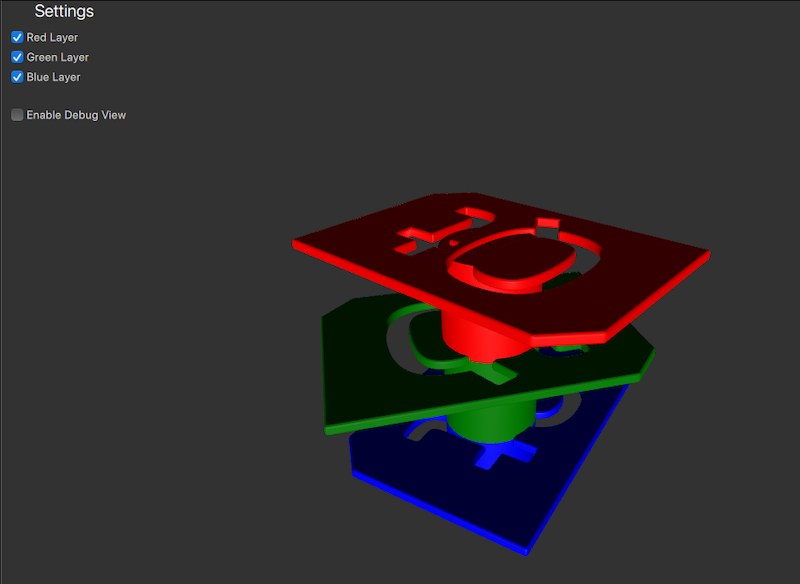
이 예제에서는 서로 다른 색상의 로고 모델들이 각기 다른 레이어에 배치되어 있습니다. 설정 패널에서 사용자는 체크박스를 선택하거나 해제하여 각 레이어의 표시 여부를 제어할 수 있습니다.
씬 레이어 준비
레이어
편의를 위해 Layer 열거형 유형에 식별하기 쉬운 별칭을 지정합니다.
readonly property int redModels: ContentLayer.Layer1
readonly property int greenModels: ContentLayer.Layer2
readonly property int blueModels: ContentLayer.Layer3
카메라
레이어를 기준으로 카메라 뷰를 필터링하고자 하므로, 카메라가 렌더링해야 할 레이어를 설정해야 합니다. 이를 위해 카메라의 ` layers ` 속성을 하나 이상의 레이어로 설정합니다. 그러면 카메라는 지정된 ` layers `에 포함된 오브젝트만 렌더링합니다. 기본적으로 카메라는 모든 ` layers`의 노드를 렌더링합니다.
활성 레이어를 선택할 수 있도록 하기 위해 cameraFilter 속성을 생성하고 이를 카메라의 layers 속성에 바인딩합니다.
property int cameraFilter: ContentLayer.LayerAll

camera: PerspectiveCamera {
    layers: v3d.cameraFilter
    position: Qt.vector3d(0, 400, 500)
    eulerRotation.x: -30
    clipFar: 2000
}
설정 패널의 체크박스를 토글하면, ‘ cameraFilter ’ 속성이 업데이트되어 해당 레이어를 포함하거나 제외하게 됩니다. 이렇게 하면 카메라는 ‘ cameraFilter ’에 지정된 레이어에 속한 오브젝트만 렌더링하게 됩니다.
CheckBox {
    id: checkBoxRedLayer
    text: qsTr("Red Layer")
    checked: true
    onCheckedChanged: {
        v3d.cameraFilter = checked ? v3d.cameraFilter | v3d.redModels : v3d.cameraFilter & ~v3d.redModels;
    }
}
모델
이제 세 가지 색상의 모델을 각각의 레이어에 할당해야 합니다. 카메라와 마찬가지로 모델의 ` layers ` 속성을 사용하여 레이어를 지정할 수 있습니다. 빨간색 로고 모델은 ` redLayer`에, 녹색은 ` greenLayer`에, 파란색은 ` blueLayer`에 할당됩니다.
Node {
    position: Qt.vector3d(0, 200, 0)
    Model {
        source: "qtlogo.mesh"
        layers: v3d.redModels
        scale: Qt.vector3d(5000, 5000, 5000)
        materials:[ PrincipledMaterial {
            baseColor: "red"
            roughness: 0.5
        } ]

        NumberAnimation on eulerRotation.y {
            from: 0
            to: 360
            duration: 15000
            loops: Animation.Infinite
        }
    }

    Model {
        position: Qt.vector3d(0, -50, 0)
        source: "#Cylinder"
        materials:[ PrincipledMaterial {
            baseColor: "red"
            roughness: 0.5
        } ]
    }

    ParticleSystem3D {
        visible: particlesCheckbox.checked
        running: particlesCheckbox.checked
        layers: v3d.redModels
        SpriteParticle3D {
            id: redParticle
            color: "red"
            maxAmount: 200
            particleScale: 8
            fadeInDuration: 500
            fadeOutDuration: 500
        }
        ParticleEmitter3D {
            particle: redParticle
            position: Qt.vector3d(0, -50, 0)
            emitRate: 40
            lifeSpan: 2000
            velocity: VectorDirection3D {
                direction: Qt.vector3d(0, 120, 0)
                directionVariation: Qt.vector3d(40, 40, 40)
            }
        }
    }
}

Node {
    position: Qt.vector3d(0, 100, 0)
    Model {
        source: "qtlogo.mesh"
        layers: v3d.greenModels
        scale: Qt.vector3d(5000, 5000, 5000)
        materials:[ PrincipledMaterial {
            baseColor: "green"
            roughness: 0.5
        } ]

        NumberAnimation on eulerRotation.y {
            from: 0
            to: 360
            duration: 20000
            loops: Animation.Infinite
        }
    }
    Model {
        position: Qt.vector3d(0, -50, 0)
        source: "#Cylinder"
        materials:[ PrincipledMaterial {
            baseColor: "green"
            roughness: 0.5
        } ]
    }

    ParticleSystem3D {
        visible: particlesCheckbox.checked
        running: particlesCheckbox.checked
        layers: v3d.greenModels
        SpriteParticle3D {
            id: greenParticle
            color: "green"
            maxAmount: 200
            particleScale: 8
            fadeInDuration: 500
            fadeOutDuration: 500
        }
        ParticleEmitter3D {
            particle: greenParticle
            position: Qt.vector3d(0, -50, 0)
            emitRate: 40
            lifeSpan: 2000
            velocity: VectorDirection3D {
                direction: Qt.vector3d(0, 120, 0)
                directionVariation: Qt.vector3d(40, 40, 40)
            }
        }
    }
}
Node {
    Model {
        source: "qtlogo.mesh"
        layers: v3d.blueModels
        scale: Qt.vector3d(5000, 5000, 5000)
        materials:[ PrincipledMaterial {
            baseColor: "blue"
            roughness: 0.5
        } ]

        NumberAnimation on eulerRotation.y {
            from: 0
            to: 360
            duration: 12500
            loops: Animation.Infinite
        }
    }
    Model {
        position: Qt.vector3d(0, -50, 0)
        source: "#Cylinder"
        materials:[ PrincipledMaterial {
            baseColor: "blue"
            roughness: 0.5
        } ]
    }

    ParticleSystem3D {
        visible: particlesCheckbox.checked
        running: particlesCheckbox.checked
        layers: v3d.blueModels
        SpriteParticle3D {
            id: blueParticle
            color: "blue"
            maxAmount: 200
            particleScale: 8
            fadeInDuration: 500
            fadeOutDuration: 500
        }
        ParticleEmitter3D {
            particle: blueParticle
            position: Qt.vector3d(0, -50, 0)
            emitRate: 40
            lifeSpan: 2000
            velocity: VectorDirection3D {
                direction: Qt.vector3d(0, 120, 0)
                directionVariation: Qt.vector3d(40, 40, 40)
            }
        }
    }
}
레이어가 설정되면, 카메라는 이제 cameraFilter 로 지정된 레이어에 포함된 모델만 렌더링합니다. 사용자는 설정 패널의 체크박스를 선택하거나 해제하여 각 레이어의 표시 여부를 전환할 수 있습니다.
© 2026 The Qt Company Ltd. Documentation contributions included herein are the copyrights of their respective owners. The documentation provided herein is licensed under the terms of the GNU Free Documentation License version 1.3 as published by the Free Software Foundation. Qt and respective logos are trademarks of The Qt Company Ltd. in Finland and/or other countries worldwide. All other trademarks are property of their respective owners.
