
Qt Quick 3D - 서브메시 예제
서브메시에 재질을 할당하는 방법을 보여줍니다.
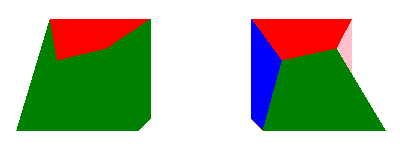
이 예제는 머티리얼과 서브메쉬가 어떻게 매핑되는지 보여줍니다.
서브메쉬와 머티리얼
Model 가 두 개 이상의 메시로 구성되어 있는 경우, 해당 메시들은 서브메시라고 합니다. 각 서브메쉬는 고유한 재질을 가질 수 있지만, 모델당 재질을 하나 이상 지정해야 하는 것은 아닙니다. 서브메쉬의 수가 재질 수보다 많을 경우, ‘ materials ’ 목록의 마지막 재질이 나머지 모든 서브메쉬에 적용됩니다. 모델에 서브 메시당 하나의 머티리얼이 제공된 경우, 이들은 일대일로 매핑됩니다. 즉, 목록의 첫 번째 머티리얼은 첫 번째 서브 메시에, 두 번째 머티리얼은 두 번째 서브 메시에 적용되는 식입니다. 모델 내 서브메쉬의 순서는 해당 모델을 생성하는 데 사용된 3D 모델링 도구의 생성 및 내보내기 방식에 따라 달라집니다.
다음 예제는 각 면이 각각 별도의 서브메쉬인 두 개의 왜곡된 큐브를 보여줍니다.
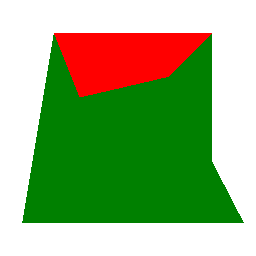
왼쪽의 큐브를 보면 한 면은 빨간색 이고 나머지 면은 녹색인 것을 볼 수 있습니다. 그 이유는 물론 머티리얼이 빨간색 하나와 녹색 하나, 총 두 가지뿐이기 때문입니다. 이 모델에서 첫 번째 서브 메쉬는 왜곡된 큐브의 “상단” 면이며, 빨간색 머티리얼이 머티리얼 목록에서 가장 먼저 배치되어 있으므로 예상대로 빨간색으로 표시됩니다. 목록의 두 번째 소재는 녹색 소재로, 왜곡된 큐브의 “앞면”인 두 번째 서브메시에 매핑됩니다. 또한 이 소재는 목록의 마지막 소재이므로, 왜곡된 큐브의 나머지 모든 면에도 이 소재가 사용됩니다.
DistortedCube {
    x: -4
    scale: Qt.vector3d(2, 2, 2)
    materials: [ PrincipledMaterial {
        baseColor: "red"
        lighting: PrincipledMaterial.NoLighting
    },
    PrincipledMaterial {
                    baseColor: "green"
                    lighting: PrincipledMaterial.NoLighting
                } ]
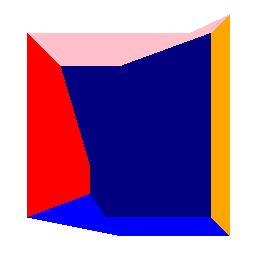
오른쪽의 큐브를 보면 더 많은 색상이 적용된 것을 확인할 수 있습니다. 이는 물론 이제 6개의 서브메쉬 각각에 서로 다른 색상을 가진 하나의 머티리얼을 할당했기 때문입니다.
Model {
    source: "qrc:/meshes/distortedcube.mesh"

    PrincipledMaterial {
        id: frontTop_material
        baseColor: "red"
        cullMode: Material.NoCulling
        lighting: PrincipledMaterial.NoLighting
    }

    PrincipledMaterial {
        id: frontBottom_material
        baseColor: "green"
        cullMode: Material.NoCulling
        lighting: PrincipledMaterial.NoLighting
    }

    PrincipledMaterial {
        id: leftSide_material
        baseColor: "blue"
        cullMode: Material.NoCulling
        lighting: PrincipledMaterial.NoLighting
    }

    PrincipledMaterial {
        id: rightSide_material
        baseColor: "pink"
        cullMode: Material.NoCulling
        lighting: PrincipledMaterial.NoLighting
    }

    PrincipledMaterial {
        id: backSide_material
        baseColor: "orange"
        cullMode: Material.NoCulling
        lighting: PrincipledMaterial.NoLighting
    }

    PrincipledMaterial {
        id: bottomSide_material
        baseColor: "navy"
        cullMode: Material.NoCulling
        lighting: PrincipledMaterial.NoLighting
    }

    materials: [
        frontTop_material,
        frontBottom_material,
        leftSide_material,
        backSide_material,
        rightSide_material,
        bottomSide_material
    ]
}© 2026 The Qt Company Ltd. Documentation contributions included herein are the copyrights of their respective owners. The documentation provided herein is licensed under the terms of the GNU Free Documentation License version 1.3 as published by the Free Software Foundation. Qt and respective logos are trademarks of The Qt Company Ltd. in Finland and/or other countries worldwide. All other trademarks are property of their respective owners.
