
창 깃발 예시
'창 플래그' 예제는 Qt에서 사용할 수 있는 창 플래그를 활용하는 방법을 보여줍니다.
창 플래그는 ‘타입(type)’ 또는 ‘힌트(hint)’ 중 하나입니다. 타입은 위젯에 대한 다양한 창 시스템 속성을 지정하는 데 사용됩니다. 위젯은 하나의 타입만 가질 수 있으며, 기본값은 ` Qt::Widget`입니다. 반면, 위젯은 힌트를 0개 이상 가질 수 있습니다. 힌트는 최상위 창의 외관을 사용자 정의하는 데 사용됩니다.
위젯의 플래그는 플래그들의 OR 조합을 저장하는 ` Qt::WindowFlags ` 유형으로 저장됩니다.
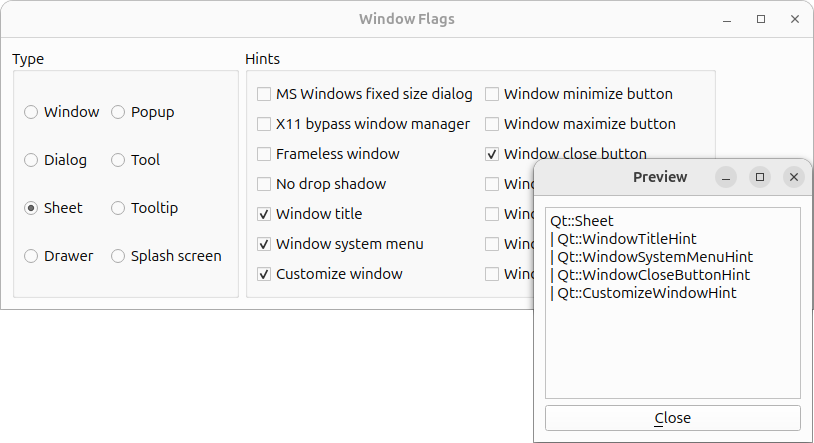
Window Flags 예제의 스크린샷
이 예제는 두 개의 클래스로 구성되어 있습니다:
ControllerWindow는 사용자가 사용 가능한 창 플래그 중에서 선택할 수 있게 하고, 별도의 미리보기 창에 그 효과를 표시하는 메인 애플리케이션 위젯입니다.PreviewWindow는 현재 설정된 창 플래그의 이름을 읽기 전용 텍스트 편집기에 표시하는 사용자 정의 위젯입니다.
먼저 ` ControllerWindow ` 클래스를 살펴본 다음, ` PreviewWindow ` 클래스를 살펴보겠습니다.
ControllerWindow 클래스 정의
class ControllerWindow : public QWidget
{
    Q_OBJECT

public:
    ControllerWindow(QWidget *parent = nullptr);

private slots:
    void updatePreview();

private:
    void createTypeGroupBox();
    void createHintsGroupBox();
    QCheckBox *createCheckBox(const QString &text);
    QRadioButton *createRadioButton(const QString &text);

    PreviewWindow *previewWindow;

    QGroupBox *typeGroupBox;
    QGroupBox *hintsGroupBox;
    QPushButton *quitButton;

    QRadioButton *windowRadioButton;
    QRadioButton *dialogRadioButton;
    QRadioButton *sheetRadioButton;
    QRadioButton *drawerRadioButton;
    QRadioButton *popupRadioButton;
    QRadioButton *toolRadioButton;
    QRadioButton *toolTipRadioButton;
    QRadioButton *splashScreenRadioButton;

    QCheckBox *msWindowsFixedSizeDialogCheckBox;
    QCheckBox *x11BypassWindowManagerCheckBox;
    QCheckBox *framelessWindowCheckBox;
    QCheckBox *windowNoShadowCheckBox;
    QCheckBox *windowTitleCheckBox;
    QCheckBox *windowSystemMenuCheckBox;
    QCheckBox *windowMinimizeButtonCheckBox;
    QCheckBox *windowMaximizeButtonCheckBox;
    QCheckBox *windowCloseButtonCheckBox;
    QCheckBox *windowContextHelpButtonCheckBox;
    QCheckBox *windowShadeButtonCheckBox;
    QCheckBox *windowStaysOnTopCheckBox;
    QCheckBox *windowStaysOnBottomCheckBox;
    QCheckBox *customizeWindowHintCheckBox;
};
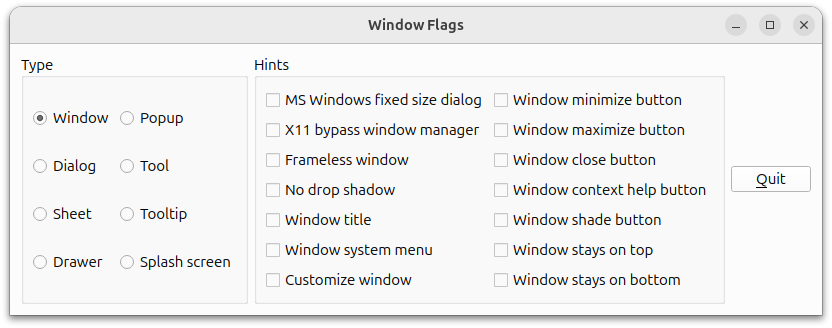
ControllerWindow 클래스는 QWidget 를 상속받습니다. 이 위젯을 통해 사용자는 사용 가능한 창 플래그 중에서 선택할 수 있으며, 별도의 미리보기 창에 그 효과가 표시됩니다.
사용자가 창 플래그를 변경할 때마다 미리보기 창을 새로 고치도록 비공개 updatePreview() 슬롯을 선언합니다.
또한 생성자를 단순화하기 위해 몇 가지 비공개 함수를 선언합니다. 비공개 ` createButton() ` 함수를 사용하여 사용 가능한 각 창 유형에 대한 라디오 버튼을 생성하는 ` createTypeGroupBox() ` 함수를 호출하고, 이를 그룹 박스 내에 모읍니다. 이와 유사한 방식으로, 비공개 ` createCheckBox() ` 함수를 사용하여 사용 가능한 각 힌트에 대한 체크박스를 생성하는 ` createHintsGroupBox() ` 함수를 사용합니다.
다양한 라디오 버튼과 체크박스 외에도, 현재 선택된 창 플래그의 효과를 표시하기 위한 관련 PreviewWindow 가 필요합니다.
ControllerWindow 클래스 구현
ControllerWindow::ControllerWindow(QWidget*parent)
    : QWidget(parent)
{
    previewWindow = new PreviewWindow(this);

    createTypeGroupBox();
    createHintsGroupBox();

    quitButton = new QPushButton(tr("&종료"));
    connect(quitButton, &QPushButton::clicked,
            qApp, &QCoreApplication::quit);

    QHBoxLayout*bottomLayout = new QHBoxLayout;
    bottomLayout->addStretch();
    bottomLayout->addWidget(quitButton);

    QHBoxLayout*mainLayout = new QHBoxLayout;
    mainLayout->addWidget(typeGroupBox);
    mainLayout->addWidget(hintsGroupBox);
    mainLayout->addLayout(bottomLayout);
    setLayout(mainLayout);

    setWindowTitle(tr("Window Flags"));
    updatePreview();
}
생성자에서 먼저 미리보기 창을 생성합니다. 그런 다음 private 함수인 ` createTypeGroupBox() `와 ` createHintsGroupBox() `를 사용하여 사용 가능한 창 플래그를 포함하는 그룹 박스를 생성합니다. 또한 ` Quit ` 버튼을 생성합니다. 이 버튼과 신축 가능한 공간을 별도의 레이아웃에 배치하여, 버튼이 ` WindowFlag ` 위젯의 오른쪽 하단 모서리에 표시되도록 합니다.
마지막으로, 버튼의 레이아웃과 두 개의 그룹 박스를 QVBoxLayout 에 추가하고, 창 제목을 설정한 뒤 updatePreview() 슬롯을 사용하여 미리보기 창을 새로 고칩니다.
void ControllerWindow::updatePreview()
{
    Qt::WindowFlags flags;

    if (windowRadioButton->isChecked())
        flags = Qt::Window;
    else if (dialogRadioButton->isChecked())
        flags = Qt::Dialog;
    else if (sheetRadioButton->isChecked())
        flags = Qt::Sheet;
    else if (drawerRadioButton->isChecked())
        flags = Qt::Drawer;
    else if (popupRadioButton->isChecked())
        flags = Qt::Popup;
    else if (toolRadioButton->isChecked())
        flags = Qt::Tool;
    else if (toolTipRadioButton->isChecked())
        flags = Qt::ToolTip;
    else if (splashScreenRadioButton->isChecked())
        flags = Qt::SplashScreen;
updatePreview() 슬롯은 사용자가 창 플래그 중 하나를 변경할 때마다 호출됩니다. 먼저 빈 Qt::WindowFlags flags 를 생성한 다음, 체크된 유형 중 어느 것인지 확인하여 이를 flags 에 추가합니다.
    if (msWindowsFixedSizeDialogCheckBox->isChecked())
        flags |= Qt::MSWindowsFixedSizeDialogHint;
    if (x11BypassWindowManagerCheckBox->isChecked())
        flags |= Qt::X11BypassWindowManagerHint;
    if (framelessWindowCheckBox->isChecked())
        flags |= Qt::FramelessWindowHint;
    if (windowNoShadowCheckBox->isChecked())
        flags |= Qt::NoDropShadowWindowHint;
    if (windowTitleCheckBox->isChecked())
        flags |= Qt::WindowTitleHint;
    if (windowSystemMenuCheckBox->isChecked())
        flags |= Qt::WindowSystemMenuHint;
    if (windowMinimizeButtonCheckBox->isChecked())
        flags |= Qt::WindowMinimizeButtonHint;
    if (windowMaximizeButtonCheckBox->isChecked())
        flags |= Qt::WindowMaximizeButtonHint;
    if (windowCloseButtonCheckBox->isChecked())
        flags |= Qt::WindowCloseButtonHint;
    if (windowContextHelpButtonCheckBox->isChecked())
        flags |= Qt::WindowContextHelpButtonHint;
    if (windowShadeButtonCheckBox->isChecked())
        flags |= Qt::WindowShadeButtonHint;
    if (windowStaysOnTopCheckBox->isChecked())
        flags |= Qt::WindowStaysOnTopHint;
    if (windowStaysOnBottomCheckBox->isChecked())
        flags |= Qt::WindowStaysOnBottomHint;
    if (customizeWindowHintCheckBox->isChecked())
        flags |= Qt::CustomizeWindowHint;

    previewWindow->setWindowFlags(flags);
또한 선택된 힌트 중 어떤 것인지 확인한 뒤, OR 연산자를 사용하여 이를 flags 에 추가합니다. flags 를 사용하여 미리보기 창의 창 플래그를 설정합니다.
    QPoint pos = previewWindow->pos();
    if (pos.x() < 0)
        pos.setX(0);
    if (pos.y() < 0)
        pos.setY(0);
    previewWindow->move(pos);
    previewWindow->showNormal();
}
미리보기 창의 위치를 조정합니다. 이렇게 하는 이유는, 일부 플랫폼에서 창 프레임을 조작할 때 사용자가 모르는 사이에 창의 위치가 변경될 수 있기 때문입니다. 창이 화면의 왼쪽 상단 모서리에 위치해 있다면, 창의 일부가 보이지 않을 수 있습니다. 따라서 위젯의 위치를 조정하여, 이러한 상황이 발생하더라도 창이 화면 경계 내에서 이동되도록 보장합니다. 마지막으로, QWidget::show()를 호출하여 미리보기 창이 보이도록 합니다.
void ControllerWindow::createTypeGroupBox()
{
    typeGroupBox = new QGroupBox(tr("Type"));

    windowRadioButton = createRadioButton(tr("Window"));
    dialogRadioButton = createRadioButton(tr("Dialog"));
    sheetRadioButton = createRadioButton(tr("Sheet"));
    drawerRadioButton = createRadioButton(tr("Drawer"));
    popupRadioButton = createRadioButton(tr("Popup"));
    toolRadioButton = createRadioButton(tr("Tool"));
    toolTipRadioButton = createRadioButton(tr("Tooltip"));
    splashScreenRadioButton = createRadioButton(tr("Splash screen"));
    windowRadioButton->setChecked(true);

    QGridLayout *layout = new QGridLayout;
    layout->addWidget(windowRadioButton, 0, 0);
    layout->addWidget(dialogRadioButton, 1, 0);
    layout->addWidget(sheetRadioButton, 2, 0);
    layout->addWidget(drawerRadioButton, 3, 0);
    layout->addWidget(popupRadioButton, 0, 1);
    layout->addWidget(toolRadioButton, 1, 1);
    layout->addWidget(toolTipRadioButton, 2, 1);
    layout->addWidget(splashScreenRadioButton, 3, 1);
    typeGroupBox->setLayout(layout);
}
createTypeGroupBox() 함수는 생성자에서 호출됩니다.
먼저 그룹 박스를 생성한 다음, 창 플래그에 포함된 사용 가능한 각 유형에 대해 (비공개 함수인 ` createRadioButton() `를 사용하여) 라디오 버튼을 생성합니다. ` Qt::Window `를 초기 적용 유형으로 설정합니다. 라디오 버튼을 ` QGridLayout `에 배치하고 그룹 박스에 레이아웃을 적용합니다.
기본 유형인 ` Qt::Widget `는 포함하지 않습니다. 그 이유는 이 유형이 다른 유형들과 다소 다르게 동작하기 때문입니다. 위젯에 유형이 지정되지 않았고 부모가 없는 경우, 해당 위젯은 창이 됩니다. 그러나 부모가 있는 경우, 표준 자식 위젯이 됩니다. 다른 유형들은 모두 최상위 창이며, 힌트는 최상위 창에만 영향을 미치므로 Qt::Widget 유형은 제외했습니다.
void ControllerWindow::createHintsGroupBox()
{
    hintsGroupBox = new QGroupBox(tr("Hints"));

    msWindowsFixedSizeDialogCheckBox =
            createCheckBox(tr("MS Windows fixed size dialog"));
    x11BypassWindowManagerCheckBox =
            createCheckBox(tr("X11 bypass window manager"));
    framelessWindowCheckBox = createCheckBox(tr("Frameless window"));
    windowNoShadowCheckBox = createCheckBox(tr("No drop shadow"));
    windowTitleCheckBox = createCheckBox(tr("Window title"));
    windowSystemMenuCheckBox = createCheckBox(tr("Window system menu"));
    windowMinimizeButtonCheckBox = createCheckBox(tr("Window minimize button"));
    windowMaximizeButtonCheckBox = createCheckBox(tr("Window maximize button"));
    windowCloseButtonCheckBox = createCheckBox(tr("Window close button"));
    windowContextHelpButtonCheckBox =
            createCheckBox(tr("Window context help button"));
    windowShadeButtonCheckBox = createCheckBox(tr("Window shade button"));
    windowStaysOnTopCheckBox = createCheckBox(tr("Window stays on top"));
    windowStaysOnBottomCheckBox = createCheckBox(tr("Window stays on bottom"));
    customizeWindowHintCheckBox= createCheckBox(tr("Customize window"));

    QGridLayout *layout = new QGridLayout;
    layout->addWidget(msWindowsFixedSizeDialogCheckBox, 0, 0);
    layout->addWidget(x11BypassWindowManagerCheckBox, 1, 0);
    layout->addWidget(framelessWindowCheckBox, 2, 0);
    layout->addWidget(windowNoShadowCheckBox, 3, 0);
    layout->addWidget(windowTitleCheckBox, 4, 0);
    layout->addWidget(windowSystemMenuCheckBox, 5, 0);
    layout->addWidget(customizeWindowHintCheckBox, 6, 0);
    layout->addWidget(windowMinimizeButtonCheckBox, 0, 1);
    layout->addWidget(windowMaximizeButtonCheckBox, 1, 1);
    layout->addWidget(windowCloseButtonCheckBox, 2, 1);
    layout->addWidget(windowContextHelpButtonCheckBox, 3, 1);
    layout->addWidget(windowShadeButtonCheckBox, 4, 1);
    layout->addWidget(windowStaysOnTopCheckBox, 5, 1);
    layout->addWidget(windowStaysOnBottomCheckBox, 6, 1);
    hintsGroupBox->setLayout(layout);
}
비공개 함수 ` createHintsGroupBox() `도 생성자에서 호출됩니다.
다시 한 번, 가장 먼저 그룹 박스를 생성합니다. 그런 다음 창 플래그 중 사용 가능한 힌트 각각에 대해 비공개 함수 ` createCheckBox() `를 사용하여 체크박스를 생성합니다. 이 체크박스들을 ` QGridLayout `에 넣고 그룹 박스에 레이아웃을 적용합니다.
QCheckBox *ControllerWindow::createCheckBox(const QString &text)
{
    QCheckBox *checkBox = new QCheckBox(text);
    connect(checkBox, &QCheckBox::clicked,
            this, &ControllerWindow::updatePreview);
    return checkBox;
}
비공개 함수 ` createCheckBox() `은 ` createHintsGroupBox()`에서 호출됩니다.
제공된 텍스트를 사용하여 QCheckBox 를 생성하고, 이를 비공개 updatePreview() 슬롯에 연결한 다음, 체크박스의 포인터를 반환합니다.
QRadioButton *ControllerWindow::createRadioButton(const QString &text)
{
    QRadioButton *button = new QRadioButton(text);
    connect(button, &QRadioButton::clicked,
            this, &ControllerWindow::updatePreview);
    return button;
}
비공개 ` createRadioButton() ` 함수 내에서는 제공된 텍스트로 ` QRadioButton ` 객체를 생성하고, 이를 비공개 ` updatePreview() ` 슬롯에 연결합니다. 이 함수는 ` createTypeGroupBox()`에서 호출되며, 버튼에 대한 포인터를 반환합니다.
PreviewWindow 클래스 정의
class PreviewWindow : public QWidget
{
    Q_OBJECT

public:
    PreviewWindow(QWidget *parent = nullptr);

    void setWindowFlags(Qt::WindowFlags flags);

private:
    QTextEdit *textEdit;
    QPushButton *closeButton;
};
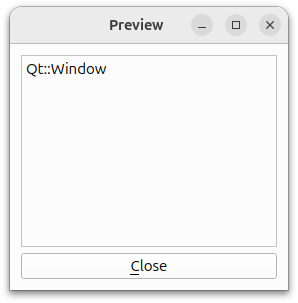
PreviewWindow 클래스는 QWidget 을 상속받습니다. 이 클래스는 현재 설정된 창 플래그의 이름을 읽기 전용 텍스트 편집기에 표시하는 사용자 정의 위젯입니다. 또한 창을 닫는 QPushbutton도 함께 제공됩니다.
우리는 생성자를 재구현하여 ` Close ` 버튼과 텍스트 편집기를 생성하고, ` QWidget::setWindowFlags()` 함수를 재구현하여 창 플래그의 이름을 표시합니다.
PreviewWindow 클래스 구현
PreviewWindow::PreviewWindow(QWidget *parent)
    : QWidget(parent)
{
    textEdit = new QTextEdit;
    textEdit->setReadOnly(true);
    textEdit->setLineWrapMode(QTextEdit::NoWrap);

    closeButton = new QPushButton(tr("&Close"));
    connect(closeButton, &QPushButton::clicked,
            this, &PreviewWindow::close);

    QVBoxLayout *layout = new QVBoxLayout;
    layout->addWidget(textEdit);
    layout->addWidget(closeButton);
    setLayout(layout);

    setWindowTitle(tr("Preview"));
}
생성자에서 먼저 ` QTextEdit `를 생성하고, 이 객체가 읽기 전용인지 확인합니다.
또한 ` QTextEdit::setLineWrapMode()` 함수를 사용하여 텍스트 편집기에서 줄 바꿈을 금지합니다. 그 결과, 창 플래그의 이름이 편집기의 너비를 초과할 때 가로 스크롤바가 나타납니다. 표시되는 텍스트를 내장된 줄 바꿈으로 구성하기 때문에 이는 합리적인 해결책입니다. 줄 바꿈이 보장되지 않는다면, 다른 ` QTextEdit::LineWrapMode `를 사용하는 것이 더 타당할 수도 있습니다.
그런 다음 Close 버튼을 생성하고, 창 제목을 설정하기 전에 두 위젯을 모두 QVBoxLayout 안에 배치합니다.
void PreviewWindow::setWindowFlags(Qt::WindowFlags flags)
{
    QWidget::setWindowFlags(flags);

    QString text;

    Qt::WindowFlags type = (flags & Qt::WindowType_Mask);
    if (type == Qt::Window)
        text = "Qt::Window";
    else if (type == Qt::Dialog)
        text = "Qt::Dialog";
    else if (type == Qt::Sheet)
        text = "Qt::Sheet";
    else if (type == Qt::Drawer)
        text = "Qt::Drawer";
    else if (type == Qt::Popup)
        text = "Qt::Popup";
    else if (type == Qt::Tool)
        text = "Qt::Tool";
    else if (type == Qt::ToolTip)
        text = "Qt::ToolTip";
    else if (type == Qt::SplashScreen)
        text = "Qt::SplashScreen";

    if (flags & Qt::MSWindowsFixedSizeDialogHint)
        text += "\n| Qt::MSWindowsFixedSizeDialogHint";
    if (flags & Qt::X11BypassWindowManagerHint)
        text += "\n| Qt::X11BypassWindowManagerHint";
    if (flags & Qt::FramelessWindowHint)
        text += "\n| Qt::FramelessWindowHint";
    if (flags & Qt::NoDropShadowWindowHint)
        text += "\n| Qt::NoDropShadowWindowHint";
    if (flags & Qt::WindowTitleHint)
        text += "\n| Qt::WindowTitleHint";
    if (flags & Qt::WindowSystemMenuHint)
        text += "\n| Qt::WindowSystemMenuHint";
    if (flags & Qt::WindowMinimizeButtonHint)
        text += "\n| Qt::WindowMinimizeButtonHint";
    if (flags & Qt::WindowMaximizeButtonHint)
        text += "\n| Qt::WindowMaximizeButtonHint";
    if (flags & Qt::WindowCloseButtonHint)
        text += "\n| Qt::WindowCloseButtonHint";
    if (flags & Qt::WindowContextHelpButtonHint)
        text += "\n| Qt::WindowContextHelpButtonHint";
    if (flags & Qt::WindowShadeButtonHint)
        text += "\n| Qt::WindowShadeButtonHint";
    if (flags & Qt::WindowStaysOnTopHint)
        text += "\n| Qt::WindowStaysOnTopHint";
    if (flags & Qt::WindowStaysOnBottomHint)
        text += "\n| Qt::WindowStaysOnBottomHint";
    if (flags & Qt::CustomizeWindowHint)
        text += "\n| Qt::CustomizeWindowHint";

    textEdit->setPlainText(text);
}
setWindowFlags() 함수를 재구현할 때, 먼저 QWidget::setWindowFlags() 함수를 사용하여 위젯의 플래그를 설정합니다. 그런 다음 사용 가능한 창 플래그를 차례로 확인하며, flags 매개변수와 일치하는 플래그 이름이 포함된 텍스트를 생성합니다. 마지막으로, 위젯의 텍스트 편집기에 해당 텍스트를 표시합니다.
© 2026 The Qt Company Ltd. Documentation contributions included herein are the copyrights of their respective owners. The documentation provided herein is licensed under the terms of the GNU Free Documentation License version 1.3 as published by the Free Software Foundation. Qt and respective logos are trademarks of The Qt Company Ltd. in Finland and/or other countries worldwide. All other trademarks are property of their respective owners.
