
Qt Linguist 用户界面
Qt Linguist 的主窗口包含一个菜单栏和以下视图:
- Context/Label (F6) 列出翻译上下文或标签。
- Strings (F7) 列出所选上下文中可翻译的字符串。
- Sources and Forms (F9) 显示源代码中选定的字符串。
- 翻译区域显示所选字符串,并允许您为其输入翻译。
- Phrases and guesses (F10) 列出当前字符串的可能翻译。
- Warnings (F8) 列出未通过验证测试的已翻译字符串。
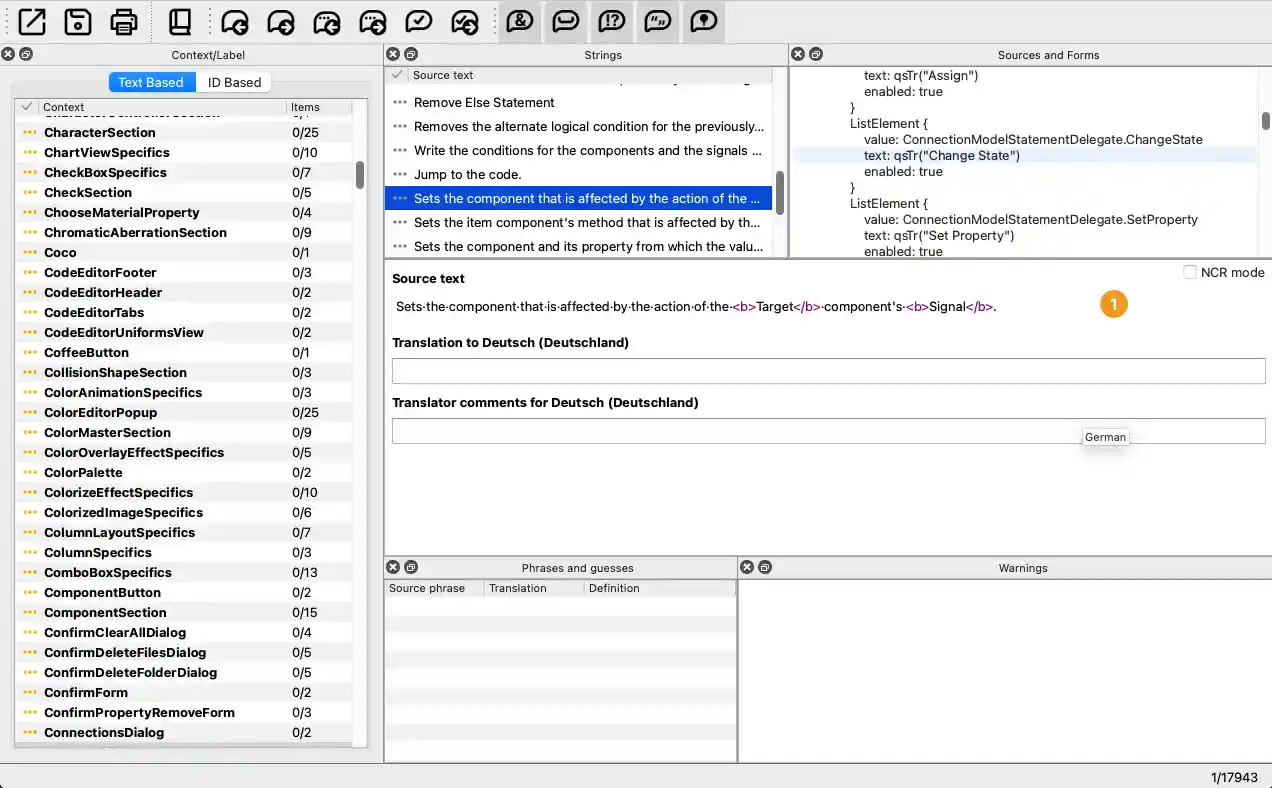
翻译区域 (1) 始终可见。要显示或隐藏其他视图,请选择“View ”>“Views ”,或使用键盘快捷键。您可以拖动视图的标题栏,将其排列在翻译区域周围,甚至主窗口之外。
© 2026 The Qt Company Ltd. Documentation contributions included herein are the copyrights of their respective owners. The documentation provided herein is licensed under the terms of the GNU Free Documentation License version 1.3 as published by the Free Software Foundation. Qt and respective logos are trademarks of The Qt Company Ltd. in Finland and/or other countries worldwide. All other trademarks are property of their respective owners.
