
QFormLayout Class
QFormLayout 类用于管理输入控件及其关联标签的布局。更多内容...
| 标题: | #include <QFormLayout> |
| CMake: | find_package(Qt6 REQUIRED COMPONENTS Widgets) target_link_libraries(mytarget PRIVATE Qt6::Widgets) |
| qmake: | QT += widgets |
| 继承自: | QLayout |
公共类型
| struct | TakeRowResult |
| enum | FieldGrowthPolicy { FieldsStayAtSizeHint, ExpandingFieldsGrow, AllNonFixedFieldsGrow } |
| enum | ItemRole { LabelRole, FieldRole, SpanningRole } |
| enum | RowWrapPolicy { DontWrapRows, WrapLongRows, WrapAllRows } |
属性
|
|
公共函数
| QFormLayout(QWidget *parent = nullptr) | |
| virtual | ~QFormLayout() |
| void | addRow(QWidget *label, QWidget *field) |
| void | addRow(QLayout *layout) |
| void | addRow(QWidget *widget) |
| void | addRow(QWidget *label, QLayout *field) |
| void | addRow(const QString &labelText, QLayout *field) |
| void | addRow(const QString &labelText, QWidget *field) |
| QFormLayout::FieldGrowthPolicy | fieldGrowthPolicy() const |
| Qt::Alignment | formAlignment() const |
| void | getItemPosition(int index, int *rowPtr, QFormLayout::ItemRole *rolePtr) const |
| void | getLayoutPosition(QLayout *layout, int *rowPtr, QFormLayout::ItemRole *rolePtr) const |
| void | getWidgetPosition(QWidget *widget, int *rowPtr, QFormLayout::ItemRole *rolePtr) const |
| int | horizontalSpacing() const |
| void | insertRow(int row, QWidget *label, QWidget *field) |
| void | insertRow(int row, QLayout *layout) |
| void | insertRow(int row, QWidget *widget) |
| void | insertRow(int row, QWidget *label, QLayout *field) |
| void | insertRow(int row, const QString &labelText, QLayout *field) |
| void | insertRow(int row, const QString &labelText, QWidget *field) |
(since 6.4) bool | isRowVisible(int row) const |
(since 6.4) bool | isRowVisible(QLayout *layout) const |
(since 6.4) bool | isRowVisible(QWidget *widget) const |
| QLayoutItem * | itemAt(int row, QFormLayout::ItemRole role) const |
| Qt::Alignment | labelAlignment() const |
| QWidget * | labelForField(QWidget *field) const |
| QWidget * | labelForField(QLayout *field) const |
| void | removeRow(int row) |
| void | removeRow(QLayout *layout) |
| void | removeRow(QWidget *widget) |
| int | rowCount() const |
| QFormLayout::RowWrapPolicy | rowWrapPolicy() const |
| void | setFieldGrowthPolicy(QFormLayout::FieldGrowthPolicy policy) |
| void | setFormAlignment(Qt::Alignment alignment) |
| void | setHorizontalSpacing(int spacing) |
| void | setItem(int row, QFormLayout::ItemRole role, QLayoutItem *item) |
| void | setLabelAlignment(Qt::Alignment alignment) |
| void | setLayout(int row, QFormLayout::ItemRole role, QLayout *layout) |
(since 6.4) void | setRowVisible(int row, bool on) |
(since 6.4) void | setRowVisible(QLayout *layout, bool on) |
(since 6.4) void | setRowVisible(QWidget *widget, bool on) |
| void | setRowWrapPolicy(QFormLayout::RowWrapPolicy policy) |
| void | setVerticalSpacing(int spacing) |
| void | setWidget(int row, QFormLayout::ItemRole role, QWidget *widget) |
| QFormLayout::TakeRowResult | takeRow(int row) |
| QFormLayout::TakeRowResult | takeRow(QLayout *layout) |
| QFormLayout::TakeRowResult | takeRow(QWidget *widget) |
| int | verticalSpacing() const |
重新实现的公共函数
| virtual void | addItem(QLayoutItem *item) override |
| virtual int | count() const override |
| virtual Qt::Orientations | expandingDirections() const override |
| virtual bool | hasHeightForWidth() const override |
| virtual int | heightForWidth(int width) const override |
| virtual void | invalidate() override |
| virtual QLayoutItem * | itemAt(int index) const override |
| virtual QSize | minimumSize() const override |
| virtual void | setGeometry(const QRect &rect) override |
| virtual void | setSpacing(int spacing) override |
| virtual QSize | sizeHint() const override |
| virtual int | spacing() const override |
| virtual QLayoutItem * | takeAt(int index) override |
详细说明
QFormLayout 是一个便捷的布局类,用于将子控件以两栏形式进行布局。左栏由标签组成,右栏由“字段”小部件(行编辑器、旋转框等)组成。
传统上,此类双栏表单布局是通过QGridLayout 实现的。QFormLayout 作为一种更高层次的替代方案,具有以下优势:
- 遵循不同平台的外观与感觉指南。
例如,macOS Aqua和 KDE 的设计规范规定标签应右对齐,而 Windows 和 GNOME 应用程序通常采用左对齐。
- 支持长行换行。
对于屏幕较小的设备,可以将 QFormLayout 设置为 `wrap long rows`,甚至设置为 `wrap all rows`。
- 用于创建标签–字段对的便捷 API。
接受QString 和QWidget *的addRow()重载方法,会在后台创建一个QLabel ,并自动设置其buddy。这样,我们就可以编写如下代码:
QFormLayout *formLayout = new QFormLayout(this); formLayout->addRow(tr("&Name:"), nameLineEdit); formLayout->addRow(tr("&Email:"), emailLineEdit); formLayout->addRow(tr("&Age:"), ageSpinBox);将其与以下使用QGridLayout 编写的代码进行比较:
QGridLayout *gridLayout = new QGridLayout(this);

nameLabel = new QLabel(tr("&Name:"));
nameLabel->setBuddy(nameLineEdit);

emailLabel = new QLabel(tr("&Name:"));
emailLabel->setBuddy(emailLineEdit);

ageLabel = new QLabel(tr("&Name:"));
ageLabel->setBuddy(ageSpinBox);

gridLayout->addWidget(nameLabel, 0, 0);
gridLayout->addWidget(nameLineEdit, 0, 1);
gridLayout->addWidget(emailLabel, 1, 0);
gridLayout->addWidget(emailLineEdit, 1, 1);
gridLayout->addWidget(ageLabel, 2, 0);
gridLayout->addWidget(ageSpinBox, 2, 1);
下表展示了不同样式下的默认外观。
| QCommonStyle 派生样式(QPlastiqueStyle除外) | QMacStyle | QPlastiqueStyle | Qt 扩展样式 |
|---|---|---|---|
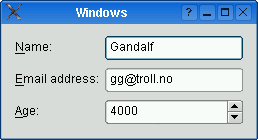 | 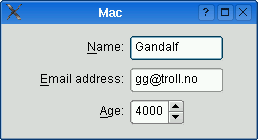 | 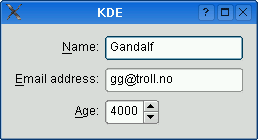 | 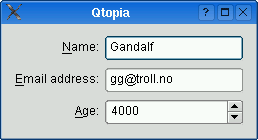 |
| 用于 Windows、GNOME 和早期版本 KDE 的传统样式。标签左对齐,可扩展字段会扩展以填满可用空间。(这通常对应于使用两列QGridLayout 时所获得的效果。) | 基于macOS Aqua设计规范的样式。标签左对齐,字段不会超出其大小提示范围,且表单在水平方向居中。 | 推荐用于 KDE 应用程序的样式。与 MacStyle 类似,但表单左对齐,且所有字段都会扩展以填满可用空间。 | Qt Extended 样式的默认样式。标签右对齐,可扩展字段会扩展以填满可用空间,并且对长行启用了换行。 |
还可以通过调用setLabelAlignment()、setFormAlignment()、setFieldGrowthPolicy() 和setRowWrapPolicy() 分别覆盖表单样式。例如,若要在所有平台上模拟 QMacStyle 的表单布局外观,但将标签左对齐,可编写如下代码:
formLayout->setRowWrapPolicy(QFormLayout::DontWrapRows);
formLayout->setFieldGrowthPolicy(QFormLayout::FieldsStayAtSizeHint);
formLayout->setFormAlignment(Qt::AlignHCenter | Qt::AlignTop);
formLayout->setLabelAlignment(Qt::AlignLeft);
另请参阅 QGridLayout 、QBoxLayout 以及QStackedLayout 。
成员类型文档
enum QFormLayout::FieldGrowthPolicy
此枚举指定了可用于控制表单字段扩展方式的各种策略。
| 常量 | 值 | 描述 |
|---|---|---|
QFormLayout::FieldsStayAtSizeHint | 0 | 字段绝不会超出其effective size hint 。这是 QMacStyle 的默认设置。 |
QFormLayout::ExpandingFieldsGrow | 1 | 水平size policy 为Expanding 或MinimumExpanding 的字段将扩展以填满可用空间。其他字段不会超出其有效大小提示。这是Plastique的默认策略。 |
QFormLayout::AllNonFixedFieldsGrow | 2 | 所有允许扩展的字段都会扩展以填满可用空间。这是大多数样式采用的默认策略。 |
另请参阅 fieldGrowthPolicy 。
enum QFormLayout::ItemRole
此枚举指定了可能出现在一行中的控件(或其他布局项)的类型。
| 常量 | 值 | 描述 |
|---|---|---|
QFormLayout::LabelRole | 0 | 标签控件。 |
QFormLayout::FieldRole | 1 | 字段控件。 |
QFormLayout::SpanningRole | 2 | 一个同时包含标签和字段列的小部件。 |
另请参阅 itemAt() 和getItemPosition()。
enum QFormLayout::RowWrapPolicy
此枚举指定了可用于控制表单行换行方式的各种策略。
| 常量 | 值 | 描述 |
|---|---|---|
QFormLayout::DontWrapRows | 0 | 字段始终与标签并排布局。这是除 Qt Extended 样式之外所有样式的默认策略。 |
QFormLayout::WrapLongRows | 1 | 为标签预留足够的水平空间以容纳最宽的标签,剩余空间分配给字段。如果字段对的最小宽度超过可用空间,则该字段将换行至下一行。这是 Qt Extended 样式的默认策略。 |
QFormLayout::WrapAllRows | 2 | 字段始终位于其标签下方。 |
另请参阅 rowWrapPolicy 。
属性文档
fieldGrowthPolicy : FieldGrowthPolicy
该属性控制表单字段的扩展方式
默认值取决于控件或应用程序的样式。对于 QMacStyle,默认值为FieldsStayAtSizeHint ;对于从QCommonStyle 派生的样式(如 Plastique 和 Windows),默认值为ExpandingFieldsGrow ;对于 Qt Extended 样式,默认值为AllNonFixedFieldsGrow 。
如果所有字段均无法扩展,且表单被调整大小,则额外空间将根据当前的form alignment 进行分配。
访问函数:
| QFormLayout::FieldGrowthPolicy | fieldGrowthPolicy() const |
| void | setFieldGrowthPolicy(QFormLayout::FieldGrowthPolicy policy) |
另请参阅 formAlignment 和rowWrapPolicy 。
formAlignment : Qt::Alignment
该属性用于控制表单布局内容在布局几何区域内的对齐方式
默认值取决于控件或应用程序样式。对于 QMacStyle,默认值为Qt::AlignHCenter |Qt::AlignTop ;对于其他样式,默认值为Qt::AlignLeft |Qt::AlignTop 。
访问函数:
| Qt::Alignment | formAlignment() const |
| void | setFormAlignment(Qt::Alignment alignment) |
另请参阅 labelAlignment 和rowWrapPolicy 。
horizontalSpacing : int
该属性控制并排布局的小部件之间的间距
默认情况下,如果未显式设置任何值,布局的水平间距将继承自父布局,或继承自父控件的样式设置。
访问函数:
| int | horizontalSpacing() const |
| void | setHorizontalSpacing(int spacing) |
另请参阅 verticalSpacing 、QStyle::pixelMetric() 和PM_LayoutHorizontalSpacing 。
labelAlignment : Qt::Alignment
该属性控制标签的水平对齐方式
默认值取决于控件或应用程序的样式。对于QCommonStyle 派生的样式(QPlastiqueStyle除外),默认值为Qt::AlignLeft ;对于其他样式,默认值为Qt::AlignRight 。
访问函数:
| Qt::Alignment | labelAlignment() const |
| void | setLabelAlignment(Qt::Alignment alignment) |
另请参阅 formAlignment 。
rowWrapPolicy : RowWrapPolicy
该属性控制表单行换行方式
默认值取决于控件或应用程序的样式。对于 Qt Extended 样式,默认值为 `WrapLongRows`;对于其他样式,默认值为 `DontWrapRows`。
若要将每个标签显示在其关联字段的上方(而非旁边),请将此属性设置为WrapAllRows 。
访问函数:
| QFormLayout::RowWrapPolicy | rowWrapPolicy() const |
| void | setRowWrapPolicy(QFormLayout::RowWrapPolicy policy) |
另请参阅 fieldGrowthPolicy 。
verticalSpacing : int
该属性控制垂直排列的小部件之间的间距
默认情况下,如果未显式设置任何值,则布局的垂直间距将继承自父布局,或继承自父控件的样式设置。
访问函数:
| int | verticalSpacing() const |
| void | setVerticalSpacing(int spacing) |
另请参阅 horizontalSpacing 、QStyle::pixelMetric()和PM_LayoutHorizontalSpacing 。
成员函数文档
[explicit] QFormLayout::QFormLayout(QWidget *parent = nullptr)
使用给定的parent 控件构建一个新的表单布局。
该布局将直接设置为parent 的顶级布局。一个控件只能有一个顶级布局。该布局由QWidget::layout()返回。
另请参阅 QWidget::setLayout()。
[virtual noexcept] QFormLayout::~QFormLayout()
破坏表单布局。
[override virtual] void QFormLayout::addItem(QLayoutItem *item)
重写了:QLayout::addItem(QLayoutItem *item)。
void QFormLayout::addRow(QWidget *label, QWidget *field)
在该表单布局底部添加一行,其label 和field 值分别为给定的值。
另请参阅 insertRow()。
void QFormLayout::addRow(QLayout *layout)
将指定的layout 添加到此表单布局的末尾。layout 横跨两列。
这是一个重载函数。
void QFormLayout::addRow(QWidget *widget)
将指定的widget 添加到此表单布局的末尾。widget 横跨两列。
这是一个重载函数。
void QFormLayout::addRow(QWidget *label, QLayout *field)
这是一个重载函数。
void QFormLayout::addRow(const QString &labelText, QLayout *field)
该重载会在后台自动创建一个QLabel ,其文本为labelText 。
这是一个重载函数。
void QFormLayout::addRow(const QString &labelText, QWidget *field)
该重载会在后台自动创建一个QLabel ,其text属性设置为labelText 。field 被设置为新创建的QLabel 的buddy 。
这是一个重载函数。
[override virtual] int QFormLayout::count() const
重新实现了:QLayout::count() const。
[override virtual] Qt::Orientations QFormLayout::expandingDirections() const
重新实现了:QLayout::expandingDirections() const。
void QFormLayout::getItemPosition(int index, int *rowPtr, QFormLayout::ItemRole *rolePtr) const
获取指定位置index 处项的行号和角色(列)。如果index 超出范围,则 *rowPtr 被设置为 -1;否则,行号存储在 *rowPtr 中,角色存储在 *rolePtr 中。
另请参阅 itemAt()、count()、getLayoutPosition()、以及getWidgetPosition()。
void QFormLayout::getLayoutPosition(QLayout *layout, int *rowPtr, QFormLayout::ItemRole *rolePtr) const
获取指定子元素layout 的行号和角色(列)。如果layout 不在表单布局中,则*rowPtr 被设为-1;否则,行号将存储在*rowPtr 中,角色将存储在*rolePtr 中。
void QFormLayout::getWidgetPosition(QWidget *widget, int *rowPtr, QFormLayout::ItemRole *rolePtr) const
获取布局中指定widget 的行号和角色(列)。如果widget 不在布局中,则*rowPtr 被设置为-1;否则,行号存储在*rowPtr 中,角色存储在*rolePtr 中。
另请参阅 getItemPosition() 和itemAt()。
[override virtual] bool QFormLayout::hasHeightForWidth() const
重新实现了:QLayoutItem::hasHeightForWidth() const。
[override virtual] int QFormLayout::heightForWidth(int width) const
重新实现了:QLayoutItem::heightForWidth(int) const。
void QFormLayout::insertRow(int row, QWidget *label, QWidget *field)
在该表单布局的row 位置插入新行,并使用给定的label 和field 。如果row 超出范围,则新行将添加到末尾。
另请参阅 addRow()。
void QFormLayout::insertRow(int row, QLayout *layout)
将指定的layout 插入到此表单布局的row 位置。layout 横跨两列。如果row 超出范围,则该控件将添加在末尾。
这是一个重载函数。
void QFormLayout::insertRow(int row, QWidget *widget)
将指定的widget 插入到此表单布局的row 位置。widget 横跨两列。如果row 超出范围,则将小部件添加到末尾。
这是一个重载函数。
void QFormLayout::insertRow(int row, QWidget *label, QLayout *field)
这是一个重载函数。
void QFormLayout::insertRow(int row, const QString &labelText, QLayout *field)
该重载会在后台自动创建一个QLabel ,其文本为labelText 。
这是一个重载函数。
void QFormLayout::insertRow(int row, const QString &labelText, QWidget *field)
该重载会在后台自动创建一个QLabel ,其文本为labelText 。该field 被设置为新创建的QLabel 的buddy 。
这是一个重载函数。
[override virtual] void QFormLayout::invalidate()
重写了:QLayout::invalidate()。
[since 6.4] bool QFormLayout::isRowVisible(int row) const
如果行row 中的某些项目可见,则返回true;否则返回false。
该函数在 Qt 6.4 中引入。
[since 6.4] bool QFormLayout::isRowVisible(QLayout *layout) const
如果与layout 对应的行中存在可见项目,则返回true;否则返回false。
这是一个重载函数。
该函数在 Qt 6.4 中引入。
[since 6.4] bool QFormLayout::isRowVisible(QWidget *widget) const
如果与widget 对应的行中存在可见项,则返回true;否则返回false。
这是一个重载函数。
该函数在 Qt 6.4 中引入。
[override virtual] QLayoutItem *QFormLayout::itemAt(int index) const
重新实现了:QLayout::itemAt(int index) const。
QLayoutItem *QFormLayout::itemAt(int row, QFormLayout::ItemRole role) const
返回给定row 中具有指定role (列)的布局项。如果不存在该布局项,则返回nullptr 。
另请参阅 QLayout::itemAt() 和setItem()。
QWidget *QFormLayout::labelForField(QWidget *field) const
返回与给定的field 关联的标签。
另请参阅 itemAt()。
QWidget *QFormLayout::labelForField(QLayout *field) const
这是一个重载函数。
[override virtual] QSize QFormLayout::minimumSize() const
重新实现了:QLayout::minimumSize() const。
void QFormLayout::removeRow(int row)
从该表单布局中删除行row 。
row 该参数必须为非负数,且小于rowCount()。
调用此函数后,rowCount() 的值将减一。该行中所有小部件及嵌套布局均被删除,包括字段小部件和标签(如有)。后续所有行将向上移动一行,腾出的垂直空间将在剩余行中重新分配。
您可以使用此函数撤销之前的addRow() 或insertRow() 操作:
QFormLayout *flay = ...;
QPointer<QLineEdit> le = new QLineEdit;
flay->insertRow(2, "User:", le);
// later:
flay->removeRow(2); // le == nullptr at this point若希望从布局中移除该行而不删除小部件,请改用takeRow()。
另请参阅 takeRow()。
void QFormLayout::removeRow(QLayout *layout)
从该表单布局中删除与layout 对应的行。
调用此函数后,rowCount() 的计数将减一。该行中所有小部件及嵌套布局均被删除,包括字段小部件和标签(如有)。后续所有行均向上移动一行,释放出的垂直空间将在剩余行之间重新分配。
您可以使用此函数撤销之前的 `addRow()` 或 `insertRow()` 操作:
QFormLayout *flay = ...;
QPointer<QVBoxLayout> vbl = new QVBoxLayout;
flay->insertRow(2, "User:", vbl);
// later:
flay->removeRow(layout); // vbl == nullptr at this point若希望从表单布局中移除该行而不删除已插入的布局,请改用takeRow()。
这是一个重载函数。
另请参阅 takeRow()。
void QFormLayout::removeRow(QWidget *widget)
从该表单布局中删除与widget 对应的行。
调用此函数后,rowCount() 的计数将减一。该行中所有小部件及嵌套布局均被删除,包括字段小部件以及(如有)标签。后续所有行均向上移动一行,腾出的垂直空间将在剩余行之间重新分配。
您可以使用此函数撤销之前的 `addRow()` 或 `insertRow()` 操作:
QFormLayout *flay = ...;
QPointer<QLineEdit> le = new QLineEdit;
flay->insertRow(2, "User:", le);
// later:
flay->removeRow(le); // le == nullptr at this point若希望从布局中移除该行而不删除小部件,请改用takeRow()。
这是一个重载函数。
另请参阅 takeRow()。
int QFormLayout::rowCount() const
返回表单中的行数。
另请参阅 ` QLayout::count()`。
[override virtual] void QFormLayout::setGeometry(const QRect &rect)
重新实现了:QLayout::setGeometry(const QRect &r)。
void QFormLayout::setItem(int row, QFormLayout::ItemRole role, QLayoutItem *item)
将给定row 中、针对给定role 的项设置为item ,必要时通过添加空行来扩展布局。
如果该单元格已被占用,则不会插入item ,并向控制台发送错误消息。item 横跨两列。
另请参阅 setLayout()。
void QFormLayout::setLayout(int row, QFormLayout::ItemRole role, QLayout *layout)
将给定row 中给定role 的子布局设置为layout ,必要时通过添加空行来扩展表单布局。
如果该单元格已被占用,则不会插入layout ,并向控制台发送一条错误消息。
注意:对于大多数应用程序,应使用 `addRow()` 或 `insertRow()` 代替 `setLayout()`。
另请参阅 setWidget()。
[since 6.4] void QFormLayout::setRowVisible(int row, bool on)
如果on 为真,则显示行row ;否则隐藏该行。
row 该值必须为非负数且小于rowCount()。
该函数在 Qt 6.4 中引入。
另请参阅 isRowVisible()、removeRow() 和takeRow()。
[since 6.4] void QFormLayout::setRowVisible(QLayout *layout, bool on)
如果on 为真,则显示与layout 对应的行;否则隐藏该行。
这是一个重载函数。
该函数在 Qt 6.4 中引入。
[since 6.4] void QFormLayout::setRowVisible(QWidget *widget, bool on)
如果on 为真,则显示与widget 对应的行;否则隐藏该行。
这是一个重载函数。
该函数在 Qt 6.4 中引入。
[override virtual] void QFormLayout::setSpacing(int spacing)
重新实现了属性QLayout::spacing 的访问函数。
该函数将垂直和水平间距均设置为spacing 。
另请参阅 spacing()、setVerticalSpacing() 和setHorizontalSpacing()。
void QFormLayout::setWidget(int row, QFormLayout::ItemRole role, QWidget *widget)
将指定role 对应的、位于给定row 中的控件设置为widget ,必要时通过添加空行来扩展布局。
如果该单元格已被占用,则不会插入widget ,并向控制台发送一条错误消息。
注意:对于大多数应用程序,应使用addRow() 或insertRow() 代替 setWidget()。
另请参阅 setLayout()。
[override virtual] QSize QFormLayout::sizeHint() const
重新实现了:QLayoutItem::sizeHint() const。
[override virtual] int QFormLayout::spacing() const
重新实现了属性QLayout::spacing 的访问函数。
如果垂直间距等于水平间距,则该函数返回该值;否则返回 -1。
另请参阅 setSpacing()、verticalSpacing() 和horizontalSpacing()。
[override virtual] QLayoutItem *QFormLayout::takeAt(int index)
重写了:QLayout::takeAt(int index)。
QFormLayout::TakeRowResult QFormLayout::takeRow(int row)
从该表单布局中移除指定的row 。
row 该值必须为非负数,且小于rowCount()。
注意:此 函数不会删除任何内容。
调用此函数后,rowCount() 的值将减一。随后的所有行将向上移动一行,而腾出的垂直空间将在剩余行之间重新分配。
您可以使用此函数撤销之前的addRow() 或insertRow() 操作:
QFormLayout *flay = ...;
QPointer<QLineEdit> le = new QLineEdit;
flay->insertRow(2, "User:", le);
// later:
QFormLayout::TakeRowResult result = flay->takeRow(2);
若要将该行从布局中移除并删除其中的小部件,请改用 `removeRow()`。
返回 一个包含小部件及其对应标签布局项的结构体
另请参阅 removeRow()。
QFormLayout::TakeRowResult QFormLayout::takeRow(QLayout *layout)
从该表单布局中移除指定的layout 。
注意:此 函数不会删除任何内容。
调用此函数后,rowCount() 的值将减一。后续所有行将向上移动一行,而腾出的垂直空间将在剩余行之间重新分配。
QFormLayout *flay = ...;
QPointer<QVBoxLayout> vbl = new QVBoxLayout;
flay->insertRow(2, "User:", vbl);
// later:
QFormLayout::TakeRowResult result = flay->takeRow(widget);若要将该行从表单布局中移除并删除已插入的布局,请改用removeRow()。
返回 一个同时包含控件和相应标签布局项的结构体
这是一个重载函数。
另请参阅 removeRow()。
QFormLayout::TakeRowResult QFormLayout::takeRow(QWidget *widget)
从该表单布局中移除指定的widget 。
注意:此 函数不会删除任何内容。
调用此函数后,rowCount() 将递减 1。后续所有行将向上移动一行,而腾出的垂直空间将重新分配给剩余的行。
QFormLayout *flay = ...;
QPointer<QLineEdit> le = new QLineEdit;
flay->insertRow(2, "User:", le);
// later:
QFormLayout::TakeRowResult result = flay->takeRow(widget);
若要将该行从布局中移除并删除其中的控件,请改用 `removeRow()`。
返回 一个包含小部件和相应标签布局项的结构体
这是一个重载函数。
另请参阅 removeRow()。
© 2026 The Qt Company Ltd. Documentation contributions included herein are the copyrights of their respective owners. The documentation provided herein is licensed under the terms of the GNU Free Documentation License version 1.3 as published by the Free Software Foundation. Qt and respective logos are trademarks of The Qt Company Ltd. in Finland and/or other countries worldwide. All other trademarks are property of their respective owners.
