
CandlestickSeries QML Type
将一系列数据以K线图形式呈现。更多...
| Import Statement: | import QtCharts 2.12 |
| Since: | QtCharts 2.2 |
| In C++: | QCandlestickSeries |
| Inherits: | |
| Status: | Deprecated |
此类型已弃用。我们强烈建议不要在新代码中使用它。
属性
- axisX : AbstractAxis
- axisXTop : AbstractAxis
- axisY : AbstractAxis
- axisYRight : AbstractAxis
- bodyOutlineVisible : bool
- bodyWidth : real
- brushFilename : string
- capsVisible : bool
- capsWidth : real
- count : int
- decreasingColor : color
- increasingColor : color
- maximumColumnWidth : real
- minimumColumnWidth : real
信号
- candlestickSetsAdded(list<CandlestickSet> sets)
- candlestickSetsRemoved(list<CandlestickSet> sets)
- clicked(CandlestickSet set)
- doubleClicked(CandlestickSet set)
- hovered(bool status, CandlestickSet set)
- pressed(CandlestickSet set)
- released(CandlestickSet set)
方法
- bool append(CandlestickSet set)
- CandlestickSet at(int index)
- void clear()
- bool insert(int index, CandlestickSet set)
- bool remove(CandlestickSet set)
详细说明
CandlestickSeries 类型用作单个K线项的容器。使用 `BarCategoryAxis` 时,每个项都会绘制到其所属的类别中。`DateTimeAxis ` 和 `ValueAxis ` 可作为 `BarCategoryAxis` 的替代方案。在这种情况下,每个K线项将根据其时间戳值进行绘制。
注意: 在同一个 CandlestickSeries 中,时间戳必须是唯一的。 使用BarCategoryAxis 时,仅绘制具有相同时间戳的第一个蜡烛图项。如果图表包含多个 CandlestickSeries 实例,来自不同系列但具有相同时间戳的项将被绘制到同一类别中。使用ValueAxis 或DateTimeAxis 时,具有相同时间戳的蜡烛图项将相互重叠。
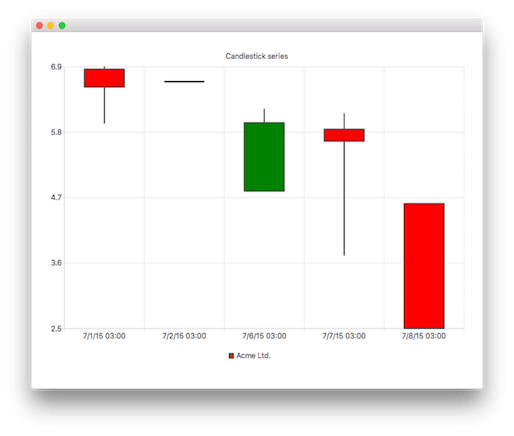
以下 QML 代码演示了如何创建一个简单的 K 线图:
import QtQuick 2.5
import QtCharts 2.2

ChartView {
    title: "Candlestick Series"
    width: 400
    height: 300

    CandlestickSeries {
        name: "Acme Ltd."
        increasingColor: "green"
        decreasingColor: "red"

        CandlestickSet { timestamp: 1435708800000; open: 690; high: 694; low: 599; close: 660 }
        CandlestickSet { timestamp: 1435795200000; open: 669; high: 669; low: 669; close: 669 }
        CandlestickSet { timestamp: 1436140800000; open: 485; high: 623; low: 485; close: 600 }
        CandlestickSet { timestamp: 1436227200000; open: 589; high: 615; low: 377; close: 569 }
        CandlestickSet { timestamp: 1436313600000; open: 464; high: 464; low: 254; close: 254 }
    }
}
另请参阅 CandlestickSet 、BarCategoryAxis 、DateTimeAxis 以及ValueAxis 。
属性文档
axisX : AbstractAxis
该系列使用的x轴。如果同时未定义axisX和axisXTop ,则会为该系列创建一个数值轴。
axisXTop : AbstractAxis
绘制在图表视图上方的、用于该数据系列的x轴。
注意:您 只能指定axisX 或 axisXTop 其中之一,不能同时指定两者。
另请参阅 axisX 。
axisY : AbstractAxis
该数据系列使用的y轴。如果同时未定义axisY和axisYRight ,则会为该数据系列创建一个数值轴。
另请参阅 axisYRight 和ValueAxis 。
axisYRight : AbstractAxis
该数据系列所使用的y轴,在图表视图中向右绘制。
注意:您 只能指定axisY 或axisYRight其中之一,不能同时指定两者。
另请参阅 axisY 。
bodyOutlineVisible : bool
K线实体轮廓的可见性。
bodyWidth : real
K线项在其所属插槽内的相对宽度,取值范围为 0.0 到 1.0。超出此范围的值将被限制为 0.0 或 1.0。
brushFilename : string
该系列中用作笔刷图像的文件名。
capsVisible : bool
帽子的可见度。
capsWidth : real
K线中上下影线的相对宽度,取值范围为0.0到1.0。超出此范围的值将被限制为0.0或1.0。
count : int [read-only]
一个系列中的K线条目数量。
decreasingColor : color
下跌K线实体部分的颜色。当K线的开盘价高于收盘价时,该K线即为下跌K线。默认情况下,此属性设置为笔刷颜色,且透明度通道值设为128。当该属性被设置为无效颜色值时,也会使用默认颜色。
increasingColor : color
上涨K线实体部分的颜色。当K线的收盘价高于开盘价时,该K线即为上涨K线。默认情况下,此属性设置为画笔颜色。当该属性被设置为无效颜色值时,也会使用默认颜色。
maximumColumnWidth : real
K线图元素的最大宽度(以像素为单位)。设置负值表示不设最大宽度。所有负值都会被转换为 -1.0。
minimumColumnWidth : real
K线图元素的最小宽度(以像素为单位)。设置负值表示没有最小宽度。所有负值都会被转换为 -1.0。
Signal 文档
candlestickSetsAdded(list<CandlestickSet> sets)
当由sets 指定的 K 线项目被添加到该系列时,会触发此信号。
相应的信号处理程序为onCandlestickSetsAdded 。
注意: 相应的处理程序 是onCandlestickSetsAdded 。
candlestickSetsRemoved(list<CandlestickSet> sets)
当由sets 指定的K线项从序列中移除时,会触发此信号。
相应的信号处理程序为onCandlestickSetsRemoved 。
注意: 相应的处理程序 为onCandlestickSetsRemoved 。
clicked(CandlestickSet set)
当在图表上点击由 `set ` 指定的 K 线对象时,会触发此信号。
相应的信号处理程序为onClicked 。
注意: 相应的处理程序 是onClicked 。
doubleClicked(CandlestickSet set)
当在图表上双击由set 指定的 K 线对象时,将触发此信号。
相应的信号处理程序为onDoubleClicked 。
注意: 相应的处理程序 为onDoubleClicked 。
hovered(bool status, CandlestickSet set)
当鼠标悬停在图表中由 `set ` 指定的 K 线项目上时,会触发此信号。
当鼠标移至该对象上时,status 会变为true ;当鼠标再次移开时,它会变为false 。
相应的信号处理程序是onHovered 。
注意: 相应的处理程序 是onHovered 。
pressed(CandlestickSet set)
当用户点击由set 指定的K线项并按住鼠标按钮时,会触发此信号。
相应的信号处理程序是onPressed 。
注意: 相应的处理程序 是onPressed 。
released(CandlestickSet set)
当用户松开对由set 指定的K线项的鼠标点击时,会触发此信号。
相应的信号处理程序是onReleased 。
注意: 相应的处理程序 是onReleased 。
方法文档
bool append(CandlestickSet set)
将由set 指定的单个K线项添加到系列中,并取得对其的所有权。如果该项为null,或者它已经存在于该系列中,则不会将其追加。
若追加成功,则返回 `true `;否则返回 `false `。
CandlestickSet at(int index)
返回位于index 指定位置的K线项。如果索引无效,则返回null。
void clear()
从该系列中移除所有K线图项,并将其永久删除。
bool insert(int index, CandlestickSet set)
将由 `set ` 指定的 K线图项插入到系列中,位置由 `index` 指定。获取该项的所有权。如果该项为空或已属于该系列,则不进行插入。
若插入成功,则返回true ;否则返回false 。
bool remove(CandlestickSet set)
从系列中删除一个由set 指定的K线项。
如果该项目已成功删除,则返回true ;否则返回false 。
© 2026 The Qt Company Ltd. Documentation contributions included herein are the copyrights of their respective owners. The documentation provided herein is licensed under the terms of the GNU Free Documentation License version 1.3 as published by the Free Software Foundation. Qt and respective logos are trademarks of The Qt Company Ltd. in Finland and/or other countries worldwide. All other trademarks are property of their respective owners.
