
PieSeries QML Type
以饼图形式展示数据。更多...
| Import Statement: | import QtCharts 2.12 |
| In C++: | QPieSeries |
| Inherits: | |
| Status: | Deprecated |
此类型已弃用。我们强烈建议在新代码中不要使用它。
属性
- count : int
- endAngle : real
- holeSize : real
- horizontalPosition : real
- size : real
- startAngle : real
- sum : real
- verticalPosition : real
信号
- added(list<PieSlice> slices)
- clicked(PieSlice slice)
- doubleClicked(PieSlice slice)
- hovered(PieSlice slice, bool state)
- pressed(PieSlice slice)
- released(PieSlice slice)
- removed(list<PieSlice> slices)
- sliceAdded(PieSlice slice)
- sliceRemoved(PieSlice slice)
方法
- PieSlice append(string label, real value)
- PieSlice at(int index)
- void clear()
- PieSlice find(string label)
- bool remove(PieSlice slice)
详细说明
饼图系列由使用PieSlice 类型定义的扇区组成。这些扇区可以包含任意数值,因为PieSeries类型会计算每个扇区相对于该系列中所有扇区总和的百分比,从而确定该扇区在图表中的实际大小。
饼图在图表中的大小和位置通过 0.0 到 1.0 之间的相对值进行控制。这些值与图表的实际矩形区域相关。
默认情况下,饼图被定义为完整饼图。可以通过为系列设置起始角度和角度范围来创建部分饼图。完整饼图为 360 度,其中 0 度位于 12 点钟方向。
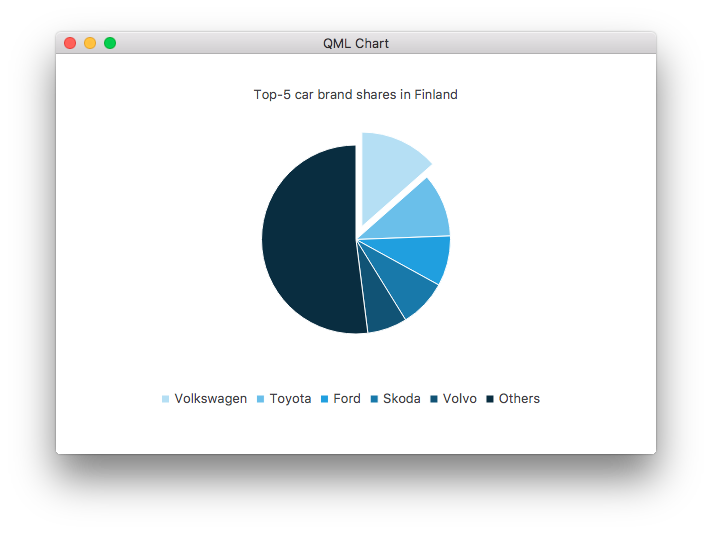
以下 QML 示例演示了如何创建一个简单的饼图。
ChartView {
    id: chart
    title: "Top-5 car brand shares in Finland"
    anchors.fill: parent
    legend.alignment: Qt.AlignBottom
    antialiasing: true

    property variant othersSlice: 0

    PieSeries {
        id: pieSeries
        PieSlice { label: "Volkswagen"; value: 13.5 }
        PieSlice { label: "Toyota"; value: 10.9 }
        PieSlice { label: "Ford"; value: 8.6 }
        PieSlice { label: "Skoda"; value: 8.2 }
        PieSlice { label: "Volvo"; value: 6.8 }
    }

    Component.onCompleted: {
        // You can also manipulate slices dynamically, like append a slice or set a slice exploded
        othersSlice = pieSeries.append("Others", 52.0);
        pieSeries.find("Volkswagen").exploded = true;
    }
}
属性文档
count : int [read-only]
该序列中的切片数量。
endAngle : real
圆饼的终点角。
一个完整的圆为360度,其中0度位于12点钟方向。
默认值为360。
holeSize : real
“甜甜圈孔”的大小。
该值相对于图表矩形,因此:
- 0.0 表示最小尺寸(绘制完整的无孔饼图)。
- 1.0 是图表中能容纳的最大尺寸(环形图无宽度)。
设置此属性时,系统会根据需要调整size 属性,以确保孔洞大小不超过饼图大小。
默认值为 0.0。
horizontalPosition : real
饼图的水平位置。
该值相对于图表矩形,因此:
- 0.0 表示绝对左侧。
- 1.0 表示绝对右侧。
默认值为 0.5(居中)。
另请参阅 verticalPosition 。
size : real
饼图的大小。
该值相对于图表矩形,因此:
- 0.0 表示最小尺寸(不绘制饼图)。
- 1.0 是图表中可容纳的最大尺寸。
设置此属性时,系统会根据需要调整holeSize 属性,以确保空洞大小不超过饼图大小。
默认值为 0.7。
startAngle : real
圆饼的起始角度。
一个完整的圆饼为360度,其中0度位于12点钟方向。
默认值为 0。
sum : real [read-only]
所有切片之和。
该序列会记录其所包含的所有切片的总和。
verticalPosition : real
饼图的垂直位置。
该值相对于图表矩形,因此:
- 0.0 表示绝对顶部。
- 1.0 表示绝对底部。
默认值为 0.5(居中)。
另请参阅 horizontalPosition 。
信号文档
added(list<PieSlice> slices)
当slices 指定的切片被添加到序列中时,会触发此信号。
相应的信号处理程序为onAdded 。
注意: 相应的处理程序 是onAdded 。
clicked(PieSlice slice)
当点击由slice 指定的切片时,会触发此信号。
相应的信号处理程序是onClicked 。
注意: 相应的处理程序 是onClicked 。
doubleClicked(PieSlice slice)
当双击由slice 指定的切片时,会触发此信号。
相应的信号处理程序为onDoubleClicked 。
注意: 相应的处理程序 是onDoubleClicked 。
hovered(PieSlice slice, bool state)
当鼠标悬停在由 `slice` 指定的切片上时,会触发此信号。当鼠标移至该切片上方时,`state ` 会变为 `true`;当鼠标再次移开时,它会变为 `false`。
相应的信号处理程序是onHovered 。
注意: 相应的处理程序 是onHovered 。
pressed(PieSlice slice)
当用户点击由slice 指定的切片并按住鼠标按钮时,会触发此信号。
相应的信号处理程序是onPressed 。
注意: 相应的处理程序 是onPressed 。
released(PieSlice slice)
当用户松开对slice 指定的切片所按下的鼠标按钮时,会触发此信号。
相应的信号处理程序是onReleased 。
注意: 相应的处理程序 是onReleased 。
removed(list<PieSlice> slices)
当由slices 指定的切片从序列中移除时,会触发此信号。
相应的信号处理程序为onRemoved 。
注意: 相应的处理程序 是onRemoved 。
sliceAdded(PieSlice slice)
当由slice 指定的切片被添加到序列中时,会触发此信号。
相应的信号处理程序为onSliceAdded 。
注意: 相应的处理程序 是onSliceAdded 。
sliceRemoved(PieSlice slice)
当由slice 指定的切片从序列中移除时,会触发此信号。
相应的信号处理程序为onSliceRemoved 。
注意: 相应的处理程序 为onSliceRemoved 。
方法文档
PieSlice append(string label, real value)
向饼图中添加一个新扇区,其标签为“label ”,值为“value ”。
PieSlice at(int index)
返回位于index 指定位置的切片。如果索引无效,则返回 null。
void clear()
从饼图中移除所有扇区。
PieSlice find(string label)
返回第一个带有标签label 的切片。如果未找到该标签,则返回 null。
bool remove(PieSlice slice)
从饼图中移除由slice 指定的扇区。如果移除成功,则返回true ;否则返回false 。
© 2026 The Qt Company Ltd. Documentation contributions included herein are the copyrights of their respective owners. The documentation provided herein is licensed under the terms of the GNU Free Documentation License version 1.3 as published by the Free Software Foundation. Qt and respective logos are trademarks of The Qt Company Ltd. in Finland and/or other countries worldwide. All other trademarks are property of their respective owners.
