
CustomSeries QML Type
CustomSeries 类型允许呈现自定义的图表类型。更多内容...
| Import Statement: | import QtGraphs |
| Since: | Qt 6.11 |
| In C++: | QCustomSeries |
属性
- delegate : Component
方法
- void append()
- void append(var data)
- void clear()
- void insert(int index)
- void insert(int index, var data)
- real mapX(real x)
- real mapY(real y)
- void remove(int index)
详细说明
使用 CustomSeries 创建自定义图表。可以将其视为一种散点图,允许您访问每个元素的自定义数据。
CustomSeries 定义了一个委托,用于渲染添加到图表中的每个项目。每个项目都包含存储在QVariantMap 中的用户定义数据。项目在图表中的索引也会自动添加到数据映射中。 在 QML 环境中,变体映射由一个 JavaScript 对象定义。系列会将该映射传递给基于委托创建的每个元素。委托决定如何使用这些数据。
要将数据映射到由GraphsView 轴定义的渲染坐标,请使用mapX 和mapY 函数。
注意:目前 ,自定义系列中的各个元素之间不会共享信息。因此,您无法实现自定义折线系列。
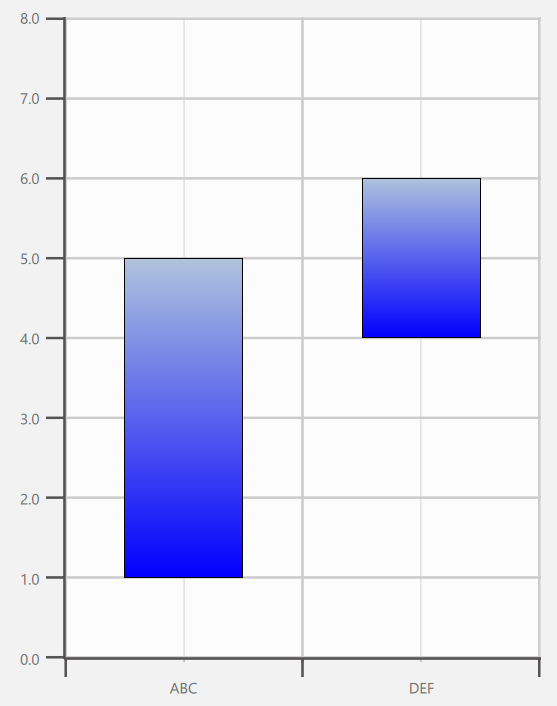
以下代码实现了图中所示的自定义图表。在此示例中,自定义数据包含两个值:upper 和 lower。这些值随后在委托中被定义,以影响元素的高度和 y 坐标。
import QtQuick
import QtGraphs

Window {
    width: 640
    height: 480
    visible: true

    GraphsView {
        anchors.fill: parent

        axisX: BarCategoryAxis {
            categories: ["ABC", "DEF"]
        }

        axisY: ValueAxis {
            max: 8
            tickInterval: 1
        }

        CustomSeries {
            id: custom

            delegate: Rectangle {
                property var data
                gradient: Gradient {
                    GradientStop { position: 0.0; color: "lightsteelblue" }
                    GradientStop { position: 1.0; color: "blue" }
                }
                border.width: 1
                x: custom.mapX(data.index + 0.5) - width * 0.5
                y: custom.mapY((data.upper + data.lower) * 0.5) - height * 0.5
                width: Math.abs(custom.mapX(1) - custom.mapX(0)) * 0.5
                height: Math.abs(custom.mapY(data.upper) - custom.mapY(data.lower))
            }

            CustomSeriesData {
                data: ({
                    upper: 5,
                    lower: 1
                })
            }

            CustomSeriesData {
                data: ({
                    upper: 6,
                    lower: 4
                })
            }
        }
    }
}
属性文档
delegate : Component
该委托用于将与提供的自定义数据相对应的元素插入到 QML 中。数据在CustomSeries 中定义,并通过“data”属性传递给被委托的元素。
delegate: Rectangle {
        property var data
        Rectangle {
            color: "tan"
            border.color: "black"
            border.width: 4
            y: series.mapY(data.index + 1) - height / 2 + 1
            x: series.mapX(data.median) - width / 2
            height: 32
            width: Math.abs(series.mapX(data.upperQuartile) - series.mapX(data.lowerQuartile))
        }
    }
}
方法文档
void append()
将一个空数据项追加到序列中。
void append(var data)
将由data 定义的数据项追加到序列中。
void clear()
清除所有数据项。
void insert(int index)
在序列的index 位置处追加一个空数据项。
void insert(int index, var data)
将由data 定义的数据项追加到序列中index 的位置。
real mapX(real x)
返回将x 轴空间坐标转换为渲染空间后的坐标。
real mapY(real y)
返回将y 轴空间坐标转换为渲染空间后的坐标。
void remove(int index)
删除位于index 处的数据项。
© 2026 The Qt Company Ltd. Documentation contributions included herein are the copyrights of their respective owners. The documentation provided herein is licensed under the terms of the GNU Free Documentation License version 1.3 as published by the Free Software Foundation. Qt and respective logos are trademarks of The Qt Company Ltd. in Finland and/or other countries worldwide. All other trademarks are property of their respective owners.
