
Page QML Type
支持页眉和页脚的样式化页面控件。更多...
| Import Statement: | import QtQuick.Controls |
| Inherits: |
属性
- footer : Item
- header : Item
- implicitFooterHeight : real
(since QtQuick.Controls 2.5 (Qt 5.12)) - implicitFooterWidth : real
(since QtQuick.Controls 2.5 (Qt 5.12)) - implicitHeaderHeight : real
(since QtQuick.Controls 2.5 (Qt 5.12)) - implicitHeaderWidth : real
(since QtQuick.Controls 2.5 (Qt 5.12)) - title : string
详细说明
Page 是一个容器控件,便于将header 和footer 项目添加到页面中。
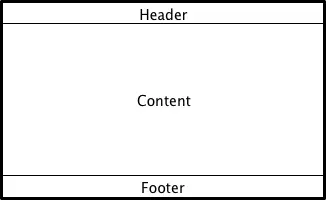
声明为 Page 子项的项目:
- 会自动作为“Page”的 contentItem 的子项。动态创建的项目需要显式地将其作为 contentItem 的子项。
- 不会自动定位或调整大小。
以下示例代码片段演示了如何使用特定于页面的工具栏页眉和全应用程序通用的标签栏页脚。
import QtQuick.Controls
import QtQuick.Layouts

ApplicationWindow {
    visible: true

    StackView {
        anchors.fill: parent

        initialItem: Page {
            header: ToolBar {
                // ...
            }

            ColumnLayout {
                anchors.fill: parent
                // ...
            }
        }
    }

    footer: TabBar {
        // ...
    }
}
另请参阅 ApplicationWindow 、容器控件以及《Qt Quick Controls 》中的焦点管理。
属性文档
footer : Item
此属性用于存储页面页脚项。页脚项位于页面底部,其宽度会根据页面宽度进行调整。默认值为null 。
注意:将 ToolBar 、TabBar 或DialogButtonBox 指定为 页面页脚时 ,会自动将相应的ToolBar::position 、TabBar::position 或DialogButtonBox::position 属性设置为Footer 。
另请参阅 header 和ApplicationWindow::footer 。
header : Item
此属性用于存储页面标题项。标题项位于页面顶部,并调整为与页面宽度相同。默认值为null 。
注意:将 ToolBar 、TabBar 或DialogButtonBox 指定 为页面页眉时,会自动将相应的ToolBar::position 、TabBar::position 或DialogButtonBox::position 属性设置为Header 。
另请参阅 footer 和ApplicationWindow::header 。
implicitFooterHeight : real [read-only, since QtQuick.Controls 2.5 (Qt 5.12)]
该属性保存了隐式页脚的高度。
其值等于footer && footer.visible ? footer.implicitHeight : 0 。
该属性在 QtQuick.Controls 2.5(Qt 5.12)中引入。
另请参阅 implicitFooterWidth 和implicitHeaderHeight 。
implicitFooterWidth : real [read-only, since QtQuick.Controls 2.5 (Qt 5.12)]
该属性存储了隐式页脚的宽度。
其值等于footer && footer.visible ? footer.implicitWidth : 0 。
该属性在 QtQuick.Controls 2.5(Qt 5.12)中引入。
另请参阅 implicitFooterHeight 和implicitHeaderWidth 。
implicitHeaderHeight : real [read-only, since QtQuick.Controls 2.5 (Qt 5.12)]
该属性存储隐式标题的高度。
其值等于header && header.visible ? header.implicitHeight : 0 。
该属性在 QtQuick.Controls 2.5(Qt 5.12)中引入。
另请参阅 implicitHeaderWidth 和implicitFooterHeight 。
implicitHeaderWidth : real [read-only, since QtQuick.Controls 2.5 (Qt 5.12)]
该属性存储隐式标题的宽度。
其值等于header && header.visible ? header.implicitWidth : 0 。
该属性于 QtQuick.Controls 2.5(Qt 5.12)中引入。
另请参阅 implicitHeaderHeight 和implicitFooterWidth 。
title : string
该属性用于存储页面标题。
标题通常显示在页面顶部,用于向用户提供当前浏览页面的上下文信息。
Page 本身不会渲染标题,而是依赖应用程序来完成此操作。例如:
© 2026 The Qt Company Ltd. Documentation contributions included herein are the copyrights of their respective owners. The documentation provided herein is licensed under the terms of the GNU Free Documentation License version 1.3 as published by the Free Software Foundation. Qt and respective logos are trademarks of The Qt Company Ltd. in Finland and/or other countries worldwide. All other trademarks are property of their respective owners.
