
SelectionRectangle QML Type
| Import Statement: | import QtQuick.Controls |
| Since: | Qt 6.2 |
| Inherits: |
属性
- active : bool
- bottomRightHandle : Component
- dragging : bool
- selectionMode : enumeration
- target : Item
- topLeftHandle : Component
关联属性
详细说明
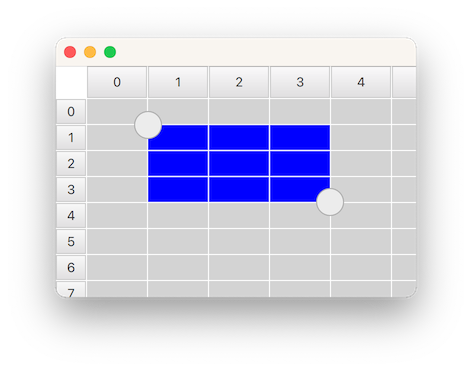
SelectionRectangle 用于在TableView 中选择表格单元格。它允许用户通过在视口内拖动指针,或在单元格上长按来开始选择。
要使 SelectionRectangle 能够选择单元格,TableView 必须已分配一个ItemSelectionModel 。该ItemSelectionModel 将存储在模型上进行的任何选择操作,并可用于查询用户已选中的单元格。
以下示例演示了如何让 SelectionRectangle 针对某个TableView :
    TableView {
        id: tableView
        anchors.fill: parent
        clip: true
        acceptedButtons: Qt.NoButton // mouse-drag changes selection

        model: TableModel {
            TableModelColumn { display: "name" }
            TableModelColumn { display: "age" }
            rows: [ { "name": "Harry", "age": "11" },
                    { "name": "Hedwig", "age": "8" } ]
        }

        selectionModel: ItemSelectionModel {
            model: tableView.model
        }

        delegate: TableViewDelegate { padding: 2 }
    }

    SelectionRectangle {
        target: tableView
    }
注意: SelectionRectangle 本身不会作为选择范围的一部分显示。仅使用委托(如topLeftHandle 和bottomRightHandle )。您还应考虑使用rendering the TableView delegate as selected 。
另请参阅 TableView 、TableView::selectionModel 和ItemSelectionModel 。
属性文档
active : bool [read-only]
当用户正在进行选择操作时,该属性为true 。选择状态将从用户开始选择时起生效,并持续至选择被取消为止,例如当用户在视口内点击时。
bottomRightHandle : Component
该属性存储将在选择矩形左上角中心处显示的控件。当提供控点时,用户可以拖动它来调整选择范围。
默认情况下,当选区被移除时,控制柄不会被隐藏。相反,这由委托负责处理,以便支持自定义淡出动画。确保控制柄最终被隐藏的最简单方法,是将 `visible ` 绑定到 `SelectionRectangle` 的 `active ` 状态:
SelectionRectangle {
    bottomRightHandle: Rectangle {
        width: 20
        height: 20
        visible: SelectionRectangle.control.active
    }
}若不希望在右下角显示选择手柄,请将此属性设置为null 。
另请参阅 topLeftHandle 。
dragging : bool [read-only]
当用户通过拖动指针或拖动控制柄来调整选择矩形时,该属性始终为true 。
selectionMode : enumeration
当需要开始选择时,此属性生效。
| 常量 | 描述 |
|---|---|
SelectionRectangle.Drag | 通过在视口内拖动指针将开始选择 |
SelectionRectangle.PressAndHold | 通过在单元格上按住不放可开始选择 |
SelectionRectangle.Auto | SelectionRectangle 将根据target 和所使用的输入设备来选择使用哪种模式。这通常意味着使用鼠标时为Drag ,而在触摸屏上则为PressAndHold 。 不过,Drag 仅在不与轻扫操作冲突时才会被使用。避免冲突的一种方法是将acceptedButtons 设置为Qt.NoButton ,从而禁用鼠标拖拽时的轻扫功能。在这种情况下,鼠标滚轮或触控板的滚动手势仍可正常工作,触摸屏的轻扫操作仍可正常工作,且触摸屏选择可通过按住不放的方式启动。 另一种方法是将 `interactive ` 设置为 `false`,这将完全禁用滑动和滚动功能(或许仅应在 UI 的某些模式下临时采用此设置)。还有一种方法是将 `TableView ` 置于 `ScrollView ` 之中(默认情况下,该控件对鼠标事件禁用滑动功能)。 |
默认值为Auto 。
target : Item
该属性保存了“TableView ”对象,SelectionRectangle 应基于该对象进行操作。
topLeftHandle : Component
该属性保存将在选择矩形左上角中心处显示的控件。当提供控制柄时,用户可以拖动它来调整选择范围。
默认情况下,当选区被移除时,选区控点不会被隐藏。相反,这由委托负责处理,以便实现自定义的淡出动画。确保选区控点最终被隐藏的最简单方法,是将 `visible ` 绑定到 `SelectionRectangle` 的 `active ` 状态:
SelectionRectangle {
    topLeftHandle: Rectangle {
        width: 20
        height: 20
        visible: SelectionRectangle.control.active
    }
}若不希望在左上角显示选择控点,请将此属性设置为null 。
另请参阅 bottomRightHandle 。
附加属性文档
SelectionRectangle.control : SelectionRectangle [attached]
该附加属性保存了管理委托实例的SelectionRectangle 。它被附加到每个句柄实例上。
SelectionRectangle.dragging : bool [attached]
当用户拖动控点时,此附加属性将设置为 `true `。它与每个控点实例相关联。
© 2026 The Qt Company Ltd. Documentation contributions included herein are the copyrights of their respective owners. The documentation provided herein is licensed under the terms of the GNU Free Documentation License version 1.3 as published by the Free Software Foundation. Qt and respective logos are trademarks of The Qt Company Ltd. in Finland and/or other countries worldwide. All other trademarks are property of their respective owners.
