
Rotation QML Type
提供了一种旋转项的方法。更多...
| Import Statement: | import QtQuick |
属性
- angle : real
- axis
- distanceToPlane : real
(since 6.11) - origin
详细说明
“旋转”类型提供了一种通过旋转变换对Item 进行旋转的方法。
它允许以任意点为基准进行(Z轴)旋转,并提供了为项目指定类似3D旋转的方式。与rotation 属性相比,这能提供对项目旋转更精细的控制。
以下示例将一个矩形围绕其内部点 (25, 25) 进行旋转:
Rectangle {
    width: 100; height: 100
    color: "blue"
    transform: Rotation { origin.x: 25; origin.y: 25; angle: 45}
}
对于类似 3D 的控件旋转,除了原点之外,还必须指定旋转轴。以下示例展示了应用于Image 控件的各种类似 3D 的旋转效果。
import QtQuick

Row {
    x: 10; y: 10
    spacing: 10

    Image { source: "images/qt-logo.png" }
    Image {
        source: "images/qt-logo.png"
        transform: Rotation { origin.x: 30; origin.y: 30; axis { x: 0; y: 1; z: 0 } angle: 18 }
    }
    Image {
        source: "images/qt-logo.png"
        transform: Rotation { origin.x: 30; origin.y: 30; axis { x: 0; y: 1; z: 0 } angle: 36 }
    }
    Image {
        source: "images/qt-logo.png"
        transform: Rotation { origin.x: 30; origin.y: 30; axis { x: 0; y: 1; z: 0 } angle: 54 }
    }
    Image {
        source: "images/qt-logo.png"
        transform: Rotation { origin.x: 30; origin.y: 30; axis { x: 0; y: 1; z: 0 } angle: 72 }
    }
}
另请参阅 “旋钮控件”示例和“Qt Quick 演示——时钟”。
属性文档
angle : real
旋转角度,单位为度,顺时针方向。
axis group
旋转的轴。对于围绕某一点进行的简单(2D)旋转,无需指定轴,因为默认轴是z轴(axis { x: 0; y: 0; z: 1 } )。
对于典型的 3D 旋转,通常需要同时指定原点和旋转轴。
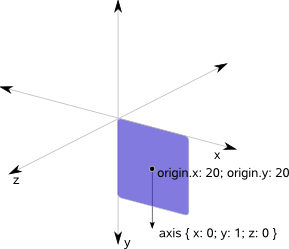
distanceToPlane : real [since 6.11]
该属性定义了透视投影模型中视平面(虚拟屏幕)与观察者之间的距离。
距离越小,透视效果越强,旋转时物体看起来后退或前移的效果越明显。数值越大,外观越趋于平坦、更接近正投影,可见的透视畸变也越少。
默认值为1024.0 ,可提供适中的透视效果,适用于大多数使用场景。
当此属性设置为0 时,将不应用透视投影。在这种情况下,旋转将直接在 3D 空间中使用由QMatrix4x4::rotate() 定义的变换进行。
该属性仅影响围绕 x 轴和 y 轴的旋转。围绕 z 轴的旋转(2D 旋转)不受此属性影响。
该属性自 Qt 6.11 起引入。
origin group
旋转的原点(即当对象的其余部分旋转时,相对于父对象保持静止的点)。默认情况下,原点位于 (0, 0)。
© 2026 The Qt Company Ltd. Documentation contributions included herein are the copyrights of their respective owners. The documentation provided herein is licensed under the terms of the GNU Free Documentation License version 1.3 as published by the Free Software Foundation. Qt and respective logos are trademarks of The Qt Company Ltd. in Finland and/or other countries worldwide. All other trademarks are property of their respective owners.
