
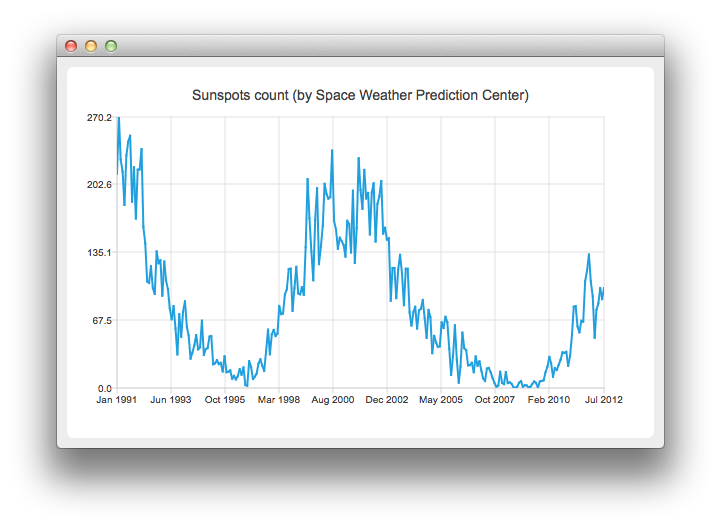
带日期和时间轴的折线图
注意:这是 “带小部件的图表图库”示例的一部分。
运行示例
您可以通过以下方式运行该示例:
- Qt Creator
打开Welcome 模式,并从Examples 中选择该示例。有关更多信息,请参阅Qt Creator :教程:构建和运行。
- Qt Extension for Visual Studio Code
在Command Palette 中执行Qt: Open Qt examples 命令,并从列表中选择该示例。有关详细信息,请参阅Qt Extension for Visual Studio Code :教程:构建和运行。
创建折线图
要创建折线图,需要一个 QLineSeries 实例。让我们创建一个。
auto series = new QLineSeries;在图表中,我们将展示太阳黑子数量随时间的变化情况。数据(来自空间天气预测中心)将从文本文件中读取。
在下面的代码片段中,请注意如何使用QDateTime::toMSecsSinceEpoch 方法将QDateTime 对象转换为数字,以便将其传递给QLineSeries的append方法。
// data from http://www.swpc.noaa.gov/ftpdir/weekly/RecentIndices.txt
// http://www.swpc.noaa.gov/ftpdir/weekly/README
// http://www.weather.gov/disclaimer
QFile sunSpots(":sun_spots");
if (!sunSpots.open(QIODevice::ReadOnly | QIODevice::Text)) {
    m_loadError = QStringLiteral("Failed to load '%1' file.").arg(sunSpots.fileName());
    return false;
}

QTextStream stream(&sunSpots);
while (!stream.atEnd()) {
    QString line = stream.readLine();
    if (line.startsWith("#") || line.startsWith(":"))
        continue;
    QStringList values = line.split(QLatin1Char(' '), Qt::SkipEmptyParts);
    QDateTime momentInTime;
    momentInTime.setDate(QDate(values[0].toInt(), values[1].toInt() , 15));
    series->append(momentInTime.toMSecsSinceEpoch(), values[2].toDouble());
}
sunSpots.close();
要在图表上展示数据,我们需要一个 QChart 实例。我们将数据系列添加到该实例中,隐藏图例,创建默认坐标轴,并设置图表标题。
auto chart = new QChart;
chart->addSeries(series);
chart->legend()->hide();
chart->setTitle("Sunspots count (by Space Weather Prediction Center)");
由于我们使用了 QLineSeries,调用 createDefaultAxes 会同时创建作为 X 轴和 Y 轴的 QValueAxis。若要使用 QDateTimeAxis,我们需要手动将其设置到图表上。首先创建 QDateTimeAxis 的实例,然后设置要显示的刻度数。 太阳黑子数量以月平均值的形式提供。因此,轴标签无需包含时间和日期信息。这可通过设置自定义标签格式来实现。请参阅QDateTime::toString() 方法的文档,了解可用的格式选项。
auto axisX = new QDateTimeAxis;
axisX->setTickCount(10);
axisX->setFormat("MMM yyyy");
axisX->setTitleText("Date");
chart->addAxis(axisX, Qt::AlignBottom);
series->attachAxis(axisX);

auto axisY = new QValueAxis;
axisY->setLabelFormat("%i");
axisY->setTitleText("Sunspots count");
chart->addAxis(axisY, Qt::AlignLeft);
series->attachAxis(axisY);
接着,我们创建一个 QChartView 对象,并将 QChart 作为参数传入。这样,我们就不需要自己创建QGraphicsView 场景了。此外,我们还启用了抗锯齿功能,以使渲染的线条看起来更美观。
createDefaultChartView(chart);图表现已准备就绪,可以显示了。
© 2026 The Qt Company Ltd. Documentation contributions included herein are the copyrights of their respective owners. The documentation provided herein is licensed under the terms of the GNU Free Documentation License version 1.3 as published by the Free Software Foundation. Qt and respective logos are trademarks of The Qt Company Ltd. in Finland and/or other countries worldwide. All other trademarks are property of their respective owners.
