
组合折线图和柱状图
注意:这是 “带小部件的图表”示例库的一部分。
在此示例中,我们将折线图与柱形图结合,并将类别轴作为两者的公共轴。
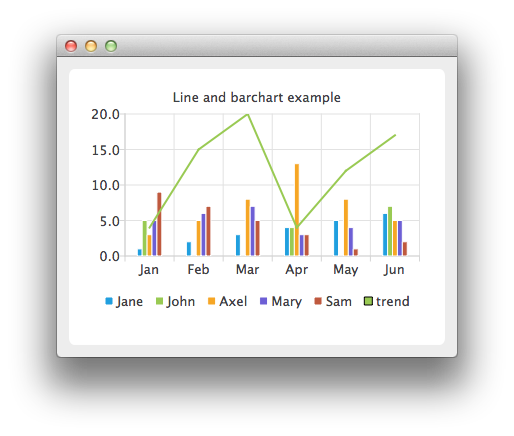
在此,我们为柱形系列创建数据。
auto set0 = new QBarSet("Jane");
auto set1 = new QBarSet("John");
auto set2 = new QBarSet("Axel");
auto set3 = new QBarSet("Mary");
auto set4 = new QBarSet("Sam");

*set0 << 1 << 2 << 3 << 4 << 5 << 6;
*set1 << 5 << 0 << 0 << 4 << 0 << 7;
*set2 << 3 << 5 << 8 << 13 << 8 << 5;
*set3 << 5 << 6 << 7 << 3 << 4 << 5;
*set4 << 9 << 7 << 5 << 3 << 1 << 2;
我们创建一个柱形系列,并向其中追加数据集。每个数据集的首个值被归入第一个类别,第二个值归入第二个类别,依此类推。
auto barseries = new QBarSeries;
barseries->append(set0);
barseries->append(set1);
barseries->append(set2);
barseries->append(set3);
barseries->append(set4);
然后,我们创建一个折线系列并向其中添加数据。为了使数据与柱形图匹配,我们将索引用作折线系列的 x 值,因此第一个点位于 (0,value),第二个点位于 (1,value),以此类推。
auto lineseries = new QLineSeries;
lineseries->setName("trend");
lineseries->append(QPoint(0, 4));
lineseries->append(QPoint(1, 15));
lineseries->append(QPoint(2, 20));
lineseries->append(QPoint(3, 4));
lineseries->append(QPoint(4, 12));
lineseries->append(QPoint(5, 17));
在此,我们创建图表并将这两个系列添加到其中。
auto chart = new QChart;
chart->addSeries(barseries);
chart->addSeries(lineseries);
chart->setTitle("Line and Bar Chart");
为了使图表正确显示这些系列,我们必须为这些系列创建自定义坐标轴。如果不创建自定义坐标轴,每个系列都会被缩放以占据图表的最大区域(如同单系列的情况),从而导致结果不正确。 通过自定义坐标轴,我们将两个系列范围设置为遵循同一坐标轴。对于 x 轴,我们使用 QBarCategoryAxis;对于 y 轴,我们使用 QValuesAxis。
QStringList categories;
categories << "Jan" << "Feb" << "Mar" << "Apr" << "May" << "Jun";
auto axisX = new QBarCategoryAxis;
axisX->append(categories);
chart->addAxis(axisX, Qt::AlignBottom);
lineseries->attachAxis(axisX);
barseries->attachAxis(axisX);
axisX->setRange(QString("Jan"), QString("Jun"));

auto axisY = new QValueAxis;
chart->addAxis(axisY, Qt::AlignLeft);
lineseries->attachAxis(axisY);
barseries->attachAxis(axisY);
axisY->setRange(0, 20);
此外,我们还希望显示图例。
chart->legend()->setVisible(true);
chart->legend()->setAlignment(Qt::AlignBottom);
最后,我们将图表添加到视图中。
createDefaultChartView(chart);© 2026 The Qt Company Ltd. Documentation contributions included herein are the copyrights of their respective owners. The documentation provided herein is licensed under the terms of the GNU Free Documentation License version 1.3 as published by the Free Software Foundation. Qt and respective logos are trademarks of The Qt Company Ltd. in Finland and/or other countries worldwide. All other trademarks are property of their respective owners.
