
QtGrpc 聊天
一款可在聊天室中分享各类消息的聊天应用。
该“Chat”示例演示了Qt GRPC 客户端API的高级用法。服务器支持用户注册和身份验证,允许用户加入聊天室(ChatRoom)。加入后,用户可以在聊天室中与其他所有参与者分享各种类型的消息,例如文本消息、图片、用户活动信息,或来自其磁盘的任何其他文件。
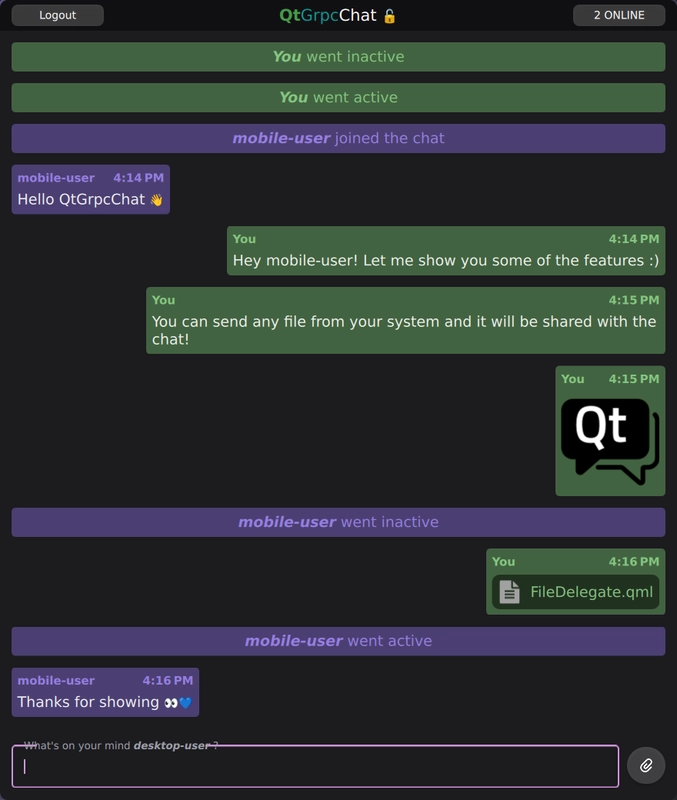
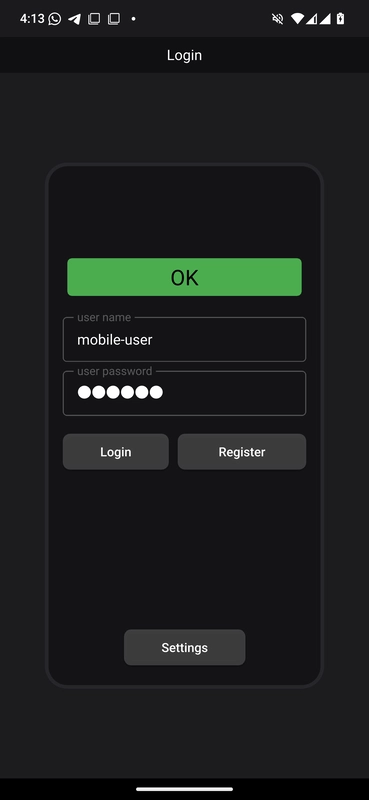
运行示例
- 请确保
qtgrpc_chat_server正在运行且已成功进入监听状态。 - 如果您与服务器位于同一台机器上,运行
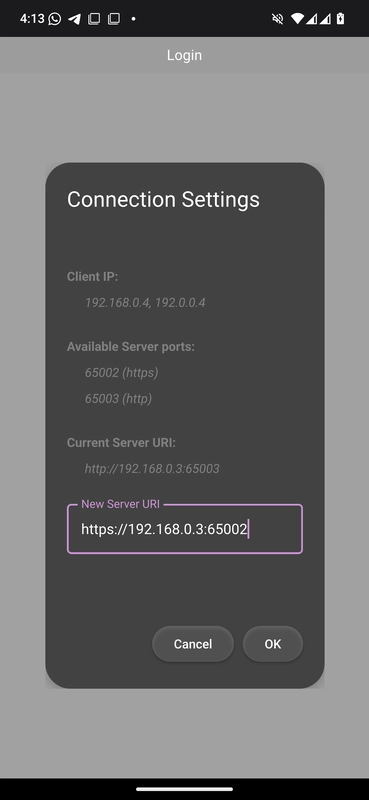
qtgrpc_chat_client时,默认的localhost地址即可满足需求。如果您使用的是除服务器主机以外的其他设备,请在“设置”对话框中指定运行服务器的宿主机的正确 IP 地址。 - 请确保在客户端启用了
GRPC_CHAT_USE_EMOJI_FONTCMake 选项,以获得流畅的表情符号体验 🚀。
要运行示例,请访问 Qt Creator中的示例,请打开Welcome 模式,并从Examples 中选择该示例。有关更多信息,请参阅Qt Creator :教程:构建与运行。
相关模块和类。
本示例介绍了以下 Qt 模块和类。
- 通过长生命周期QGrpcBidiStream 进行通信。
- 从工作者节点(thread )使用
QtGrpc客户端。 - 在 protobuf 模式中使用QtProtobufQtCoreTypes 模块。
- 通过SSL 进行安全通信。
- 在 QML 中可视化QtProtobuf 消息ListView 。
Protobuf 模式
Protobuf 模式定义了聊天应用中使用的消息和服务结构。该模式分为两个文件:
syntax = "proto3";

package chat;

import "chatmessages.proto";

service QtGrpcChat {
    // Register a user with \a Credentials.
    rpc Register(Credentials) returns (None);
    // Join as a registered user and exchange \a ChatMessage(s)
    rpc ChatRoom(stream ChatMessage) returns (stream ChatMessage) {}
}
qtgrpcchat.proto 文件定义了QtGrpcChat服务,该服务提供了两个RPC方法:
Register: 使用提供的Credentials注册用户。服务器将用户信息以明文形式存储在数据库中并进行验证。ChatRoom: 建立一个双向流,用于在所有已连接的客户端之间交换ChatMessage。服务器将所有收到的消息广播给其他已连接的客户端。
syntax = "proto3";

package chat;

import "QtCore/QtCore.proto";

message ChatMessage {
    string username = 1;
    int64 timestamp = 2;
    oneof content {
        TextMessage text = 3;
        FileMessage file = 4;
        UserStatus user_status = 5;
    }
}
chatmessages.proto 文件定义了ChatMessage ,这是一个带标签的联合类型(也称为和类型)。它代表了所有可通过ChatRoom 流式RPC发送的独立消息。每个ChatMessage 都必须包含username 和timestamp ,以标识发送方。
您需要导入QtCore/QtCore.proto 以启用QtProtobufQtCoreTypes 模块中的类型,从而实现QtCore 特定类型与其 Protobuf 对应类型之间的无缝转换。
message FileMessage {
    enum Type {
        UNKNOWN = 0;
        IMAGE = 1;
        AUDIO = 2;
        VIDEO = 3;
        TEXT = 4;
    }
    Type type = 1;
    string name = 2;
    bytes content = 3;
    uint64 size = 4;

    message Continuation {
        uint64 index = 1;
        uint64 count = 2;
        QtCore.QUuid uuid = 3;
    }
    optional Continuation continuation = 5;
}
FileMessage 是ChatMessage 集合类型所支持的消息类型之一。它允许将任何本地文件封装为一条消息。可选的Continuation 字段通过分块处理大文件传输,从而确保可靠交付。
注意:有关在 Protobuf 模式和应用程序代码中使用ProtobufQtCoreTypes 模块的更多详细信息, 请参阅 Qt Core usage。
服务器
注意: 此处描述的服务器应用程序 使用了 gRPC™ 库。
该服务器应用程序使用了异步gRPC 回调API。这使我们能够充分利用异步API带来的性能优势,同时避免了手动管理完成队列所带来的复杂性。
class QtGrpcChatService final : public chat::QtGrpcChat::CallbackService您需要声明QtGrpcChatService 类,该类继承自生成的QtGrpcChat 服务中的CallbackService 类。
    grpc::ServerBidiReactor<chat::ChatMessage, chat::ChatMessage> *
    ChatRoom(grpc::CallbackServerContext *context) override
    {
        return new ChatRoomReactor(this, context);
    }

    grpc::ServerUnaryReactor *Register(grpc::CallbackServerContext *context,
                                       const chat::Credentials *request,
chat::None * /*response*/) override此外,还需重写虚拟函数,以实现该服务提供的两个gRPC 方法的功能:
Register方法用于验证用户身份并将用户信息存储在纯文本文档中。ChatRoom方法会将元数据中提供的凭据与数据库进行比对。如果验证成功,则建立用于通信的双向流。
    // Broadcast \a message to all connected clients. Optionally \a skip a client
    void broadcast(const std::shared_ptr<chat::ChatMessage> &message, const ChatRoomReactor *skip)
    {
        for (auto *client : activeClients()) {
            assert(client);
            if (skip && client == skip)
                continue;
            client->startSharedWrite(message);
        }
}服务实现会跟踪所有通过ChatRoom 方法连接或断开连接的活动客户端。这启用了broadcast 功能,该功能可与所有已连接的客户端共享消息。为减少存储空间和开销,将ChatMessage 封装在shared_ptr 中。
    // Share \a response. It will be kept alive until the last write operation finishes.
    void startSharedWrite(std::shared_ptr<chat::ChatMessage> response)
    {
        std::scoped_lock lock(m_writeMtx);
        if (m_response) {
            m_responseQueue.emplace(std::move(response));
        } else {
            m_response = std::move(response);
            StartWrite(m_response.get());
        }
    }
startSharedWrite 方法是ChatRoomReactor 的成员函数。如果反应器当前正在写入,则消息会被缓冲到队列中;否则,将发起写入操作。所有客户端共享一条唯一的消息。response 消息的每份副本都会增加use_count 的计数。当所有客户端都完成消息写入,且其use_count 降至0时,相关资源将被释放。
    // Distribute the incoming message to all other clients.
    m_service->broadcast(m_request, this);
    m_request = std::make_shared<chat::ChatMessage>(); // detach
StartRead(m_request.get());此代码片段是ChatRoomReactor::OnReadDone 虚拟方法的一部分。每次调用此方法时,都表示已从客户端接收了一条新消息。该消息将广播给所有其他客户端,但跳过发送方。
    std::scoped_lock lock(m_writeMtx);

    if (!m_responseQueue.empty()) {
        m_response = std::move(m_responseQueue.front());
        m_responseQueue.pop();
        StartWrite(m_response.get());
        return;
    }

m_response.reset();此代码片段是ChatRoomReactor::OnWriteDone 虚拟方法的一部分。每次调用此方法时,都表示已向客户端写入一条消息。如果队列中存在缓冲的消息,则写入下一条消息;否则,将m_response 重置为0,以指示当前没有写入操作正在进行。使用锁来防止与broadcast 方法发生竞争。
客户端
客户端应用程序使用提供的 Protobuf 模式与服务器进行通信。它同时具备前端和后端功能,用于注册用户以及处理ChatRoom gRPC 方法的长期双向流。这使得ChatMessage的可视化和通信成为可能。
设置
add_library(qtgrpc_chat_client_proto STATIC)
qt_add_protobuf(qtgrpc_chat_client_proto
    QML
    QML_URI QtGrpcChat.Proto
    PROTO_FILES
        ../proto/chatmessages.proto
    PROTO_INCLUDES
        $<TARGET_PROPERTY:Qt6::ProtobufQtCoreTypes,QT_PROTO_INCLUDES>
)

qt_add_grpc(qtgrpc_chat_client_proto CLIENT
    PROTO_FILES
        ../proto/qtgrpcchat.proto
    PROTO_INCLUDES
        $<TARGET_PROPERTY:Qt6::ProtobufQtCoreTypes,QT_PROTO_INCLUDES>
)
首先,根据 Protobuf 模式生成源文件。由于qtgrpcchat.proto 文件中不包含任何message 定义,因此只需执行qtgrpcgen生成操作。此外,还需提供ProtobufQtCoreTypes 模块的PROTO_INCLUDES ,以确保"QtCore/QtCore.proto" 的导入有效。
target_link_libraries(qtgrpc_chat_client_proto
    PUBLIC
        Qt6::Protobuf
        Qt6::ProtobufQtCoreTypes
        Qt6::Grpc
)请确保独立的qtgrpc_chat_client_proto 目标已对其依赖项(包括ProtobufQtCoreTypes 模块)进行公开链接。随后,应用程序目标将链接到该库。
后端逻辑
该应用程序的后端围绕四个关键要素构建:
ChatEngine:一个面向 QML 的单例,用于管理应用程序逻辑。ClientWorker:一个异步提供gRPC 客户端功能的 worker 对象。ChatMessageModel: 一个自定义的QAbstractListModel,用于处理和存储ChatMessage。UserStatusModel: 一个用于管理用户活动的自定义QAbstractListModel。
    explicit ChatEngine(QObject *parent = nullptr);
    ~ChatEngine() override;

    // Register operations
    Q_INVOKABLE void registerUser(const chat::Credentials &credentials);
    // ChatRoom operations
    Q_INVOKABLE void login(const chat::Credentials &credentials);
    Q_INVOKABLE void logout();
    Q_INVOKABLE void sendText(const QString &message);
    Q_INVOKABLE void sendFile(const QUrl &url);
    Q_INVOKABLE void sendFiles(const QList<QUrl> &urls);
    Q_INVOKABLE bool sendFilesFromClipboard();
上面的代码片段展示了部分从 QML 调用以与服务器交互的Q_INVOKABLE 功能。
    explicit ClientWorker(std::shared_ptr<LogModel> logger, QObject *parent = nullptr);
    ~ClientWorker() override;

public Q_SLOTS:
    void registerUser(const chat::Credentials &credentials);
    void login(const chat::Credentials &credentials);
    void logout();
    void sendFile(const QUrl &url);
    void sendFiles(const QList<QUrl> &urls);
    void sendMessage(const chat::ChatMessage &message);
ClientWorker 提供的槽(slots)在一定程度上与ChatEngine 暴露的 API 相呼应。ClientWorker 在专用线程中运行,以便在后台处理耗时较长的操作,例如传输或接收大文件。
m_clientWorker->moveToThread(&m_clientThread);
m_clientThread.start();
connect(&m_clientThread, &QThread::finished, m_clientWorker, &QObject::deleteLater);
connect(m_clientWorker, &ClientWorker::registerFinished, this, &ChatEngine::registerFinished);
connect(m_clientWorker, &ClientWorker::chatError, this, &ChatEngine::chatError);
...在ChatEngine 的构造函数中,将ClientWorker 分配给其专用的工作线程,并继续处理和转发其信号,以便在 QML 侧使用这些信号。
void ChatEngine::registerUser(const chat::Credentials &credentials)
{
    QMetaObject::invokeMethod(m_clientWorker, &ClientWorker::registerUser, credentials);
}
...
void ClientWorker::registerUser(const chat::Credentials &credentials)
{
    if (credentials.name().isEmpty() || credentials.password().isEmpty()) {
        emit chatError(tr("Invalid credentials for registration"));
        return;
    }

    if ((!m_client || m_hostUriDirty) && !initializeClient()) {
        emit chatError(tr("Failed registration: unabled to initialize client"));
        return;
    }

    auto reply = m_client->Register(credentials, QGrpcCallOptions{}.setDeadlineTimeout(2s));
    const auto *replyPtr = reply.get();
    connect(
        replyPtr, &QGrpcCallReply::finished, this,
        [this, reply = std::move(reply)](const QGrpcStatus &status) {
            emit registerFinished(status);
        },
        Qt::SingleShotConnection);
}这演示了ChatEngine 如何与ClientWorker 交互以注册用户。由于ClientWorker 在自己的线程中运行,因此必须使用invokeMethod 来安全地调用其成员函数。
在ClientWorker 中,需检查客户端是否未初始化,或者主机URI是否已更改。若满足任一条件,则调用initializeClient ,该方法将创建一个新的QGrpcHttp2Channel 。由于这是一项耗时较长的操作,应尽量减少其调用次数。
要处理Register RPC,请使用setDeadlineTimeout 选项以防范服务器闲置。通常建议为一元RPC设置超时限制。
void ClientWorker::login(const chat::Credentials &credentials)
{
    if (credentials.name().isEmpty() || credentials.password().isEmpty()) {
        emit chatError(tr("Invalid credentials for login"));
        return;
    }
    ...
    QGrpcCallOptions opts;
    opts.setMetadata({
        { "user-name",     credentials.name().toUtf8()     },
        { "user-password", credentials.password().toUtf8() },
    });
    connectStream(opts);
}登录ChatRoom 时,您可以使用setMetadata 选项提供用户凭据,以满足服务器身份验证的要求。实际的调用和连接建立由connectStream 方法处理。
void ClientWorker::connectStream(const QGrpcCallOptions &opts)
{
    ...
    m_chatStream = m_client->ChatRoom(*initialMessage, opts);
    ...
    connect(m_chatStream.get(), &QGrpcBidiStream::finished, this,
            [this, opts](const QGrpcStatus &status) {
                if (m_chatState == ChatState::Connected) {
                    // If we're connected retry again in 250 ms, no matter the error.
                    QTimer::singleShot(250, [this, opts]() { connectStream(opts); });
                } else {
                    setState(ChatState::Disconnected);
                    m_chatResponse = {};
                    m_userCredentials = {};
                    m_chatStream.reset();
                    emit chatStreamFinished(status);
                }
            });
...为应对流在您仍处于连接状态时突然结束的情况,需实现基本的重新连接逻辑。实现方法很简单,只需再次调用connectStream ,并传入初始调用时的QGrpcCallOptions 。这可确保所有必需的连接均得到更新。
注意:Android 的 Doze/应用待机模式可能会被触发,例如使用 FileDialog 或切换到其他应用时。该模式会关闭网络访问,终止所有活跃的QTcpSocket 连接,并导致流处于finished 状态。您可以通过重连逻辑来解决此问题。
    connect(m_chatStream.get(), &QGrpcBidiStream::messageReceived, this, [this]{
        ...
        switch(m_chatResponse.contentField()) {
        casechat::ChatMessage::ContentFields::UninitializedField:
            qDebug("Received uninitialized message");
           return;
        casechat::ChatMessage::ContentFields::Text:
            if(m_chatResponse.text().content().isEmpty())
                return;
            break;
        casechat::ChatMessage::ContentFields::File:
           // 下载任何文件消息,并将下载的 URL 存储在
            // 内容中,以便模型可以从那里引用它。
            m_chatResponse.file()
                .setContent(saveFileRequest(m_chatResponse.file()).toString().toUtf8());
           break;
        ...
        emitchatStreamMessageReceived(m_chatResponse);
    });
    setState(Backend::ChatState::Connecting);
}收到消息时,ClientWorker 会进行一些预处理,例如保存FileMessage 内容,这样ChatEngine 只需专注于模型即可。使用ContentFields 枚举来安全地检查 ChatMessage 组合类型的oneof content 字段。
void ChatEngine::sendText(const QString &message)
{
    if (message.trimmed().isEmpty())
        return;

    if (auto request = m_clientWorker->createMessage()) {
        chat::TextMessage tmsg;
        tmsg.setContent(message.toUtf8());
        request->setText(std::move(tmsg));
        QMetaObject::invokeMethod(m_clientWorker, &ClientWorker::sendMessage, *request);
        m_chatMessageModel->appendMessage(*request);
    }
}
...
void ClientWorker::sendMessage(const chat::ChatMessage &message)
{
    if (!m_chatStream || m_chatState != ChatState::Connected) {
        emit chatError(tr("Unable to send message"));
        return;
    }
    m_chatStream->writeMessage(message);
}在发送消息时,ChatEngine 会生成格式正确的请求。例如,sendText 方法接受一个QString ,并使用createMessage 函数生成一个有效的消息,其中username 和timestamp 字段已设置完毕。随后调用客户端发送该消息,并将一份副本加入我们自己的ChatMessageModel 队列中。
QML 前端
import QtGrpc
import QtGrpcChat
import QtGrpcChat.Proto
QML 代码中使用了以下导入:
QtGrpc: 提供QtGrpc 的QML功能,例如StatusCode 。QtGrpcChat: 我们的应用程序模块,其中包含诸如ChatEngine单例等组件。QtGrpcChat.Proto: 提供对生成的protobuf 类型的 QML 访问。
    Connections {
        target: ChatEngine
        function onChatStreamFinished(status) {
            root.handleStatus(status)
            loginView.clear()
        }
        function onChatStateChanged() {
            if (ChatEngine.chatState === Backend.ChatState.Connected && mainView.depth === 1)
                mainView.push("ChatView.qml")
            else if (ChatEngine.chatState === Backend.ChatState.Disconnected && mainView.depth > 1)
                mainView.pop()
        }
        function onRegisterFinished(status) {
            root.handleStatus(status)
        }
        function onChatError(message) {
            statusDisplay.text = message
            statusDisplay.color = "yellow"
            statusDisplay.restart()
        }
    }
Main.qml 处理由ChatEngine 发出的核心信号。这些信号大多在全局范围内处理,并在应用程序的任何状态下均可显示。
Rectangle {
    id: root

    property credentials creds
    ...
    ColumnLayout {
        id: credentialsItem
        ...
        RowLayout {
            id: buttonLayout
            ...
            Button {
                id: loginButton
                ...
                enabled: nameField.text && passwordField.text
                text: qsTr("Login")
                onPressed: {
                    root.creds.name = nameField.text
                    root.creds.password = passwordField.text
                    ChatEngine.login(root.creds)
                }
}由Protobuf模式生成的消息类型可在QML中访问,因为它们是QML_VALUE_TYPE(即消息定义的驼峰式命名版本)。LoginView.qml 使用credentials 值类型属性,在ChatEngine 上初始化login 。
        ListView {
            id: chatMessageView
            ...
            component DelegateBase: Item {
                id: base

                required property chatMessage display
                default property alias data: chatLayout.data
                ...
            }
            ...
            // We use the DelegateChooser and the 'whatThis' role to determine
            // the correct delegate for any ChatMessage
            delegate: DelegateChooser {
                role: "whatsThis"
                ...
                DelegateChoice {
                    roleValue: "text"
                    delegate: DelegateBase {
                        id: dbt
                        TextDelegate {
                            Layout.fillWidth: true
                            Layout.maximumWidth: root.maxMessageBoxWidth
                            Layout.preferredHeight: implicitHeight
                            Layout.bottomMargin: root.margin
                            Layout.leftMargin: root.margin
                            Layout.rightMargin: root.margin

                            message: dbt.display.text
                            selectionColor: dbt.lightColor
                            selectedTextColor: dbt.darkColor
                        }
                    }
}在ChatView.qml 中,ListView 会在ChatRoom 中显示消息。这稍微复杂一些,因为你需要根据具体情况处理ChatMessage 的总和类型。
您可以使用DelegateChooser,它允许我们根据消息类型选择合适的委托。请使用模型中的默认whatThis 角色,该角色为每个ChatMessage 实例提供消息类型。随后,DelegateBase 组件会访问模型的display 角色,从而使chatMessage数据可供渲染。
TextEdit {
    id: root

    required property textMessage message

    text: message.content
    color: "#f3f3f3"
    font.pointSize: 14
    wrapMode: TextEdit.Wrap
    readOnly: true
    selectByMouse: true
}以下是一个用于可视化TextMessage 类型的分组件。它使用protobuf模块中的textMessage 值类型来可视化文本内容。
                TextArea.flickable: TextArea {
                    id: inputField

                    function sendTextMessage() : void {
                        if (text === "")
                            return
                        ChatEngine.sendText(text)
                        text = ""
                    }
                    ...
                    Keys.onPressed: (event) => {
                        if (event.key === Qt.Key_Return && event.modifiers & Qt.ControlModifier) {
                            sendTextMessage()
                            event.accepted = true
                        } else if (event.key === Qt.Key_V && event.modifiers & Qt.ControlModifier) {
                            if (ChatEngine.sendFilesFromClipboard())
                                event.accepted = true
                        }
                    }
聊天客户端在发送消息时提供了多种访问方式,例如:
- 接受拖放到应用程序上的文件。
- <Ctrl + V> 发送 QClipboard 中存储的任何内容。
- 按 <Ctrl + Enter> 键从
inputField - 点击发送按钮以
inputField - 通过文件对话框选择文件
SSL
为了确保服务器与客户端之间的通信安全,采用了SSL/TLS加密。这至少需要满足以下条件:
- 私钥:包含服务器的私钥,用于建立安全连接。该私钥必须严格保密,绝不能与他人共享。
- 证书:包含服务器的公钥证书,该证书与客户端共享,用于验证服务器的身份。通常由证书颁发机构(CA)签发,也可为测试目的而自签名。
- 可选的根 CA 证书:如果您使用自定义证书颁发机构 (CA) 来签署服务器证书,则客户端需要根 CA 证书来验证服务器的证书链。 这可确保客户端能够信任服务器的证书,因为自定义 CA 的根证书并未像公共 CA 的证书那样预先安装在客户端的信任存储中。
请使用OpenSSL创建这些文件,并配置我们的gRPC 通信以使用 SSL/TLS。
        grpc::SslServerCredentialsOptions sslOpts;
        sslOpts.pem_key_cert_pairs.emplace_back(grpc::SslServerCredentialsOptions::PemKeyCertPair{
            LocalhostKey,
            LocalhostCert,
        });
        builder.AddListeningPort(QtGrpcChatService::httpsAddress(), grpc::SslServerCredentials(sslOpts));
builder.AddListeningPort(QtGrpcChatService::httpAddress(), grpc::InsecureServerCredentials());您需要向gRPC 服务器提供私钥和 证书。有了这些,您就可以生成SslServerCredentials ,从而在服务器端启用TLS。除了安全通信外,还应允许未加密的访问。
服务器监听以下地址:
- HTTPS:
0.0.0.0:65002 - HTTP:
0.0.0.0:65003
服务器绑定到0.0.0.0 以监听所有网络接口,允许同一网络中的任何设备访问。
if(m_hostUri.scheme()== "https") {
    if(!QSslSocket::supportsSsl()) {
        emitchatError(tr("该设备不支持 SSL。请使用 'http' 协议。"));
        return false;
    }
    QFile crtFile(":/res/root.crt");
    if(!crtFile.open(QFile::ReadOnly)) {
        qFatal("Unable to load root certificate");
       return false;
    }

    QSslConfiguration sslConfig;
    QSslCertificate crt(crtFile.readAll());
    sslConfig.addCaCertificate(crt);
    sslConfig.setProtocol(QSsl::TlsV1_2OrLater);
    sslConfig.setAllowedNextProtocols({"h2"});// 允许 HTTP/2

    // 禁用主机名验证,允许来自任何本地 IP 的连接。
   // 开发环境中可以接受,但出于安全考虑,生产环境中应避免使用。
    sslConfig.setPeerVerifyMode(QSslSocket::VerifyNone);
    opts.setSslConfiguration(sslConfig);
}
由于您已对 CA 进行了自签名,客户端会加载根 CA 证书。该证书用于生成QSslCertificate 。由于您正在使用 HTTP/2,因此务必为"h2" 协议提供setAllowedNextProtocols ,这一点非常重要。
拦截器
聊天客户端使用QGrpcInterceptorChain 来监视所有RPC活动。在初始化过程中,LoggingInterceptor 会连接到该通道,从而使应用程序能够实时查看通过该链的每项操作。
QGrpcInterceptorChain interceptorChain;
interceptorChain.add(std::make_unique<LoggingInterceptor>(m_logModel));
auto channel = std::make_shared<QGrpcHttp2Channel>(m_hostUri, opts,
std::move(interceptorChain));您需要构建一个QGrpcInterceptorChain ,并使用其unique_ptr 重载方法将拦截器添加到该链中,该方法会将所有权转移给该链。随后,将该链传递给QGrpcHttp2Channel 构造函数。通道取得所有权后,该拦截器在通道的整个生命周期内均保持有效。
class LoggingInterceptor final : public QGrpcStartInterceptor,
                                 public QGrpcInitialMetadataInterceptor,
                                 public QGrpcMessageReceivedInterceptor,
                                 public QGrpcWriteMessageInterceptor,
                                 public QGrpcWritesDoneInterceptor,
                                 public QGrpcTrailingMetadataInterceptor,
                                 public QGrpcCancelInterceptor,
                                 public QGrpcFinishedInterceptor
{
public:
    explicit LoggingInterceptor(std::shared_ptr<LogModel> logModel);
    ~LoggingInterceptor() override;

    Continuation onStart(QGrpcInterceptionContext &context, QProtobufMessage &message,
                         QGrpcCallOptions &callOptions) override;

    void onInitialMetadata(QGrpcInterceptionContext &context,
                           QMultiHash<QByteArray, QByteArray> &metadata) override;

    void onMessageReceived(QGrpcInterceptionContext &context, QByteArray &messageData) override;

    void onWriteMessage(QGrpcInterceptionContext &context, QProtobufMessage &message) override;

    void onWritesDone(QGrpcInterceptionContext &context) override;

    void onTrailingMetadata(QGrpcInterceptionContext &context,
                            QMultiHash<QByteArray, QByteArray> &metadata) override;

    void onCancel(QGrpcInterceptionContext &context) override;

    void onFinished(QGrpcInterceptionContext &context, QGrpcStatus &status) override;

private:
    std::shared_ptr<LogModel> m_log;
    using Clock = std::chrono::steady_clock;
    using Ms = std::chrono::duration<double, std::milli>;
    QHash<quint64, Clock::time_point> m_activeRPCs;
};
LoggingInterceptor 实现了所有可用的拦截器接口,覆盖了完整的 RPC 生命周期。它持有对shared_ptr 的引用,用于通过LogModel 添加日志条目;同时持有对QHash 的引用,用于按 ID 追踪正在进行的操作。
日志拦截器实现
以下代码片段展示了onStart 和onFinished 这两个拦截点的工作原理。其余拦截点则负责对其各自事件进行基本日志记录。
LoggingInterceptor::Continuation LoggingInterceptor::onStart(QGrpcInterceptionContext &context,
                                                             QProtobufMessage &, QGrpcCallOptions &)
{
    const auto id = context.operationId();
    m_activeRPCs.insert(id, Clock::now());
    m_log->add(LogModel::Level::Debug, id, context.descriptor(), u"Starting"_s);
    return Continuation::Proceed;
}在onStart 中,拦截器将当前时间戳存储在以operationId() 为键的QHash 中。返回Continuation::Proceed 会将调用传递给链中的下一级。
void LoggingInterceptor::onFinished(QGrpcInterceptionContext &context, QGrpcStatus &status)
{
    const auto it = m_activeRPCs.find(context.operationId());
    Q_ASSERT(it != m_activeRPCs.cend());
    const auto duration = Ms(Clock::now() - it.value()).count();
    m_activeRPCs.erase(it);

    const auto codeStr = QDebug::toString(status.code()).section("::", -1);
    auto msg = u"Finished in %1 ms. StatusCode: %2"_s.arg(duration).arg(codeStr);
    if (!status.message().isEmpty())
        msg += u", Message: "_s + status.message();

    const auto level = [&] {
        switch (status.code()) {
        case QtGrpc::StatusCode::Ok:
            return LogModel::Level::Info;
        case QtGrpc::StatusCode::NotFound:
        case QtGrpc::StatusCode::Unauthenticated:
            return LogModel::Level::Warning;
        default:
            return LogModel::Level::Error;
        }
    }();

    m_log->add(level, context.operationId(), context.descriptor(), msg);
}在onFinished 中,系统会根据操作ID查找已存储的时间戳,以计算RPC持续时间。日志级别由状态码推导得出,最终日志条目会被添加到LogModel 中。
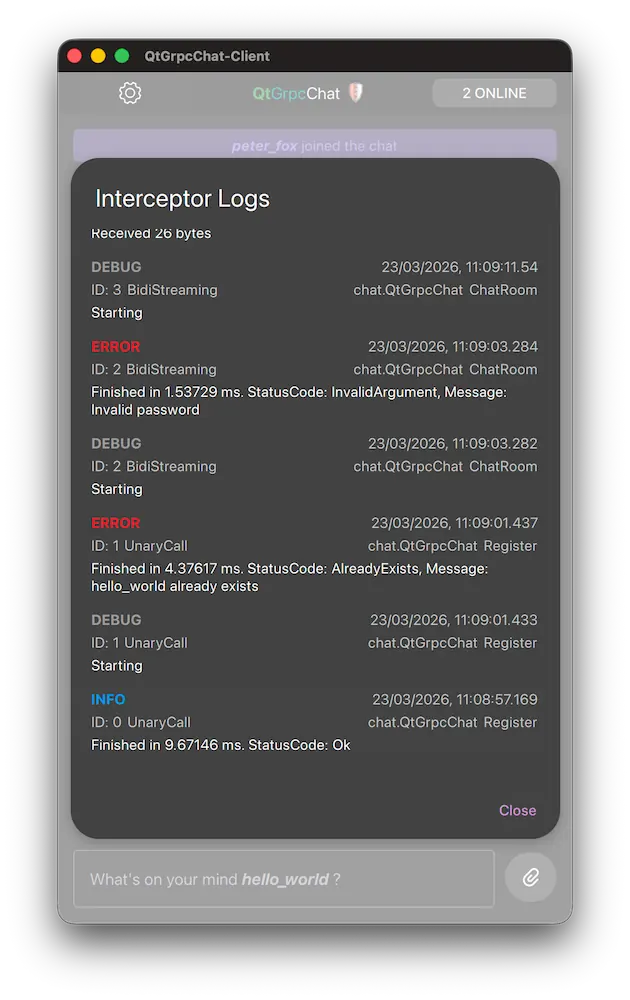
累积的日志条目通过ChatEngine::logModel 属性暴露给QML。专用的LogDialog 会将其渲染在ListView 中:
Dialog {
    id: root
    title: "Interceptor Logs"
    ...
    ListView {
        ScrollIndicator.horizontal: ScrollIndicator { }
        ScrollIndicator.vertical: ScrollIndicator { }

        anchors.fill: parent
        model: ChatEngine.logModel
        clip: true

        delegate: ItemDelegate {
            id: delegate

            required property int level
            required property string timestamp
            required property int operationId
            required property string service
            required property string method
            required property int rpcType
            required property string message

            width: ListView.view.width

            contentItem: ColumnLayout {
                RowLayout {
                    Label {
                        font.bold: true
                        text: root.levelToString(delegate.level)
                        color: root.levelToColor(delegate.level)
                    }
                    Item { Layout.fillWidth: true }
                    Label {
                        text: delegate.timestamp
                        opacity: 0.7
                    }
                }
                // further entries for visualizing the RPC context and message.
                ...
            }
        }
    }
}
每个委托对象都会显示日志级别、时间戳和 RPC 详细信息。LogModel 会将新条目追加到日志顶部,因此最新活动会显示在最上方。
源文件
另请参阅 所有 Qt 示例。
© 2026 The Qt Company Ltd. Documentation contributions included herein are the copyrights of their respective owners. The documentation provided herein is licensed under the terms of the GNU Free Documentation License version 1.3 as published by the Free Software Foundation. Qt and respective logos are trademarks of The Qt Company Ltd. in Finland and/or other countries worldwide. All other trademarks are property of their respective owners.
