
地点 (QML)
“地点”示例演示了如何搜索地点并访问相关内容。
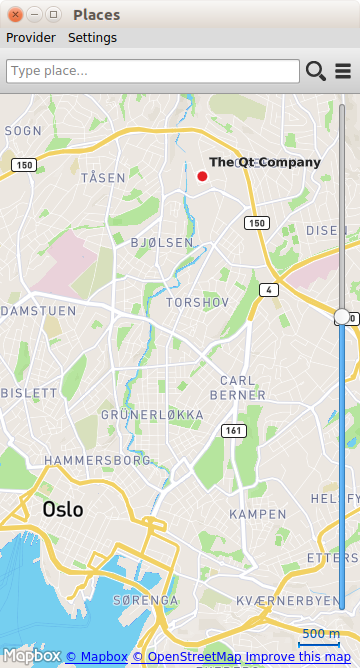
“地点”示例演示了如何搜索地点。特别是,它展示了如何检索评论、图片和相关内容等更多信息。
运行示例
您可以从以下位置运行该示例:
- Qt Creator
打开Welcome 模式,并从Examples 中选择该示例。有关更多信息,请参阅Qt Creator :教程:构建和运行。
- Qt Extension for Visual Studio Code
在Command Palette 中运行Qt: Open Qt examples 命令,并从列表中选择该示例。有关更多信息,请参阅Qt Extension for Visual Studio Code :教程:构建和运行。
该示例可与任何可用的地理服务插件配合使用。但某些插件可能需要额外的plugin parameters 才能正常运行。可通过在命令行中使用--plugin 参数传递Plugin parameters ,其格式如下:
--plugin.<parameter name> <parameter value>有关各地理服务插件支持哪些参数的详细信息,请参阅各插件的文档。本示例使用的默认插件是Qt Location OpenStreetMap 插件,该插件无需任何参数。
概述
“地点”示例展示了一个显示地图的应用程序窗口。窗口顶部有一个搜索框,用于输入地点搜索查询。 要搜索地点,请在文本框中输入搜索词,然后点击放大镜图标。若要按类别搜索地点,请点击类别图标以显示可用类别列表,然后选择所需的类别。地点搜索查询将针对地图上当前位置附近的地点进行。
对于某些插件,当输入三个或更多字符时,搜索框会提供搜索词建议。选择其中一个建议后,系统将使用所选搜索文本执行地点搜索。
点击搜索结果将显示该地点的详细信息。如果该地点拥有丰富的内容(如评论、评价和图片),可通过详情页面上的按钮进行访问。要查找类似地点,请点击“查找类似”按钮。
可通过访问“提供商”菜单来更改地理位置服务提供商。
显示分类
在执行按类别搜索之前,需要先获取可用类别的列表。这可以通过创建一个CategoryModel 来实现。
CategoryModel {
    id: categoryModel
    hierarchical: true
}
CategoryModel 类型提供了一个可用类别的模型。它可以提供扁平列表或分层树模型。在本示例中,我们通过将hierarchical 属性设置为true来使用分层树模型。plugin 属性在示例初始化时进行设置。
接下来,我们创建一个ListView 来显示类别模型。
ListView {
    id: root
    property var categoryModel
    property var rootIndex

    signal searchCategory(var category)
    signal showSubcategories(var index)

    snapMode: ListView.SnapToItem

    model: DelegateModel {
        id: delegeteDataModel
        model: root.categoryModel
        rootIndex: root.rootIndex
        delegate: CategoryDelegate {
            width: ListView.view.width
            onSearchCategory: root.searchCategory(category);
            onShowSubcategories: root.showSubcategories(delegeteDataModel.modelIndex(index));
        }
    }
}由于使用了分层模型,因此需要一个DelegateModel 来提供导航功能。如果使用的是扁平列表模型,视图可以直接使用CategoryModel 。
rootIndex属性用于设置DelegateModel 的根索引。类别由CategoryDelegate 显示,该类提供了两个信号。onShowSubcategories会发出showSubcategories()信号,并将根索引设置为当前索引,从而显示所选类别的子类别。onSearchCategory处理程序会发出searchCategory()信号,并携带一个 category 参数,该参数指示已选中的具体类别。
当点击Label 时,CategoryDelegate会显示类别名称并发出searchCategory()信号:
Label {
    id: labelItem
    text: category.name
    anchors.left: icon.right
    anchors.right: parent.right
    anchors.verticalCenter: parent.verticalCenter
}

TapHandler {
    id: tapHanlder
    onTapped: {
        if (model.hasModelChildren) {
            root.showSubcategories()
        } else {
            root.searchCategory()
        }
    }
}
呈现搜索建议
PlaceSearchSuggestionModel 类型用于根据已输入的部分搜索词,获取相应的搜索建议。
每当输入的搜索词发生变化时,都会触发一次新的搜索建议。
SearchBar {
    id: searchBar
    onSearchTextChanged: function (searchText) {
        if (searchText.length >= 3 && suggestionModel != null) {
            suggestionModel.searchTerm = searchText;
            suggestionModel.update();
        }
    }
}
只有当搜索词的长度为三个字符或以上时,才会查询建议。
当PlaceSearchSuggestionModel 的状态发生变化时,将显示搜索建议。
PlaceSearchSuggestionModel {
    id: suggestionModel
    searchArea: searchRegion

    onStatusChanged: {
        if (status == PlaceSearchSuggestionModel.Ready)
            stackView.showSuggestions()
    }
}在“SuggestionsShown”状态下,显示搜索建议的主体是ListView 。
ListView {
    id: suggestionView
    property var suggestionModel
    signal suggestionSelected(string text)

    model: suggestionModel
    delegate: Item {
        width: ListView.view.width
        height: label.height * 1.5
        Label {
            id: label
            text: suggestion
        }
        MouseArea {
            anchors.fill: parent
            onClicked: suggestionSelected(suggestion)
        }
    }
}
Label 对象用作委托,用于显示建议文本。点击建议的搜索词会更新搜索词,并触发基于该搜索建议的地点搜索。
搜索地点
PlaceSearchModel 类型用于搜索地点。
PlaceSearchModel {
    id: placeSearchModel
    searchArea: searchRegion

    function searchForCategory(category) {
        searchTerm = "";
        categories = category;
        recommendationId = "";
        searchArea = searchRegion
        limit = -1;
        update();
    }

    function searchForText(text) {
        searchTerm = text;
        categories = null;
        recommendationId = "";
        searchArea = searchRegion
        limit = -1;
        update();
    }

    function searchForRecommendations(placeId) {
        searchTerm = "";
        categories = null;
        recommendationId = placeId;
        searchArea = null;
        limit = -1;
        update();
    }

    onStatusChanged: {
        switch (status) {
        case PlaceSearchModel.Ready:
            if (count > 0)
                stackView.showPlaces()
            else
                stackView.showMessage(qsTr("Search Place Error"),qsTr("Place not found !"))
            break;
        case PlaceSearchModel.Error:
            stackView.showMessage(qsTr("Search Place Error"),errorString())
            break;
        }
    }
}首先设置模型的某些属性,这些属性将用于构建搜索请求。将searchArea 属性设置为searchRegion对象,该对象是一个geoCircle ,其中心位置与Map 上显示的当前位置相关联。
最后,我们定义了三个辅助函数:searchForCategory()、searchForText()和searchForRecommendations(),它们会分别设置categories 、searchTerm 或recommendationId 属性,并调用update() 方法以启动地点搜索。搜索结果将显示在ListView 中。
ListView {
    id: searchView

    property var placeSearchModel
    signal showPlaceDetails(var place, var distance)
    signal showMap()

    model: placeSearchModel
    delegate: SearchResultDelegate {
        width: ListView.view.width
        onShowPlaceDetails: function (place, distance) { searchView.showPlaceDetails(place, distance) }
        onSearchFor: function (query) { placeSearchModel.searchForText(query) }
    }

    footer: RowLayout {
        width: parent.width

        Button {
            text: qsTr("Previous")
            enabled: placeSearchModel.previousPagesAvailable
            onClicked: placeSearchModel.previousPage()
            Layout.alignment: Qt.AlignHCenter
        }

        Button {
            text: qsTr("Clear")
            onClicked: {
                placeSearchModel.reset()
                showMap()
            }
            Layout.alignment: Qt.AlignHCenter
        }

        Button {
            text: qsTr("Next")
            enabled: placeSearchModel.nextPagesAvailable
            onClicked: placeSearchModel.nextPage()
            Layout.alignment: Qt.AlignHCenter
        }
    }
}
ListView 中使用的委托SearchResultDelegate旨在通过Loader 对象处理多种搜索结果类型。对于PlaceResult类型的结果,该委托如下:
Component {
    id: placeComponent
    Item {
        id: placeRoot
        width: root.width
        height: Math.max(icon.height, 3 * placeName.height)

        Rectangle {
            anchors.fill: parent
            color: "#44ffffff"
            visible: mouse.pressed
        }

        Rectangle {
            anchors.fill: parent
            color: "#dbffde"
            visible: model.sponsored !== undefined ? model.sponsored : false

            Label {
                text: qsTr("Sponsored result")
                horizontalAlignment: Text.AlignRight
                anchors.right: parent.right
                anchors.bottom: parent.bottom
                font.pixelSize: 8
                visible: model.sponsored !== undefined ? model.sponsored : false
            }
        }

        GridLayout {
            rows: 2
            columns: 2
            anchors.fill: parent
            anchors.leftMargin: 30
            flow: GridLayout.TopToBottom

            Image {
                // anchors.verticalCenter: parent.verticalCenter
                id:icon
                source: place.favorite ? Qt.resolvedUrl("../resources/star.png") : place.icon.url()
                Layout.rowSpan: 2
            }

            Label {
                id: placeName
                text: place.favorite ? place.favorite.name : place.name
                Layout.fillWidth: true
            }

            Label {
                id: distanceText
                font.italic: true
                text: Helper.formatDistance(distance)
                Layout.fillWidth: true
            }
        }

        Rectangle {
            anchors.left: parent.left
            anchors.right: parent.right
            anchors.margins: 15
            height: 1
            color: "#46a2da"
        }

        MouseArea {
            id: mouse
            anchors.fill: parent
            onClicked: {
                if (model.type === undefined || type === PlaceSearchModel.PlaceResult) {
                    if (!place.detailsFetched)
                        place.getDetails();
                    root.showPlaceDetails(model.place, model.distance);
                }
            }
        }
    }
}
显示地点内容
地点可能包含额外的丰富内容,包括评论、评价和图片。通过一组模型可以访问这些丰富内容。内容模型通常并非由应用程序开发人员直接创建,而是从Place 类型的editorialModel 、reviewModel 和imageModel 属性中获取。
© 2026 The Qt Company Ltd. Documentation contributions included herein are the copyrights of their respective owners. The documentation provided herein is licensed under the terms of the GNU Free Documentation License version 1.3 as published by the Free Software Foundation. Qt and respective logos are trademarks of The Qt Company Ltd. in Finland and/or other countries worldwide. All other trademarks are property of their respective owners.
