
Qt Quick 3D - 图层示例
演示了在QtQuick3D 中使用图层的方法。
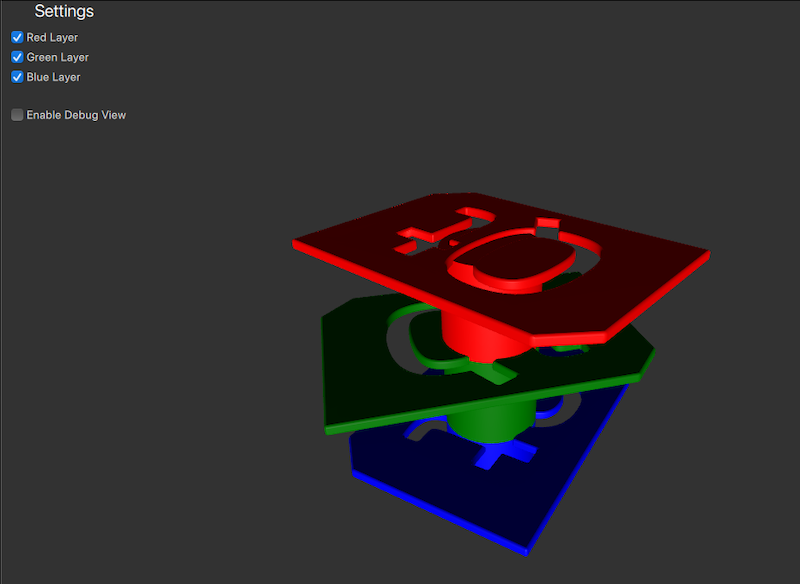
在此示例中,不同颜色的徽标模型被放置在不同的图层中。用户可以通过在设置面板中勾选或取消勾选复选框来控制每个图层的可见性。
准备场景图层
图层
为方便起见,我们将Layer 枚举类型别名设置为更易于识别的名称。
readonly property int redModels: ContentLayer.Layer1
readonly property int greenModels: ContentLayer.Layer2
readonly property int blueModels: ContentLayer.Layer3
摄像机
由于我们希望根据图层过滤摄像机视图,因此需要设置摄像机应渲染的图层。具体操作是将摄像机的layers 属性设置为一个或多个图层。这样,摄像机将仅渲染位于指定layers 中的对象。默认情况下,摄像机将渲染所有layers 中的节点。
为了能够选择活动图层,我们创建一个cameraFilter 属性,并将其绑定到摄像机的layers 属性上。
property int cameraFilter: ContentLayer.LayerAll

camera: PerspectiveCamera {
    layers: v3d.cameraFilter
    position: Qt.vector3d(0, 400, 500)
    eulerRotation.x: -30
    clipFar: 2000
}当设置面板中的复选框被选中或取消选中时,cameraFilter 属性将相应更新,以包含或排除相应的图层。这样,摄像机将仅渲染位于cameraFilter 中指定图层中的对象。
CheckBox {
    id: checkBoxRedLayer
    text: qsTr("Red Layer")
    checked: true
    onCheckedChanged: {
        v3d.cameraFilter = checked ? v3d.cameraFilter | v3d.redModels : v3d.cameraFilter & ~v3d.redModels;
    }
}
模型
现在需要将这三个不同颜色的模型分配到相应的图层中。与相机设置类似,我们可以使用模型的layers 属性将其分配到图层。红色徽标模型分配到redLayer 图层,绿色徽标模型分配到greenLayer 图层,蓝色徽标模型分配到blueLayer 图层。
Node {
    position: Qt.vector3d(0, 200, 0)
    Model {
        source: "qtlogo.mesh"
        layers: v3d.redModels
        scale: Qt.vector3d(5000, 5000, 5000)
        materials:[ PrincipledMaterial {
            baseColor: "red"
            roughness: 0.5
        } ]

        NumberAnimation on eulerRotation.y {
            from: 0
            to: 360
            duration: 15000
            loops: Animation.Infinite
        }
    }

    Model {
        position: Qt.vector3d(0, -50, 0)
        source: "#Cylinder"
        materials:[ PrincipledMaterial {
            baseColor: "red"
            roughness: 0.5
        } ]
    }

    ParticleSystem3D {
        visible: particlesCheckbox.checked
        running: particlesCheckbox.checked
        layers: v3d.redModels
        SpriteParticle3D {
            id: redParticle
            color: "red"
            maxAmount: 200
            particleScale: 8
            fadeInDuration: 500
            fadeOutDuration: 500
        }
        ParticleEmitter3D {
            particle: redParticle
            position: Qt.vector3d(0, -50, 0)
            emitRate: 40
            lifeSpan: 2000
            velocity: VectorDirection3D {
                direction: Qt.vector3d(0, 120, 0)
                directionVariation: Qt.vector3d(40, 40, 40)
            }
        }
    }
}

Node {
    position: Qt.vector3d(0, 100, 0)
    Model {
        source: "qtlogo.mesh"
        layers: v3d.greenModels
        scale: Qt.vector3d(5000, 5000, 5000)
        materials:[ PrincipledMaterial {
            baseColor: "green"
            roughness: 0.5
        } ]

        NumberAnimation on eulerRotation.y {
            from: 0
            to: 360
            duration: 20000
            loops: Animation.Infinite
        }
    }
    Model {
        position: Qt.vector3d(0, -50, 0)
        source: "#Cylinder"
        materials:[ PrincipledMaterial {
            baseColor: "green"
            roughness: 0.5
        } ]
    }

    ParticleSystem3D {
        visible: particlesCheckbox.checked
        running: particlesCheckbox.checked
        layers: v3d.greenModels
        SpriteParticle3D {
            id: greenParticle
            color: "green"
            maxAmount: 200
            particleScale: 8
            fadeInDuration: 500
            fadeOutDuration: 500
        }
        ParticleEmitter3D {
            particle: greenParticle
            position: Qt.vector3d(0, -50, 0)
            emitRate: 40
            lifeSpan: 2000
            velocity: VectorDirection3D {
                direction: Qt.vector3d(0, 120, 0)
                directionVariation: Qt.vector3d(40, 40, 40)
            }
        }
    }
}
Node {
    Model {
        source: "qtlogo.mesh"
        layers: v3d.blueModels
        scale: Qt.vector3d(5000, 5000, 5000)
        materials:[ PrincipledMaterial {
            baseColor: "blue"
            roughness: 0.5
        } ]

        NumberAnimation on eulerRotation.y {
            from: 0
            to: 360
            duration: 12500
            loops: Animation.Infinite
        }
    }
    Model {
        position: Qt.vector3d(0, -50, 0)
        source: "#Cylinder"
        materials:[ PrincipledMaterial {
            baseColor: "blue"
            roughness: 0.5
        } ]
    }

    ParticleSystem3D {
        visible: particlesCheckbox.checked
        running: particlesCheckbox.checked
        layers: v3d.blueModels
        SpriteParticle3D {
            id: blueParticle
            color: "blue"
            maxAmount: 200
            particleScale: 8
            fadeInDuration: 500
            fadeOutDuration: 500
        }
        ParticleEmitter3D {
            particle: blueParticle
            position: Qt.vector3d(0, -50, 0)
            emitRate: 40
            lifeSpan: 2000
            velocity: VectorDirection3D {
                direction: Qt.vector3d(0, 120, 0)
                directionVariation: Qt.vector3d(40, 40, 40)
            }
        }
    }
}设置好图层后,渲染器现在只会渲染位于cameraFilter 所指定图层中的模型。用户可以通过在设置面板中勾选或取消勾选复选框来切换各图层的可见性。
© 2026 The Qt Company Ltd. Documentation contributions included herein are the copyrights of their respective owners. The documentation provided herein is licensed under the terms of the GNU Free Documentation License version 1.3 as published by the Free Software Foundation. Qt and respective logos are trademarks of The Qt Company Ltd. in Finland and/or other countries worldwide. All other trademarks are property of their respective owners.
