
Squish Serverへの接続
Squish Server への接続を作成するには:
- 「Preferences 」>「Squish 」>「General 」を選択します。
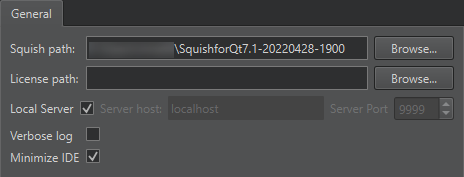
- 「Squish path 」で、Squishのインストールディレクトリへのパスを指定します。
- License path では、Squish ライセンスファイルがホームフォルダにない場合、そのパスを指定します。たとえば、複数のユーザーが利用するグローバルインストール環境であり、ライセンスキーがグローバルフォルダにインストールされている場合などです。
- ローカルにインストールされた
squishserver.exeを使用する場合は、「Local server 」を選択します。別のコンピュータで実行されているサーバーを使用する場合は、チェックボックスをオフにし、「Server host 」にサーバーのアドレスを、「Server port 」にポート番号を指定します。ポートが指定されていない場合、Qt Creator はsquishserverを起動し、空きポートを自動的に選択できるようにします。 - 「Verbose log 」を選択すると、ログ出力に追加のログレベルが含まれます。
- 「Minimize IDE 」を選択すると、テストケースの実行または記録中にQt Creator が自動的に最小化されます。
関連項目: 「Squish テストスイートの作成」、「プラグインの有効化と無効化」、「Squish テストスイートとテストケースの管理」、「Squish AUT の選択」、および「Squish」も参照してください 。
Copyright © The Qt Company Ltd. and other contributors. Documentation contributions included herein are the copyrights of their respective owners. The documentation provided herein is licensed under the terms of the GNU Free Documentation License version 1.3 as published by the Free Software Foundation. Qt and respective logos are trademarks of The Qt Company Ltd in Finland and/or other countries worldwide. All other trademarks are property of their respective owners.
